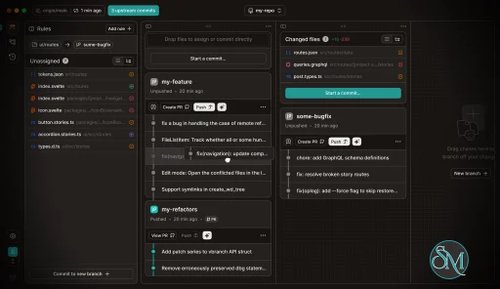

GitButler is a desktop Git client that helps developers manage multiple branches more efficiently. It introduces the concept of stacked branches, allowing developers to build features incrementally while keeping changes organized and reviewable.
The tool is designed to work alongside popular Git hosting platforms while enhancing local repository management.
Download GitButler 0.22.1 - Software Mirrors |
|---|
Download GitButler GitButler 0.22.1 For macOS Silicon (M1/M2/M3) Download GitButler GitButler 0.22.1 For macOS Intel Download GitButler GitButler 0.22.1 For Windows Intel | Download GitButler GitButler 0.22.1 For Linux Silicon (M1/M2/M3) (RPM) Download GitButler GitButler 0.22.1 For Linux Silicon (M1/M2/M3) (AppImage) Download GitButler GitButler 0.22.1 For Linux Silicon (M1/M2/M3) (Debian) Download GitButler GitButler 0.22.1 For Linux Silicon (M1/M2/M3) Download GitButler GitButler 0.22.1 For Linux Intel (RPM) Download GitButler GitButler 0.22.1 For Linux Intel (AppImage) Download GitButler GitButler 0.22.1 For Linux Intel (Debian) Download GitButler GitButler 0.22.1 For Linux Intel |
GitButler CLI install:curl -fsSL https://gitbutler.com/install.sh | sh |
GitButler 0.22.1 Release Notes:Changes
- macOS: Holding
⌘ while selecting a project now shows that it will open in a new window
- Adds "Create PR" and "Land" to the branch context menu, so both actions are available regardless of the "Land branches directly" setting
- When updates from the target branch conflict with uncommitted work, GitButler now keeps both versions, shows the files as conflicted, and lets you mark them as resolved
Fixes
- Fixes unexpected vertical scrolling of the workspace while dragging branches between lanes
- Fixes tracked files being deleted in some workspaces after landing a branch
- Fixes failed GitHub operations showing a generic response-decoding error instead of GitHub's actual error message
- Fixes rebase operations unexpectedly moving tags
- Fixes conflicted commits losing their conflict state when reworded
- Fixes stale uncommitted files being shown after commits made by the CLI or another process
- Fixes clean commits being incorrectly treated as conflicted
- Fixes commit and merge request links using the wrong URL for self-hosted forges reached over SSH on a non-standard port
- Fixes workspace updates failing after a branch in a stack was squash-merged upstream
- Fixes "Open in browser" requiring a second click from the branch menu
- Fixes the diff view failing to highlight commits that uncommitted changes depend on
- Fixes successful pushes to branches tracking a non-default remote being reported as failures
- Fixes GitLab projects with many merge requests not showing all of them
- Fixes some GitHub pull requests getting stuck at "mergeability is unknown", leaving the Merge action disabled
- Fixes GitHub repositories with more than 100 open pull requests not showing all of them
- Fixes a branch-not-found error in the branch view after the displayed branch was integrated, landed, or deleted
- Fixes project-not-found errors that could appear after deleting a project or cancelling project setup
CLI
- Adds
but resolve conflicts and but resolve apply for inspecting and resolving individual conflicts in conflicted commits without checking them out
but commit can now target any branch chosen from the picker, including branches lower in a stack
but commit, but amend, but move, and but squash now show example commands when arguments are invalid
but move --branch can now stack one branch onto another
but now detects the terminal's light or dark theme automatically; BUT_THEME still overrides it
- Adds
c, m, and s as default aliases for but commit, but move, and but squash
but pick now supports branch targeting with --branch, --above, and --below
but squash and but discard now accept directory paths to select the uncommitted changes within them
but discard with no target now discards all uncommitted changes
but uncommit now moves the branch's commits back to uncommitted changes and removes the branch
but discard --json and but move --json now include a type field on each result
- The
but push picker now shows one entry per stack and which ancestor branches will also be pushed
but branch new now supports --above and --below for positioning branches; --anchor and -a remain deprecated aliases for --above
but land now deletes the branch from its push remote after landing succeeds
but branch --help now points to but reword for renaming branches
- Improved the guidance shown to coding agents when the GitButler skill is missing or a CLI update is available
- DeepSeek Harness (
dsh) is now detected as a coding agent, with automatic skill setup
but pull now keeps both versions when target-branch updates conflict with uncommitted work; resolve the files with but resolve ...
but pr new now reports the branch and remote that were actually pushed to
but push --json now includes the destination branch name in each branchToRemote entry
but unapply now explains how to create a branch when the commits being unapplied are not attached to one
but push now exits non-zero when one or more branches in a batch fail to push
but reword now preserves conflict state when rewording a conflicted commit
but status, but pull, and but commit no longer fail when a clean commit is incorrectly marked as conflicted
- Fixes
but push failing to detect conflicted commits in ancestor branches before pushing
- Fixes
but land and but pull deleting tracked files in some workspaces
- Fixes
but status failing with a "too many IDs" error in repositories with a very large number of untracked files
- Fixes
but pull failing when a branch in a stack was squash-merged upstream
TUI
- Improved diff rendering performance, especially for uncommitted files
- You can now switch directly between commit, squash, and move modes in the TUI
but tui can now open directly on a branch, commit, file, or hunk; --diff opens the diff view immediately and replaces the deprecated but diff --tui
- Improved the TUI graph preview when moving a branch out of a stack
- You can now uncommit an entire branch in the TUI
- You can now press
p in the TUI to cherry-pick the selected commit
- The TUI action bar now lists
commit before squash when both are available
- Fixes ANSI color codes appearing in TUI error messages
- Fixes stale selection marks remaining after closing a commit's file list in the TUI
- Fixes conflicted commits losing their conflict state when reworded in the TUI
|
Key Features
GitButler provides a visual branch management interface that clearly shows relationships between branches. This makes it easier to understand how feature branches depend on one another.
Stacked branch workflows allow developers to split large changes into smaller logical pieces. Each stack can be reviewed independently, improving collaboration and code review quality.
The interface simplifies rebasing, merging, and conflict resolution. Developers can perform complex Git operations without relying heavily on command line commands.
GitButler also enhances pull request preparation by helping structure commits and branches cleanly before pushing to a remote repository.
Ease of Use
GitButler offers a clean and modern user interface. The visual approach makes branch management more intuitive compared to command line tools.
While experienced Git users may already understand advanced workflows, GitButler helps reduce mistakes and speeds up daily tasks. New users may still need basic Git knowledge to fully understand branching concepts.
Performance and Compatibility
GitButler runs as a desktop application and integrates with existing Git repositories. It is designed to operate efficiently without significant system overhead.
Compatibility with standard Git repositories ensures that users can adopt it without changing their existing workflow or hosting provider.
Pros and Cons
Advantages include intuitive stacked branch management, strong visualization tools, simplified rebasing workflows, and improved pull request preparation.
Limitations may include learning curve for new workflow concepts and reliance on desktop application usage rather than web based management.
Final Verdict
GitButler is an innovative Git client that modernizes branch management and simplifies complex development workflows. Its stacked branch approach and visual interface make it a valuable tool for developers seeking cleaner collaboration and more efficient version control management.
For teams looking to improve Git workflow organization and code review clarity, GitButler is a strong and practical choice.
GitButler is a modern Git client designed to simplify complex branch management and improve developer workflows. It focuses on stacked branches, visual clarity, and streamlined collaboration, making it especially appealing for teams that work with feature branches and pull request based development.
Unlike traditional Git interfaces, GitButler aims to reduce friction in everyday version control operations.