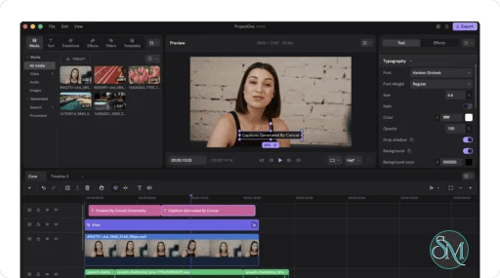

Concat is a free, open-source video editor designed as an alternative to commercial editing applications like CapCut. It integrates a multi-track timeline, visual effects, transitions, animations, audio editing, and AI tools into a single desktop application.
One of its primary advantages is its offline-first workflow. Video editing, automatic subtitling, text-to-speech, voice cloning, and background removal all run locally. Users do not need an account, a subscription, or to upload files to the cloud to work on their footage. Optional AI models are downloaded as needed and remain fully functional offline thereafter.
Developed primarily in Rust, Concat is available for Windows, macOS, Linux, and Android. Furthermore, the system includes an MCP server and a JSON-RPC API, enabling scripts and AI agents to automate video editing tasks.
Features
Multitrack Video Editing
Concat provides a nonlinear editing environment with multiple video and audio tracks. Users can combine footage, images, titles, shapes, and sound effects within the same project.
Its timeline supports common editing operations, including:
Splitting, trimming, moving, and merging clips.
Ripple editing and magnetic timeline behavior.
Multiple timelines within one project.
Linked captions and overlays.
Crop, flip, and blend modes.
Clip replacement and duplication.
Frame-accurate editing and playback.
Proxy generation for smoother editing with high-resolution footage.
The interface is organized around a media library, preview monitor, inspector, and timeline. These areas provide access to imported media, editing tools, clip properties, and project content without relying on separate applications.
Effects, Filters, and Transitions
Concat includes more than 100 effects, filters, and transitions for visual customization. Users can apply effects directly to clips or place them on separate timeline layers.
Available effects cover several styles, including cinematic looks, blur, distortion, retro footage, lighting, and visual enhancements.
The transition system is particularly flexible because transitions behave like timeline clips. They can be moved, trimmed, and adjusted independently rather than being restricted to a fixed transition button between two clips.
The editor also includes animated flashes and effects such as:
Glitch and VHS tracking.
Old film and light leaks.
Lens flare and duotone.
Kaleidoscope and mirror.
Split screen and blur frame.
Flash, strobe, flicker, and beat pulse.
Luma wipe, ripple, blinds, and mosaic transitions.
This makes Concat suitable for social media videos, promotional clips, music edits, and creative projects.
Keyframes and Animation
Concat provides keyframe animation with a built-in curve editor. Users can animate individual clip properties and adjust how changes happen over time.
Supported properties include:
Position and scale.
Width and height.
Rotation and opacity.
Volume and audio parameters.
Effect parameters.
The animation system also supports easing curves, custom motion curves, and reusable animation presets.
Users can apply entrance, exit, and looping animations to clips, images, titles, and shapes. Speed curves provide additional control over playback, including smooth speed ramps, freeze frames, and reverse playback.
AI-Powered Automatic Captions
Concat includes local speech recognition through Whisper models. It can transcribe video and audio clips and generate captions directly on the timeline.
Users can choose between different model sizes and language options. Larger models generally provide better recognition accuracy but require more memory and processing time.
Generated captions can be styled and edited like other timeline elements. The application also provides a dedicated caption lane, allowing users to apply a consistent appearance across the generated captions.
Because transcription runs locally, footage does not need to be uploaded to an external transcription service.
Text-to-Speech and Voice Cloning
Concat includes built-in text-to-speech and voice cloning capabilities through optional local models.
Its supported voice model families include:
Kokoro: Provides built-in voices in several languages and is designed for relatively quick speech generation.
Pocket TTS: Creates a voice from a short recording, with a focus on lightweight local inference.
Chatterbox Turbo: Provides more expressive speech generation and supports voice cloning from recordings.
Users can enter a script, select a model and voice, and generate narration that is placed directly on the timeline.
Voice cloning is useful for creating consistent narration across multiple videos. However, users should only clone voices when they have the necessary permission from the person whose voice is being used.
Background Removal and Chroma Key
Concat includes tools for separating people and objects from their backgrounds without requiring a traditional green screen.
Its background removal features include:
Automatic person cutout.
Object cutout.
A smart brush for manually refining masks.
Chroma key for green-screen footage.
Multiple masks with different modes and keyframes.
These tools are useful for product videos, presentations, tutorials, and social media content.
The application also supports mask animation, allowing users to adjust selections over time rather than applying a static mask to an entire clip.
Audio Editing and Voice Cleanup
Concat includes audio tools for cleaning recordings and improving the sound of a finished video.
Its audio features include:
Voice isolation from background music and noise.
Audio denoising and voice enhancement.
Loudness leveling.
Voiceover recording directly into the timeline.
Volume keyframes and fade controls.
Sound effects and audio treatments.
Reverse and playback speed adjustments.
It also includes audio effects for creative voice transformations, such as telephone, robot, and chipmunk-style sounds.
Another useful feature is beat detection. Concat can analyze music locally, identify beats and bars, and display markers along the timeline. Users can then snap edits to musical beats or split a clip across detected beats.
Video Enhancement and Stabilization
Concat provides enhancement and stabilization tools for improving footage before export.
The Enhance feature uses a local model to restore and upscale soft or older footage, with processing up to 2K. Stabilization helps reduce unwanted camera movement in shaky recordings.
These tools are useful for improving existing footage, although results depend on the source material and available hardware. Enhancement should not be considered a replacement for dedicated professional restoration software.
Titles, Text, and Shapes
The editor includes tools for creating titles, captions, and graphical elements without requiring a separate graphics application.
Users can customize typography, colors, outlines, shadows, and background plates. Individual words within a title can also receive separate formatting, including different colors, font weights, sizes, and text decorations.
Concat also supports shapes with gradients, outlines, stars, and shadows. These elements can be animated with keyframes and combined with video clips on the timeline.
Export and Video Formats
Concat supports exporting video using several modern codecs and hardware or software encoding options.
Its advertised export capabilities include:
H.264.
HEVC.
AV1.
Resolutions up to 4K.
Frame rates up to 60 FPS.
10-bit color output.
Variable and constant bitrate controls.
Transparent video export through supported formats and codecs.
Export settings allow users to control output quality and encoding behavior. The application also provides export progress monitoring and cancellation.
Actual encoding performance depends on the selected codec, source footage, processor, graphics hardware, and encoder availability.
AI Agent Integration and Automation
One of Concat's more unusual features is its built-in Model Context Protocol server.
AI agents such as Claude Code and Claude Desktop can connect to the application through the concat --mcp command. Once connected, an agent can perform editing operations using the same underlying API as the desktop interface.
Supported operations include:
Creating and managing projects.
Importing and inspecting media.
Adding, trimming, splitting, and moving clips.
Creating titles and captions.
Applying effects and keyframes.
Managing masks and stabilization.
Previewing rendered frames.
Starting, monitoring, and canceling exports.
Concat also exposes a JSON-RPC API for scripts and external applications. This makes it possible to build automated video production workflows without manually performing every editing operation.
The MCP integration has project-access safeguards. In headless mode, the agent works with its own projects rather than silently modifying a project currently open in the desktop editor. File access is also restricted to configured directories. Live editing of the project currently displayed in the window is not yet supported.
Download Concat v0.2.13 - Video Editor - Software Mirrors |
|---|
Concat v0.2.13 - Video Editor for Windows |
Concat v0.2.13 - Video Editor for macOS |
Concat v0.2.13 - Video Editor for LinuxConcat-0.2.13-x86_64.AppImage | 137.44 MB Concat-0.2.13-linux-x86_64.rpm | 150.5 MB Concat-0.2.13-linux-x86_64.pkg.tar.zst | 140.8 MB Concat-0.2.13-linux-x86_64.deb | 151.2 MB Concat-0.2.13-linux-aarch64.rpm | 138.45 MB Concat-0.2.13-linux-aarch64.pkg.tar.zst | 130.85 MB |
Concat v0.2.13 - Video Editor for Android |
Concat v0.2.13 - Video Editor Source Code |
Concat v0.2.13 - Video Editor Release Notes:Concat 0.2.1322 new effects, transitions and flashes, exports and captions that can no longer take the editor down with them, a new Android app, and a faster studio voice. New
Fixed
Faster
Before you install
DownloadA self-contained build for every platform Concat ships on.
|
Performance and Compatibility
Concat is primarily written in Rust and uses a native rendering engine with GPU acceleration. Its architecture is designed to keep editing responsive while handling video decoding, effects, previews, and exports.
Proxy support helps make high-resolution footage easier to edit on less powerful hardware. The application also uses separate processing lanes for operations such as saving, preview rendering, and long-running jobs, reducing the chance that an export or transcription task will block normal editing.
GPU support includes Metal on macOS, DirectX 12 on Windows, and Vulkan on Linux. When a usable GPU is unavailable, Concat can fall back to CPU-based drawing, although performance and available preview effects may be affected.
Its local AI features are another consideration. Caption transcription, voice generation, background removal, and enhancement require optional models that are downloaded separately. The application does not bundle all model weights into its installer, keeping the initial download smaller.
Concat is still in beta. Its active development brings frequent improvements, but users may encounter compatibility issues, unfinished features, or changes to project formats. The latest release also introduces a project-file conversion, so users should back up existing projects before upgrading.
System Requirements
Concat publishes minimum and recommended hardware specifications:
Processor: Any 64-bit CPU; six or more cores recommended.
Memory: 4 GB RAM minimum; 16 GB recommended for 4K editing and larger caption models.
Graphics: No dedicated GPU required, but Metal, DirectX 12, or Vulkan support is recommended.
Storage: Approximately 500 MB for the application and smallest caption model.
Optional AI models: Approximately 3.4 GB if all available model families are installed.
Supported platforms include:
Windows: x86-64 installer and MSI packages. Windows ARM builds are currently paused.
macOS: Intel and Apple Silicon, with macOS 12 or later.
Linux: x86-64 and ARM64, with DEB, RPM, AppImage, and Arch packages.
Android: ARM64 devices running Android 8.0 or later.
iOS and iPadOS: A beta IPA exists, but the latest release does not provide a new iOS build.
Some AI features have additional requirements. On Intel Macs, background removal, enhancement, and certain voice models require macOS 13.4 or later.
Pros and Cons
Pros
Free and open-source under the AGPL-3.0-or-later license.
No watermark, account, subscription, or mandatory cloud service.
Local video editing and AI processing.
Supports Windows, macOS, Linux, and Android.
Multitrack editing with multiple timelines.
More than 100 effects, filters, and transitions.
Keyframe animation and speed curves.
Automatic captions using local Whisper models.
Text-to-speech and voice cloning.
Background removal, chroma key, and masks.
Voice isolation, denoising, and audio enhancement.
Beat detection for music-based editing.
Supports H.264, HEVC, and AV1 exports.
Supports 4K 60 FPS and 10-bit color output.
GPU acceleration with CPU fallback.
Built-in MCP server and JSON-RPC API.
AI agent integration for automated video editing.
Available in multiple interface languages.
Cons
Still in beta, so some features and workflows may change.
Project files may require conversion when upgrading.
Optional AI models require additional downloads and storage.
Larger caption and voice models can require substantial memory.
Windows ARM builds are currently paused.
Windows builds are not code-signed, which can trigger SmartScreen warnings.
Android ARM64 APK builds have limited automated device testing.
iOS is not included in the latest release.
Advanced AI processing can be demanding on older hardware.
Not a complete replacement for mature professional editing suites in every workflow.
How to Install
Visit the official Concat website or GitHub repository.
Open the download section and select the package for your operating system and processor architecture.
Download the installer or portable package.
Install and launch Concat.
Create a project and import video, audio, and image files.
Download optional AI models from Settings when using captions, speech generation, background removal, or enhancement.
Edit the footage using the timeline, effects, titles, and audio tools.
Open Export to configure the output codec, resolution, frame rate, and quality.
Linux users can install the appropriate DEB, RPM, AppImage, or Arch package. Android users can install the ARM64 APK, while iOS users need to use an available beta IPA from an earlier release and sideload it.
Developers building Concat from source need Rust 1.93 or later, FFmpeg 7 or later development libraries, CMake, and a C++ compiler. The repository provides the build instructions and commands.
Final Verdict
Concat is an ambitious open-source video editor that combines many features typically found across separate video editing and AI content creation applications. Its multitrack timeline, keyframe animation, visual effects, automatic captions, voice cloning, background removal, and audio tools make it a capable option for creating social media videos, tutorials, and general-purpose content.
Its strongest advantage is the local-first architecture. Users can edit footage and run AI-powered features without uploading their content to a cloud service. The built-in MCP server and JSON-RPC API also make Concat particularly interesting for developers and creators who want to automate video production.
However, its beta status means it is not yet the safest choice for every professional workflow. Hardware compatibility, project-format changes, and platform-specific limitations are worth considering before making it a primary editing application.
Overall, Concat is one of the more interesting open-source video editors available. It offers an unusually broad feature set without requiring subscriptions or imposing watermarks, while its automation capabilities give it potential beyond conventional desktop editing.