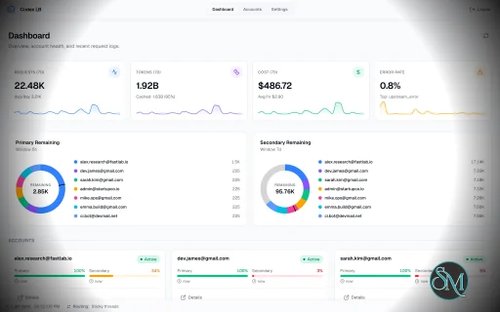



Codex LB is an open source load balancer and proxy designed for users who work with multiple ChatGPT accounts. Instead of configuring each account separately in every coding tool, Codex LB puts the accounts behind a single service that can manage authentication, route requests, track usage, and provide a central dashboard.
The main feature is account pooling. You can add multiple ChatGPT accounts and let Codex LB distribute requests between them. This can be particularly useful for developers who regularly use Codex or compatible coding agents and want a single endpoint instead of manually switching between accounts.
Usage tracking is another useful part of Codex LB. The dashboard provides information about account usage, tokens, costs, and usage trends. API keys can also have individual rate limits based on tokens, cost, time windows, and models, giving administrators more control over how the proxy is used.
Codex LB is not limited to the Codex CLI. It provides OpenAI compatible endpoints that can be used with Codex CLI, OpenCode, OpenClaw, Hermes Agent, and the OpenAI Python SDK. This makes it more useful as a general AI gateway rather than simply a utility for one particular client.
The dashboard is also a nice addition. Instead of managing everything through configuration files, users get a central interface for accounts, API keys, usage information, and other settings. Dashboard authentication supports passwords and optional TOTP, which is useful when the service is exposed beyond localhost.
Installation is relatively straightforward. Docker is the recommended option, but Codex LB can also be launched with uvx or Nix. The default setup uses SQLite, while PostgreSQL is available as an alternative database backend. Docker deployments use persistent application data, so that data should be included in your backup strategy.
For self hosted users, the simple deployment approach is particularly convenient. The project provides sensible defaults while still offering enough configuration options for more advanced deployments.
There are some important considerations, though. Running a proxy between coding clients and ChatGPT accounts adds another component that needs to be secured and maintained. If you expose the dashboard or API remotely, proper authentication, API keys, reverse proxy configuration, and network security become important.
Another consideration is whether managing multiple accounts fits within the applicable terms and policies of the services being accessed. Codex LB provides the technical infrastructure for account pooling, but users remain responsible for how they use those accounts and whether their setup complies with the relevant service rules.
The project is particularly interesting for developers who frequently switch between AI coding environments. Having one endpoint for several accounts can simplify configuration and make it easier to monitor usage from a central location.
Download Codex LB v1.24.0 - Software Mirrors |
|---|
Codex LB v1.24.0 Python Package |
Others Download related to Codex LB v1.24.0 |
Codex LB v1.24.0 Source Code |
Codex LB v1.24.0 Release Notes:What's Changed
New Contributors
Full Changelog: v1.23.0...v1.24.0 Install / Run |
Quick Start
# Docker (recommended)
docker volume create codex-lb-data
docker network inspect codex-lb-net >/dev/null 2>&1 || docker network create codex-lb-net
docker run -d --name codex-lb \
  --network codex-lb-net \
  -p 2455:2455 -p 1455:1455 \
  -v codex-lb-data:/var/lib/codex-lb \
  ghcr.io/soju06/codex-lb:latest

# or uvx
uvx codex-lb

# or nix
nix run github:Soju06/codex-lb
Open localhost:2455 → Add account → Done.
Accessing the dashboard remotely for the first time? You need a one-time bootstrap token — see Getting started.
Client Setup
Point any OpenAI-compatible client at codex-lb. For Codex CLI, ~/.codex/config.toml:
model = "gpt-5.6-sol"
model_reasoning_effort = "xhigh"
model_provider = "codex-lb"

[model_providers.codex-lb]
name = "openai"  # required — enables remote /responses/compact. Lowercase since Codex 2026-05-23; older "OpenAI" stops resolving gpt-5.5
base_url = "http://127.0.0.1:2455/backend-api/codex"
wire_api = "responses"
supports_websockets = true
requires_openai_auth = true # required for codex app
Documentation
Full docs live at https://soju06.github.io/codex-lb/:
Getting started — quick start, remote bootstrap token
Client setup — Codex CLI, OpenCode, OpenClaw, Python SDK
Configuration — the few settings that matter
Authentication — dashboard auth modes
API keys — protecting proxy routes
Routing — strategy guide
Database — SQLite / PostgreSQL, Postgres 16 → 18 upgrade
Pros
Load balances requests across multiple ChatGPT accounts
Central dashboard for account and usage management
Tracks tokens, costs, and usage trends
OpenAI compatible API endpoints
Works with Codex CLI and several other AI clients
Configurable API key rate limits
Password and optional TOTP dashboard authentication
Supports Docker, uvx, and Nix
SQLite and PostgreSQL support
Open source
Cons
Adds another service that needs to be maintained
Remote deployments require careful security configuration
Multiple account usage may have policy or terms implications
More complex than using a single ChatGPT account directly
Requires persistent application data for account and usage management
Final Verdict
Codex LB is an impressive project for developers who need to manage multiple ChatGPT accounts from a single endpoint. Its combination of account pooling, usage tracking, API key management, OpenAI compatible endpoints, and a web dashboard makes it considerably more capable than a simple proxy.
The straightforward deployment options make it accessible to self hosted users, while support for PostgreSQL and multiple AI clients gives advanced users plenty of flexibility.
For developers already using several ChatGPT accounts and compatible coding agents, Codex LB can simplify account management considerably. For users with only one account, however, its additional complexity is probably unnecessary.