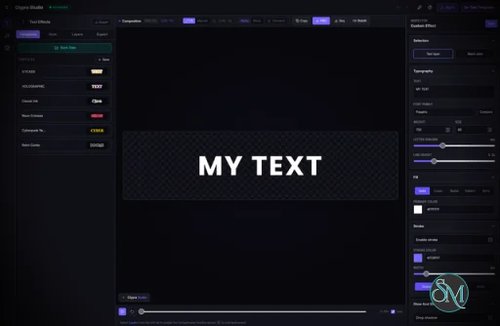

Clypra is a free and open source desktop video editor built with Tauri, React, TypeScript, Rust, and FFmpeg. The project aims to provide many of the editing capabilities found in premium short-form video editors while remaining lightweight, privacy-friendly, and completely local. Unlike cloud-based editors, Clypra processes media on your own computer without subscriptions, accounts, or watermarks.
Many modern video editors rely on cloud services or paid subscriptions for advanced features. Clypra takes a different approach by focusing on native desktop performance and local media processing.
Built on Tauri instead of Electron, the application has a smaller footprint while leveraging FFmpeg for video processing and React for its user interface. The project is still in active development, but it already includes many core editing capabilities expected from a modern timeline-based editor.
Key Features of Clypra
Multi-Track Timeline
Clypra features a professional multi-track timeline that supports separate video and audio tracks, making it suitable for more complex editing projects than simple clip trimming.
Frame-Accurate Editing
Editors can trim clips with frame-level precision, helping create cleaner cuts and smoother transitions between scenes.
Audio Waveforms
Built-in waveform visualization makes it easier to synchronize audio, locate speech, and edit music tracks accurately.
Filmstrip Preview
Video clips display filmstrip thumbnails directly on the timeline, allowing users to identify scenes quickly without repeatedly opening preview windows.
Local FFmpeg Processing
Clypra uses FFmpeg for rendering and media processing, enabling broad support for common video and audio formats while keeping all processing on the local machine.
Cross-Platform Support
The application targets Windows, macOS, and Linux through Tauri, providing a consistent experience across major desktop operating systems.
Open Source
Released under the MIT License, Clypra allows developers to inspect the source code, contribute features, or customize the editor for their own needs.
Download Clypra v1.6.0 - Software Mirrors |
|---|
Clypra v1.6.0 for Windows |
Clypra v1.6.0 for macOS |
Clypra v1.6.0 for LinuxClypra_1.6.0_arm64.deb | 97.73 MB Clypra_1.6.0_amd64.deb | 101.2 MB Clypra_1.6.0_amd64.AppImage | 166.63 MB Clypra_1.6.0_aarch64.AppImage | 158.65 MB |
Others Download related to Clypra v1.6.0 |
Clypra v1.6.0 Source Code |
Clypra v1.6.0 Release Notes:Automated multi-platform release bundle — macOS (arm64, x64), Windows (x64, arm64), Linux (x64, arm64). |
Performance and User Experience
One of Clypra's biggest strengths is its use of Tauri instead of Electron. Startup is fast, memory usage is relatively low, and the interface feels responsive on modern hardware.
The editor has a clean, modern dark interface that resembles commercial video editing software without overwhelming new users. Since the project is still evolving, some advanced features such as effects, transitions, and plugins are still under active development.
Pros
Free and open source.
Lightweight Tauri-based architecture.
Multi-track timeline.
Frame-accurate editing.
Audio waveform visualization.
Local processing with FFmpeg.
No watermark.
Cross-platform support.
Active development.
Cons
Still in an early stage of development.
Some advanced editing features are not yet available.
Limited export presets compared to mature commercial editors.
Documentation continues to expand as the project evolves.
Who Should Use Clypra?
Clypra is an excellent choice for content creators, YouTubers, students, hobbyists, and developers looking for a modern open source desktop video editor.
It is also an interesting project for developers who want to learn how a professional video editor can be built using Tauri, Rust, React, and FFmpeg.
Users producing complex commercial productions may still prefer mature editors such as DaVinci Resolve or Adobe Premiere Pro, but Clypra is rapidly becoming a compelling lightweight alternative for everyday editing.
Final Verdict
Clypra is one of the most promising new open source video editors available today. Its combination of native desktop performance, local processing, modern architecture, and privacy-focused design makes it stand out from many free alternatives.
Although it is still under active development, the foundation is impressive. If the project continues at its current pace, Clypra has the potential to become a serious competitor in the open source video editing space.