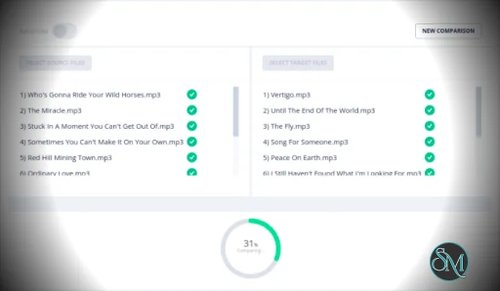


AVbeam for Windows is audio comparison software designed to find matching or similar segments across multiple audio files. It can compare multiple source files against multiple target files and identify matches even when the audio has been partially changed, filtered, amplified, dampened, or affected by noise. AVbeam performs its analysis locally, so audio files do not need to be uploaded to a cloud service.
Features
AVbeam uses audio fingerprinting and a comparison algorithm to identify similar audio segments rather than requiring two files to be identical. It can find partial matches at different positions within the source and target files.
The application supports multiple audio formats, including MP3, WAV, OGG, and FLAC. Multiple source and target files can be compared in a single analysis, which is useful when checking larger collections of recordings.
AVbeam is designed to remain effective when audio has been modified. Its comparison process is intended to handle noise, frequency filtering, amplification, damping, and other common changes to audio.
Results include the matching segments, their exact time offsets, and a similarity percentage. A waveform viewer and built-in audio player make it possible to inspect and listen to detected matches. The application can also save comparison results as a PDF.
Buy AVbeam with Discount 20% Off - Software Mirrors | |
|---|---|
Performance and Compatibility
AVbeam is intended for local audio comparison rather than cloud-based processing. The developer states that comparisons are performed on the local computer and that audio files do not leave the computer. This makes it suitable for audio collections where uploading source material to an online service is undesirable.
The software is particularly useful when exact file matching is insufficient. Because it looks for similar-sounding segments and can account for differences such as noise and filtering, it can identify matches that ordinary file hashes or basic waveform comparisons would miss.
AVbeam supports Windows 7, Windows 8, Windows 10, and Windows 11 according to the available Windows software information. The developer currently distributes a 64-bit Windows build.
System Requirements
The developer does not list detailed CPU, RAM, or GPU requirements. Third-party Windows software information lists no additional specific system requirements beyond a supported Windows installation.
Supported platform:
Windows 64-bit
Windows 7
Windows 8
Windows 10
Windows 11
Actual processing time will depend on the number and length of audio files being compared, as well as the computer's available processing resources.
Pros and Cons
Pros
Finds partial and similar audio matches
Supports multiple source and target files
Handles different time offsets
Designed to tolerate noise and audio distortion
Supports MP3, WAV, OGG, and FLAC
Audio fingerprinting
Shows similarity percentages
Shows exact matching time offsets
Built-in waveform viewer
Built-in audio player
Works offline
Audio files remain on the local computer
Can export comparison results to PDF
Cons
Focused specifically on audio comparison rather than general audio editing
Detailed hardware requirements are not published
The current Windows release is distributed as a trial
Advanced comparison work can require significant processing depending on the size of the audio collection
How to Install
Download the 64-bit Windows version of AVbeam from the developer's website.
Run the Windows installer and follow the installation prompts. After installation, open AVbeam and select the source and target audio files you want to compare.
Start the comparison and review the detected matches in the results and waveform viewer. You can inspect the reported time offsets and similarity percentages and use the built-in player to listen to the matching sections.
Final Verdict
AVbeam for Windows is a specialized tool for finding matching audio content across multiple files. Its combination of audio fingerprinting, partial matching, distortion tolerance, waveform inspection, and local processing makes it useful for audio verification, duplicate detection, content research, and other tasks where identifying reused audio is more important than editing it.
The application is not intended to replace a conventional audio editor. Its value comes from its focused comparison capabilities and ability to locate similar audio even when the files have been modified.
For users who need dedicated offline audio comparison software, AVbeam is a practical option.