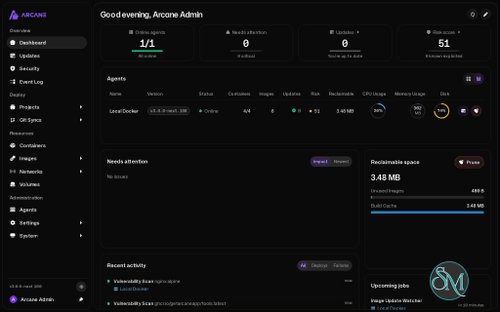

Arcane is a self-hosted container management platform that provides a modern web interface for managing Docker environments. Developed by the GetArcane team, it integrates container management, Docker Compose deployments, image handling, backups, and automated updates into a single dashboard.
Instead of relying exclusively on terminal commands, users can inspect containers, edit Compose files, monitor resource usage, manage volumes, and deploy applications—all through a web browser. Arcane also supports remote hosts, enabling the management of multiple Docker environments from a centralized installation.
Beyond Docker, Arcane has expanded its capabilities to include native Podman management and Docker Swarm support. This makes it an attractive option for home-lab enthusiasts, developers, and administrators who manage self-hosted infrastructure.
Features
Docker Container Management
Arcane provides a centralized interface for managing Docker containers. Users can inspect running and stopped containers, monitor resource consumption, view logs, and perform common lifecycle operations.
Available management capabilities include:
Start, stop, restart, and remove containers.
Inspect container configuration and metadata.
Monitor CPU and memory usage.
View container logs and activity.
Access container processes.
Manage container environment variables and settings.
Identify available image updates.
These features make routine container administration easier without requiring users to remember every Docker command.
Docker Compose Project Management
One of Arcane's strongest features is its Docker Compose project management system.
Users can create projects directly from the dashboard, write or edit Compose YAML files, configure environment variables, and deploy multiple services together.
The project workspace includes a file editor with support for managing configuration files, folders, and .env files. Existing Compose projects can also be discovered from configured directories.
Project operations include:
Create and deploy Compose projects.
Start, stop, restart, and redeploy services.
Edit Compose files and environment variables.
Build images directly from project configurations.
Manage project files through a browser-based workspace.
Organize projects using tags.
Monitor deployment output and activity.
Arcane also supports Git synchronization. Projects can pull configuration from repositories, push changes back to Git, or synchronize in both directions. This is useful for maintaining infrastructure configurations under version control.
Image Management and Updates
Arcane provides tools for managing Docker images and monitoring available updates.
Users can browse local images, inspect image details, pull new versions, remove unused images, and review image update information.
Its automatic update functionality can periodically check for newer image versions and apply configured update strategies. Users can also control update behavior for individual containers and projects.
Additional capabilities include:
Registry browsing and image tag discovery.
Image building from Compose projects.
Image update notifications.
Automatic image updates.
Image pruning and cleanup.
Digest-based update strategies.
Configurable update schedules.
These features help administrators maintain container environments without manually checking every image.
Backup and Restore
Arcane includes backup functionality for protecting container-related data and configurations.
It supports backups of Docker volumes, project files, and system-level configuration. Backup destinations can include local storage and compatible remote storage services.
The integration with Rustic provides additional backup and repository management capabilities.
Users can configure backup schedules and retention policies to reduce manual maintenance. This is particularly useful for homelabs and self-hosted applications that store important data in Docker volumes.
A backup strategy should still be tested through actual restoration procedures. Having a successful backup job does not automatically guarantee that an application can be recovered correctly.
Remote Docker Management
Arcane can manage multiple Docker hosts through its remote agent architecture.
A central Arcane Manager communicates with lightweight agents installed on remote machines. These agents connect outward to the manager, so they do not need publicly exposed inbound ports.
This architecture is useful for managing servers located behind NAT, firewalls, or different network environments.
Administrators can use one dashboard to monitor and manage containers across multiple hosts instead of maintaining separate management interfaces for each server.
The agent architecture also supports secure communication options, including mutual TLS authentication.
Native Podman Support
Arcane is no longer limited to Docker. It also supports native Podman management, including rootless Podman environments.
Its Podman interface provides access to:
Containers and images.
Volumes and networks.
Pods.
Quadlets.
Kubernetes YAML.
Podman secrets.
Podman automatic updates.
Rootless Podman support is particularly useful for users who want container management without running their workloads as root.
This makes Arcane a more flexible option for environments that use Podman instead of Docker.
Docker Swarm Management
Arcane also provides management capabilities for Docker Swarm environments.
Its documentation covers cluster administration, workloads, nodes, agents, configurations, and secrets.
This allows administrators to manage more than standalone containers and Compose projects through the same platform.
For users running distributed container workloads, having these tools available in one interface can simplify infrastructure operations.
Security and Vulnerability Scanning
Arcane includes container image vulnerability scanning through Trivy.
The security dashboard helps administrators identify vulnerable packages, review findings, and prioritize remediation based on risk.
Its security features include:
Scheduled vulnerability scans.
CVE discovery and severity reporting.
Image risk scoring.
Vulnerability filtering and export.
Available fix information.
Image patching through Copacetic for supported scenarios.
The ability to patch fixable operating-system package vulnerabilities without waiting for an upstream image release is particularly interesting.
However, image patching has additional requirements, including Docker's containerd image store. Administrators should understand the migration implications before enabling it on production hosts.
Dashboard, Monitoring, and Notifications
Arcane provides a customizable dashboard for monitoring container environments.
The dashboard uses configurable widgets, allowing users to arrange information according to their preferences.
It can display container status, host resource usage, environment information, and other operational data.
Additional monitoring and integration features include GPU monitoring, OpenTelemetry support, activity tracking, and notifications through supported services.
The activity center provides a centralized view of deployments, updates, backups, and other background operations.
User Management and Authentication
Arcane includes access control features for installations shared by multiple administrators.
Its authentication and authorization capabilities include:
User accounts and role-based permissions.
OpenID Connect single sign-on.
Passkeys and multi-factor authentication.
Federated credentials.
API access controls.
Agent authentication and mutual TLS options.
These features make it more suitable for team environments than basic container dashboards with a single shared login.
Download Arcane v3.0.1 - Modern Docker Management - Software Mirrors |
|---|
Arcane v3.0.1 - Modern Docker Management for macOSarcane_darwin_arm64 | 117.68 MB arcane_darwin_amd64 | 125.51 MB arcane-cli_darwin_arm64.tar.gz | 9.23 MB |
Arcane v3.0.1 - Modern Docker Management for Linuxarcane_linux_riscv64 | 112.06 MB arcane_linux_armv7 | 115.31 MB arcane_linux_arm64 | 114.44 MB arcane_linux_amd64 | 123.14 MB arcane-cli_linux_riscv64.tar.gz | 9.21 MB arcane-cli_linux_armv7.tar.gz | 9.16 MB arcane-cli_linux_arm64.tar.gz | 8.78 MB arcane-cli_linux_amd64.tar.gz | 9.72 MB arcane-cli_linux_386.tar.gz | 9.2 MB arcane-cli_3.0.1_x86_64.apk | 9.97 MB arcane-cli_3.0.1_x86.apk | 9.43 MB arcane-cli_3.0.1_riscv64.deb | 9.11 MB arcane-cli_3.0.1_riscv64.apk | 9.39 MB arcane-cli_3.0.1_i386.deb | 9.09 MB arcane-cli_3.0.1_armv7.apk | 9.4 MB arcane-cli_3.0.1_armhf.deb | 9.05 MB arcane-cli_3.0.1_arm64.deb | 8.67 MB arcane-cli_3.0.1_amd64.deb | 9.61 MB arcane-cli_3.0.1_aarch64.apk | 9 MB arcane-cli-3.0.1-1.x86_64.rpm | 9.88 MB arcane-cli-3.0.1-1.riscv64.rpm | 9.31 MB arcane-cli-3.0.1-1.i386.rpm | 9.35 MB arcane-cli-3.0.1-1.armv7hl.rpm | 9.29 MB arcane-cli-3.0.1-1.aarch64.rpm | 8.91 MB arcane-cli-3.0.1-1-x86_64.pkg.tar.zst | 9.41 MB arcane-cli-3.0.1-1-i686.pkg.tar.zst | 8.81 MB arcane-cli-3.0.1-1-armv7h.pkg.tar.zst | 8.72 MB arcane-cli-3.0.1-1-aarch64.pkg.tar.zst | 8.44 MB arcane-agent_linux_riscv64 | 86.75 MB arcane-agent_linux_armv7 | 90.06 MB arcane-agent_linux_arm64 | 89.19 MB |
Arcane v3.0.1 - Modern Docker Management Source CodeArcane v3.0.1 - Modern Docker Management Source code (zip) Arcane v3.0.1 - Modern Docker Management Source code (tar.gz) |
Arcane v3.0.1 - Modern Docker Management Release Notes:
Agent mode
Security and updates
Docker and containers
Stacks and configuration
Backups
Build
|
Performance and Compatibility
Arcane is built using Go for its backend and SvelteKit with TypeScript for its web interface. Its architecture separates management operations from remote host execution through dedicated agents.
The application is designed to run as a self-hosted service, typically using Docker Compose. Once deployed, administrators can access its dashboard through a web browser.
Its performance improvements include optimized database queries, caching, background job processing, and virtualized tables for large datasets.
Arcane supports Docker and Podman environments, with additional management capabilities for Docker Swarm. Remote agents allow it to manage multiple machines from a single installation.
One important consideration is Docker socket access. The standard installation mounts /var/run/docker.sock into the Arcane container. This grants extensive control over the Docker host and should be treated as a highly privileged interface. For environments with stricter security requirements, consider using a socket proxy or the documented remote-agent architecture.
Arcane is distributed under the BSD 3-Clause license, making its source code available for inspection, modification, and redistribution under the license terms.
System Requirements
Linux server or another supported container host.
Docker Engine and Docker Compose for the standard installation.
Podman for supported Podman deployments.
Persistent storage for application data and configuration.
A web browser for accessing the management interface.
Network connectivity between the manager and remote agents.
Sufficient CPU, RAM, and storage for the number of managed containers and background operations.
Arcane does not specify one universal minimum hardware configuration. Resource requirements depend on the number of environments, containers, projects, vulnerability scans, and backup workloads.
Pros and Cons
Pros
Free and open-source under the BSD 3-Clause license.
Modern web-based container management interface.
Comprehensive Docker container and image management.
Full Docker Compose project editor and deployment workflow.
Git synchronization for infrastructure configurations.
Remote management through lightweight agents.
Native Podman and rootless Podman support.
Docker Swarm management capabilities.
Automated image updates and backup scheduling.
Integrated Trivy vulnerability scanning.
Image patching through Copacetic for supported configurations.
Role-based access control, OIDC, and passkey authentication.
Customizable dashboard and activity center.
Supports GPU monitoring and OpenTelemetry.
Cons
Requires self-hosting and container infrastructure.
Standard Docker installation grants extensive privileges through socket access.
Some advanced security features require additional configuration.
Vulnerability patching has specific Docker storage requirements.
Managing large environments can require more resources for scanning, monitoring, and background jobs.
Major version upgrades may introduce breaking changes that require migration planning.
How to Install
Arcane provides a Docker Compose installation method and a Linux installation script.
Docker Compose Installation
First, generate an encryption key:
docker run --rm ghcr.io/getarcaneapp/manager:latest \
  /app/arcane generate secret
Create a compose.yaml file:
services:
  arcane:
    image: ghcr.io/getarcaneapp/manager:latest
    container_name: arcane
    ports:
      - "3552:3552"
    volumes:
      - /var/run/docker.sock:/var/run/docker.sock
      - arcane-data:/app/data
      - /opt/docker:/opt/docker
    environment:
      - ARCANE_APP_URL=http://localhost:3552
      - PUID=1000
      - PGID=1000
      - ARCANE_ENCRYPTION_KEY=YOUR_GENERATED_KEY
      - ARCANE_PROJECTS_DIRECTORY=/opt/docker
    cgroup: host
    restart: unless-stopped

volumes:
  arcane-data:
Replace YOUR_GENERATED_KEY with the generated encryption key. Adjust the project directory and user IDs according to your environment.
Start Arcane:
docker compose up -dOpen the web interface at:
http://localhost:3552On first startup, Arcane generates an initial administrator password. Retrieve it using:
docker compose cp arcane:/app/data/initial-admin-password .Use the generated credentials to sign in and configure your account.
Linux Installation Script
Arcane also provides an installation script that installs Docker and Arcane:
curl -fsSL https://getarcane.app/install.sh | sudo bashReview the official installation documentation before using the script, especially on systems with an existing Docker installation or customized container configuration.
Final Verdict
Arcane is a comprehensive self-hosted container management platform that goes well beyond basic Docker dashboards. Its combination of container administration, Compose project management, Git synchronization, remote agents, automated updates, backups, and vulnerability scanning makes it a strong option for managing modern container environments.
Native Podman support and Docker Swarm management further expand its usefulness, while role-based access control and OIDC integration make it suitable for shared infrastructure.
Its biggest consideration is security. The standard Docker socket integration provides substantial control over the host, so administrators should carefully configure access and consider the available security alternatives before exposing the dashboard beyond a trusted network.
Overall, Arcane is an excellent choice for developers, homelab enthusiasts, and system administrators looking for a centralized interface to manage Docker and Podman infrastructure.