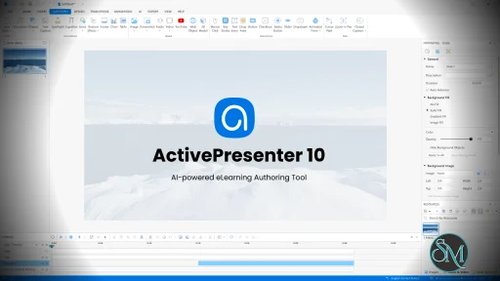
ActivePresenter Pro EDU is an educational license for ActivePresenter, a comprehensive eLearning authoring application developed by Atomi Systems. It is tailored for students, educators, educational institutions, and non-profit organizations that need to create instructional videos, interactive lessons, software demonstrations, and online training materials.
The software integrates screen recording, video editing, presentation creation, interactive quizzes, and course publishing into a single application. Unlike basic screen recorders, ActivePresenter transforms recorded demonstrations and presentations into interactive learning experiences, featuring clickable objects, branching scenarios, assessments, and learner tracking.
Pro EDU includes all the features found in the Pro edition. It is particularly useful for educators who require professional-grade course creation capabilities without the need to purchase a standard commercial license.
Download ActivePresenter 10.7.0 Pro - Software Mirrors | |
|---|---|
Download ActivePresenter 10.7.0 Download ActivePresenter 9.4.0 | |
Get Discount 20% OFF using "SWMR" Coupon code for Atomi Systems Products below:
Features
Screen Recording and Capture
ActivePresenter includes built-in screen recording tools for creating software tutorials, classroom demonstrations, and instructional videos.
Users can record:
Full-screen activity.
Individual application windows.
Selected screen regions.
Webcam footage.
Microphone input.
System audio.
The application supports both full-motion video recording and smart capture. Full-motion recording captures continuous screen activity, while smart capture creates slides based on user interactions, making it useful for software simulations and step-by-step tutorials.
Recorded content can be edited directly inside ActivePresenter without requiring a separate video editor.
Video and Audio Editing
ActivePresenter provides a built-in timeline editor for refining recordings and combining multimedia content.
Editing capabilities include:
Trimming, cutting, splitting, and joining clips.
Multiple audio and video layers.
Cropping and resizing footage.
Adjusting playback speed.
Adding transitions and visual effects.
Applying blur and green-screen effects.
Adding background music and voiceovers.
Noise reduction and audio normalization.
Adding captions and annotations.
Users can also insert zoom-and-pan effects, cursor paths, callouts, shapes, images, and other visual elements to make demonstrations easier to follow.
The editor is suitable for producing software tutorials, instructional videos, product demonstrations, and recorded lectures.
Interactive eLearning Course Creation
The main advantage of Pro EDU is its interactive course-authoring functionality.
Instead of publishing lessons as passive videos, users can create interactive presentations in which learners click objects, enter information, navigate between slides, and respond to questions.
Interactive elements include:
Buttons and clickable objects.
Mouse-click interactions.
Text-entry fields.
Drag-and-drop activities.
Keyboard interactions.
Conditional actions.
Variables and object states.
Slide navigation and branching.
Custom feedback and scoring.
These features allow educators to create lessons that respond to learner input rather than simply presenting information.
Quiz and Assessment Tools
ActivePresenter includes a dedicated quiz authoring system for creating assessments and evaluating learner performance.
It supports 14 question types, including:
Multiple choice.
Multiple response.
True or false.
Fill in the blanks.
Short answer.
Essay.
Matching.
Sequence.
Drag-and-drop.
Hotspot.
Other interactive assessment formats.
Questions can include scoring, feedback, answer validation, and navigation rules.
The application also supports question pools and randomization, allowing different learners to receive different questions from the same assessment bank.
Quiz results can be reported through compatible learning management systems when courses are published using supported tracking standards.
Scenario Editor and Branching Learning Paths
The Scenario Editor makes it possible to create learning experiences based on decisions and user responses.
For example, an educator can create a workplace safety lesson in which learners select an action and receive different explanations depending on their choices.
Branching scenarios can include:
Multiple decision paths.
Conditional navigation.
Custom feedback.
Variables and scoring.
Different outcomes based on learner responses.
This is particularly useful for compliance training, customer service simulations, professional development, and practical skills assessments.
Responsive Design and Content Blocks
ActivePresenter supports responsive course layouts designed for different screen sizes.
Its responsive design tools help authors adapt content for desktop computers, tablets, and smartphones.
Content Blocks provide reusable layout components that can be incorporated into course projects. This helps maintain consistency across lessons and reduces repetitive authoring work.
Responsive HTML5 publishing allows learners to access courses through supported modern browsers without installing the desktop authoring application.
PowerPoint Import
ActivePresenter can import Microsoft PowerPoint presentations and turn existing slides into editable course content.
This is useful for educators who already have lecture slides, training presentations, or instructional materials.
After importing a presentation, users can enhance it with:
Interactive buttons.
Audio and video.
Animations.
Quizzes and assessments.
Branching navigation.
Captions and annotations.
Interactive objects.
This provides a practical way to convert existing teaching materials into more engaging eLearning courses.
Microsoft Office does not need to be installed for PowerPoint import or document exports. ActivePresenter handles supported presentation and document formats directly.
AI-Powered Content Creation
ActivePresenter includes AI-assisted tools designed to accelerate the creation of educational materials.
Available capabilities include:
AI text generation and assistance.
Text-to-speech narration.
Automatic caption generation.
Caption translation.
AI image generation.
Additional AI-assisted content workflows.
These tools can help educators prepare narration, generate supporting visuals, create subtitles, and adapt learning materials for different languages.
AI features rely on a credit system rather than providing unlimited usage with the license. Paid editions include an initial credit balance, and additional credits can be purchased separately when needed.
This is an important distinction for users planning to rely heavily on AI-assisted content production.
HTML5, SCORM, and xAPI Publishing
Pro EDU supports publishing interactive courses in formats designed for online learning platforms.
Supported publishing options include:
HTML5 for browser-based learning content.
SCORM 1.2.
SCORM 2004.
xAPI (Tin Can API).
cmi5.
Direct publishing to uPresenter LMS.
SCORM and xAPI exports allow compatible LMS platforms to track learner progress, completion status, and assessment results.
The HTML5 player can also be customized with different controls and player settings.
This makes ActivePresenter suitable for institutions that need to distribute courses through an existing LMS rather than hosting every lesson directly on the software vendor's platform.
Document and Video Export
ActivePresenter can export projects into several formats for different teaching and distribution requirements.
Supported outputs include:
MP4 and other supported video formats.
HTML5.
PDF documents.
Microsoft Word.
Microsoft Excel.
Microsoft PowerPoint.
Image sequences.
This flexibility allows educators to reuse the same project as a video lesson, printable document, interactive course, or presentation.
The application can therefore serve as both an eLearning authoring tool and a general-purpose instructional content production environment.
uPresenter LMS Integration
ActivePresenter integrates with uPresenter LMS, Atomi Systems' learning management platform.
Users can publish interactive courses directly to the platform and distribute them to learners.
The integration supports learner progress monitoring, quiz results, and course completion tracking.
For organizations already using another LMS, SCORM and xAPI publishing provide alternative distribution options.
Performance and Compatibility
ActivePresenter is a desktop authoring application designed for Windows and macOS. Its recording, editing, and course-authoring features are integrated into a single interface, reducing the need to switch between separate applications.
The software can handle projects containing multiple video and audio layers, interactive objects, animations, and assessments. However, performance depends on project complexity, media resolution, and available system resources.
HTML5 courses are designed to run in modern web browsers. Playback of projects containing multiple high-resolution videos or green-screen effects benefits from hardware acceleration and WebGL 2 support.
The application also provides a useful separation between course creation and course delivery. Authors work in the desktop application, while learners access published content through a browser or compatible LMS.
One limitation is that some document-related functionality is platform-specific. Users working primarily on macOS should verify the availability of individual import and export features before establishing a production workflow.
System Requirements
According to the official system requirements, ActivePresenter supports:
Windows: Windows 10 and Windows 11, 64-bit.
macOS: macOS 13 or later.
Processor: 2 GHz or faster with SSE2 support.
Memory: 8 GB RAM or more.
Storage: 10 GB of available disk space.
Audio: Sound card and microphone for audio recording.
Webcam: Required only for webcam recording.
Additional requirements for course playback include:
Modern versions of Chrome, Firefox, Edge, or Safari.
iOS 15 or later for supported iOS course playback.
Android 12 or later for supported Android course playback.
WebGL 2 and browser hardware acceleration recommended for smoother playback of courses containing green-screen video.
Microsoft Office is not required for importing PowerPoint presentations or generating Word, Excel, and PowerPoint documents.
Pros and Cons
Pros
Full Pro edition functionality at educational pricing.
Perpetual license with a one-time purchase.
Screen recording with webcam, microphone, and system audio.
Built-in audio and video editing.
Interactive eLearning authoring tools.
14 question types for quizzes and assessments.
Branching scenarios and conditional navigation.
Responsive course layouts.
PowerPoint presentation import.
AI-assisted text, image, speech, and caption tools.
Exports to HTML5, SCORM, xAPI, and cmi5.
Compatible with many third-party LMS platforms.
Direct publishing to uPresenter LMS.
Exports to video, PDF, Word, Excel, and PowerPoint.
No requirement to install Microsoft Office for supported document operations.
Suitable for creating lectures, tutorials, simulations, and assessments.
Cons
Pro EDU requires eligibility verification and approval.
Available only for Windows and macOS authoring.
AI tools consume credits, with additional credits requiring separate purchases.
Large projects containing multiple video tracks can require substantial system resources.
HTML5 playback quality depends partly on the learner's browser and hardware.
Some document-related features are platform-specific.
The authoring application is not a replacement for a complete LMS.
Advanced interactive projects require time to learn and configure.
How to Install
Visit the official ActivePresenter website.
Download the installer for Windows or macOS.
Install the application using the downloaded installer.
Launch ActivePresenter.
If you have not purchased a license, you can start with the Free Edition to explore the application.
For Pro EDU, first verify your educational eligibility with Atomi Systems.
Submit the required proof of eligibility to the sales team.
After approval, complete the purchase and activate the product using the supplied license key.
Educational eligibility is available to qualifying students, teachers and staff, schools, and nonprofit organizations. Documentation must generally be current and dated within the previous six months.
The license can be used on a personally owned computer or an eligible school's computer, subject to the applicable licensing terms.
Final Verdict
ActivePresenter Pro EDU is a comprehensive eLearning authoring solution for educators and institutions that need more than a conventional screen recorder or presentation editor. Its combination of screen recording, video editing, interactive quizzes, branching scenarios, responsive layouts, and LMS publishing makes it suitable for producing complete digital learning experiences.
Its strongest advantage is the ability to create both passive and interactive educational content within one application. Educators can record a lesson, edit the footage, add captions, create assessments, and publish an interactive course without moving between multiple specialized tools.
The SCORM, xAPI, and HTML5 publishing options are particularly valuable for schools and organizations that already operate an LMS. AI-assisted content creation also adds convenience, although the credit-based usage system should be considered when planning frequent AI operations.
The main limitation is that Pro EDU is restricted to eligible educational users and organizations. It also requires some time to master its more advanced interactive authoring features.
Overall, ActivePresenter Pro EDU is an excellent choice for students, teachers, and educational institutions that want professional course-authoring capabilities at a reduced educational license cost.