Online advertisements are supposed to help businesses reach potential customers, but a new cybersecurity investigation has revealed how the advertising ecosystem can also become a tool for surveillance and spyware attacks. The technique, known as AdFection, shows how simply displaying a targeted advertisement can potentially expose a device to sophisticated malware without requiring the user to click anything.
The findings, published by the University of Toronto's Citizen Lab on October 15, 2026, have raised serious questions about online advertising, digital privacy, and the security of the systems used to deliver advertisements across websites and mobile applications. The investigation linked the technique to spyware attacks targeting devices at Al Jazeera, an international news organization.
For everyday internet users, this discovery is a reminder that online security involves more than avoiding suspicious links and downloads. It also means paying attention to the advertising content loaded by websites, the tracking technologies operating behind the scenes, and the tools available to reduce exposure to potentially harmful ads.
What Is AdFection?
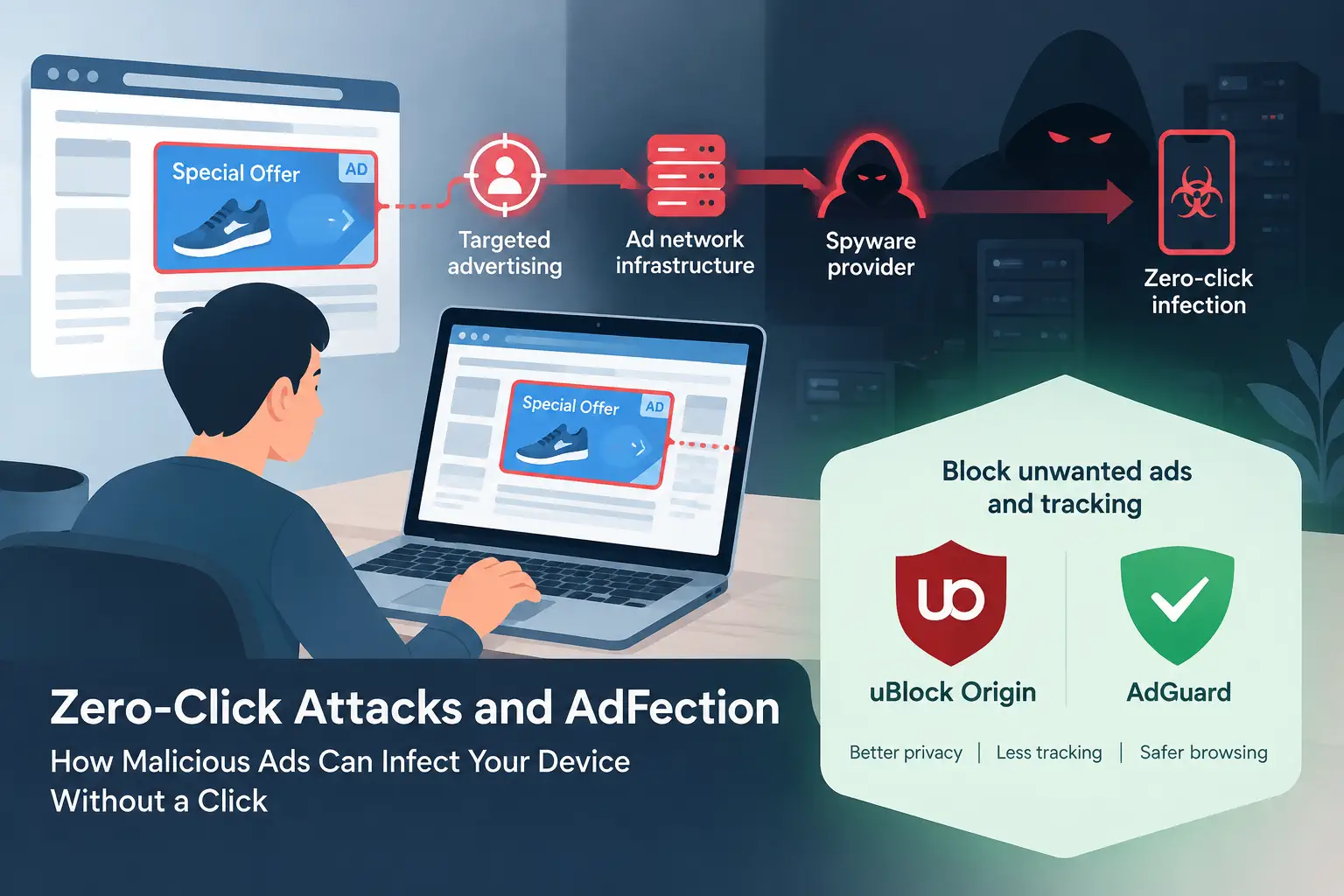
AdFection is a term used by Citizen Lab to describe a technique that abuses targeted online advertising to deliver zero-click spyware.
Traditional cyberattacks often depend on victims taking an action, such as opening a malicious attachment, downloading a suspicious application, or clicking a dangerous link. Zero-click attacks work differently. Under the right conditions, attackers can exploit vulnerabilities without requiring the victim to interact with the malicious content.
According to Citizen Lab's investigation, Discover-Tech, an advertising company based in Israel, operated infrastructure that connected online advertising systems with commercial spyware providers. Its platform, known as Controlium, could profile and identify potential targets before delivering malicious code through advertisements.
The process takes advantage of the complex advertising infrastructure used across the internet. When someone opens a website or application, advertising systems can exchange information about the user and their device during automated auctions. That information can help determine which advertisement appears on the screen.
In the AdFection attacks documented by researchers, advertisements could also trigger requests to external servers. Those servers could determine whether a particular device was a target and, in selected cases, return code associated with the spyware delivery process.
This means an advertisement does not necessarily have to look suspicious to present a security risk. It might resemble an ordinary promotion for a consumer product or digital service.
The investigation provides technical evidence of zero-click mercenary spyware delivered through targeted advertisements, making AdFection a significant development in the understanding of how advertising technology can be abused.
Latest AdFection News: What the Investigation Revealed
Citizen Lab published its investigation on October 15, 2026, alongside related research from advertising security company Confiant. Several major technology and cybersecurity publications reported on the findings.
Here are the key developments.
1. Advertisements Were Linked to Spyware Attacks Against Al Jazeera
Citizen Lab reported that at least 45 devices within Al Jazeera were targeted in attacks linked with high confidence to Candiru spyware delivered through Discover-Tech's advertising infrastructure during 2024 and 2025.
The researchers analyzed network logs supplied by Al Jazeera and identified activity connecting the affected devices to Discover-Tech infrastructure.
Candiru is a commercial spyware provider previously placed on the US government's Entity List over concerns about its surveillance technology.
The findings are particularly concerning because the targeted organization operates in journalism, where confidential communications, source identities, and sensitive reporting materials can be valuable to attackers.
However, the investigation should not be interpreted as evidence that every person who viewed one of Discover-Tech's advertisements was infected. The researchers described a targeted operation in which particular devices could receive malicious code while other users received no such payload.
2. The Advertising Network Reached a Large Audience
The investigation also highlighted the enormous reach of the advertising infrastructure involved.
According to reporting by Reuters, Discover-Tech advertisements appeared across more than 120,000 websites and 75,000 applications through its various partnerships.
The researchers also found evidence that the advertising operation reached sensitive networks, including organizations associated with governments and international institutions.
These findings illustrate why advertising security is not simply a concern for people visiting unfamiliar websites. Advertising technology operates across a broad range of online services, potentially exposing users to tracking and malicious activity even when they visit otherwise familiar platforms.
The number of websites or applications carrying an advertisement does not mean that all their visitors were infected. It demonstrates the potential scale of the advertising infrastructure that researchers investigated.
3. Major Advertising Platforms Took Action
Following the investigation, Google terminated Discover-Tech's access to its advertising exchange platforms. IAB Europe also removed the company from its vendor registry, while other advertising providers took steps to suspend or block its access.
These actions demonstrate that advertising platforms can play an important role in limiting abuse when credible evidence emerges.
However, removing one company does not automatically eliminate the underlying security problem. The broader advertising ecosystem involves multiple intermediaries, automated auctions, tracking identifiers, and external services. Similar weaknesses could potentially be abused by other operators.
That is why the investigation matters beyond the specific company involved. It raises questions about how advertising vendors are verified, how malicious code is detected, and whether existing safeguards adequately protect the people who view online advertisements.
Why Zero-Click Attacks Are Difficult to Prevent
One of the most worrying aspects of AdFection is that it challenges the usual advice about staying safe online.
Many people understand that they should avoid suspicious links, ignore unexpected downloads, and never open attachments from unknown senders. These precautions remain important, but they cannot prevent every type of cyberattack.
Zero-click attacks can exploit vulnerabilities in software that processes content automatically. Depending on the attack, the vulnerable component might be a browser, an application, or another part of the operating system.
Advertising technology introduces another layer of complexity because advertisements can be delivered through third-party services that website owners do not directly control.
Several factors make these attacks difficult to prevent.
Advertisements can come from third parties. A website may rely on external advertising networks to deliver content. Even when the website itself is legitimate, its advertising partners and the systems used to serve ads introduce additional dependencies.
Malicious content may be selectively delivered. Attackers can target specific devices or users instead of distributing the same malicious payload to everyone. This makes suspicious activity harder to identify through ordinary observation.
Users may not notice anything unusual. A targeted advertisement can look like a normal promotion. If an exploit runs without user interaction, the victim might not see a warning or realize that anything happened.
Traditional security habits have limitations. Avoiding suspicious downloads and links is useful, but it does not address vulnerabilities that attackers can exploit without a click.
These challenges do not mean that every online advertisement is dangerous. They demonstrate why browser security, software updates, privacy protection, and advertising controls should work together rather than relying on a single precaution.
Can an Ad Blocker Prevent AdFection?
An ad blocker is one practical way to reduce exposure to online advertising, including unwanted tracking and potentially malicious advertisements.
Tools such as uBlock Origin and AdGuard can prevent many advertisements and requests to known tracking or advertising domains from loading. Depending on their configuration and the filtering rules available, they can also block some unwanted scripts and other web content.
This makes ad blocking a useful part of a broader security strategy.
However, an ad blocker is not a guaranteed defense against zero-click spyware. The protection provided depends on the attack, the browser, the filtering rules, and whether the malicious content can be identified and blocked. A sophisticated exploit may use infrastructure or delivery techniques that an ordinary filtering list does not recognize.
AdFection is a useful example of why users should combine ad blocking with other security measures rather than treating it as complete protection.
uBlock Origin: A Strong Choice for Browser Privacy
uBlock Origin is a well-known content blocker that can block advertisements, trackers, and other unwanted network requests.
Its main advantages include extensive filtering capabilities, customizable rules, and support for community-maintained filter lists. Users can benefit from fewer intrusive advertisements, reduced tracking, and less unnecessary content loading.
For people who want a lightweight way to improve browser privacy without relying on a large security suite, uBlock Origin is worth considering.
The important detail is browser compatibility. The full uBlock Origin extension is available for Firefox and compatible browsers. Chrome users should check the extension's current compatibility because browser restrictions have affected the availability of the full extension. uBlock Origin Lite is a separate option designed around the newer extension platform used by Chrome.
Users should install extensions from their browser's official extension store or the developer's official distribution channels.
Recommendation: If you primarily use Firefox, consider installing uBlock Origin and keeping its filter lists updated. It provides a practical way to reduce unwanted advertising and tracking during everyday browsing.
AdGuard Ad Blocker: Another Excellent Option
AdGuard is another strong choice for people who want to block advertisements and improve their online privacy.
AdGuard offers browser extensions and separate applications, depending on the operating system and the level of protection required. Its browser extension can filter advertisements and tracking requests on supported websites, while its broader applications offer additional filtering capabilities outside the browser.
For users who frequently browse content-heavy websites, AdGuard can help remove intrusive banners, pop-ups, and other unwanted advertising elements. It can also reduce exposure to some advertising-related tracking technologies.
The availability of specific features depends on the product, platform, and configuration. Users should review the official documentation before choosing between the browser extension and a standalone application.
Recommendation: Consider AdGuard if you want an accessible ad-blocking solution with options for different devices and browsing environments. Its browser extension is a sensible starting point for reducing advertising and tracking without immediately installing a full security suite.
For people who want a straightforward recommendation, both uBlock Origin and AdGuard are worth considering. The best choice depends on your browser, device, and preferred level of control.
Avoid installing unofficial copies of either product. Fake browser extensions can introduce the very security and privacy problems that legitimate blockers are intended to help prevent.
uBlock Origin vs. AdGuard: Which Should You Choose?
Both products can improve the browsing experience, but their approaches and available features differ.
Feature | uBlock Origin | AdGuard |
|---|---|---|
Advertisement blocking | Yes | Yes |
Tracker blocking | Yes | Yes |
Custom filtering rules | Extensive | Available |
Browser extension | Yes, with browser-specific availability | Yes, with browser-specific availability |
Standalone applications | Not its primary offering | Available for supported platforms |
Reduces exposure to some malicious ads | Yes | Yes |
Guarantees protection against zero-click spyware | No | No |
The table describes general capabilities, not a guarantee that every feature works identically across platforms.
If you prefer detailed control over browser filtering, uBlock Origin is an excellent choice. If you want a broader product family with both browser extensions and standalone applications, AdGuard is worth exploring.
You do not necessarily need to install multiple blockers at once. Running overlapping extensions can cause compatibility problems, duplicate filtering, or confusing troubleshooting behavior. Start with one suitable option and adjust its configuration as needed.
Most importantly, neither product should be considered a replacement for security updates or a guarantee against targeted spyware attacks.
How to Protect Yourself From AdFection and Other Zero-Click Attacks
Although ordinary users are unlikely to be the target of every sophisticated spyware campaign, improving your digital security is still worthwhile. The following steps can help reduce your exposure to common threats.
1. Install a Reliable Ad Blocker
Start by installing uBlock Origin or AdGuard.
Blocking unwanted advertisements and tracking requests can reduce the number of third-party advertising resources your browser loads. This may also prevent some malicious advertising content from reaching your browser.
Keep your blocker updated and avoid disabling its protection unnecessarily.
Remember that ad blocking is a preventive measure, not a complete defense against targeted attacks.
2. Keep Your Browser and Operating System Updated
Security updates are among the most important defenses against spyware.
Browser and operating system developers regularly fix vulnerabilities that attackers may attempt to exploit. Installing updates promptly helps protect your devices against known security weaknesses.
Enable automatic updates where practical, and do not continue using browsers or operating systems that no longer receive security patches.
3. Reduce Unnecessary Browser Extensions
Every browser extension introduces additional code and permissions into your browsing environment.
Install only extensions you genuinely need, review their permissions, and remove those you no longer use.
Download extensions from official sources and check the publisher before installing them. An extension that claims to block advertisements is not necessarily trustworthy simply because it advertises privacy protection.
4. Be Careful With Sensitive Devices
If you work with confidential information, manage important business systems, or handle sensitive communications, consider adopting additional security measures.
These may include managed devices, restricted browser environments, endpoint security software, and policies that limit unnecessary third-party content.
People who may be specifically targeted by commercial spyware, including journalists, activists, and individuals handling sensitive information, may need specialized security guidance.
An ad blocker alone is not sufficient protection for someone facing a credible threat from a sophisticated attacker.
5. Understand What an Ad Blocker Can and Cannot Do
It is important to distinguish between reducing exposure to malicious advertisements and preventing a targeted spyware attack.
An ad blocker may prevent an advertisement or its associated network requests from loading. However, it cannot guarantee that every exploit will be blocked, detect every compromised device, or repair an infection that has already occurred.
For this reason, use ad blocking alongside software updates, appropriate security tools, and good account security practices.
If you suspect that your device has been targeted by sophisticated spyware, seek help from a qualified security professional rather than relying on an ad blocker to identify or remove the infection.
What AdFection Means for the Future of Online Advertising
The AdFection investigation highlights a broader problem with the modern advertising ecosystem.
Online advertising relies on an extensive network of publishers, advertising exchanges, data providers, and technology companies. These systems are designed to deliver relevant advertisements efficiently, but they also process information that can reveal details about users and their devices.
When that infrastructure is abused, the consequences can extend beyond unwanted advertisements or invasive tracking.
The investigation suggests that the same systems used to identify advertising audiences can also help malicious operators identify specific targets and deliver spyware. This creates a security challenge that cannot be solved entirely by asking users to browse more carefully.
Advertising platforms need stronger vendor verification, better security monitoring, and effective processes for investigating suspicious activity. Website operators should also consider the security implications of the third-party services they integrate into their websites.
At the same time, browser developers and security researchers have an important role in identifying vulnerabilities and improving protections against malicious content.
For internet users, the practical lesson is straightforward: reducing unnecessary tracking and advertising is a sensible privacy measure, but protecting against sophisticated spyware requires a broader approach.
Final Verdict
AdFection demonstrates how online advertisements can become part of a sophisticated cyberattack, potentially allowing spyware to reach targeted devices without a click.
The investigation published by Citizen Lab on October 15, 2026, provides technical evidence connecting targeted advertising infrastructure with zero-click spyware attacks against devices at Al Jazeera. It also raises serious questions about the security of the advertising systems used throughout the internet.
For everyday browsing, uBlock Origin and AdGuard are both worthwhile options for blocking unwanted advertisements and reducing exposure to some tracking technologies.
If you use Firefox, uBlock Origin is a strong recommendation. If you prefer an ad-blocking product with browser extensions and standalone applications, consider AdGuard.
Neither product can guarantee protection against AdFection or other sophisticated zero-click attacks. Keep your software updated, install extensions from official sources, and treat ad blocking as one layer of your overall security strategy.
You do not need to wait for another spyware investigation to take basic privacy precautions. Installing a reputable ad blocker is a practical first step toward a cleaner, less intrusive browsing experience.
Sources
Citizen Lab, Exposing AdFection Executive Summary, October 15, 2026.
https://citizenlab.ca/research/exposing-adfection-executive-summary/Citizen Lab, Exposing AdFection: How Discover-Tech Turned Targeted Ads Into a Pipeline for Zero-Click Mercenary Spyware.
https://citizenlab.ca/research/how-discover-tech-turned-targeted-ads-into-a-pipeline-for-spyware/Reuters, Israeli firm used online ads to run vast spy operation, researchers say, October 15, 2026.
https://www.reuters.com/legal/litigation/israeli-firm-used-online-ads-run-vast-spy-operation-researchers-say-2026-10-15/The Guardian, Online ads weaponised to deliver 'zero-click' spyware, researchers say, October 15, 2026.
https://www.theguardian.com/technology/2026/oct/15/israeli-firm-digital-ads-enabling-installation-of-zero-click-spyware-researchers-sayArs Technica, Targeted ads delivered 0-click exploits to install mercenary malware, October 15, 2026.
https://arstechnica.com/security/2026/10/targeted-ads-delivered-0-click-exploits-to-install-mercenary-malware/uBlock Origin, official project repository.
https://github.com/gorhill/uBlockAdGuard, official website.
https://adguard.com/