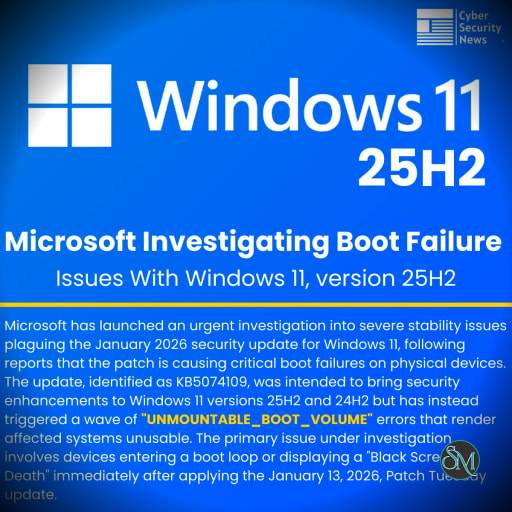
If you have recently updated your Windows 11 PC to the January 2026 security patch and now face boot issues, you are not alone. Many users report their systems failing to start properly after installing KB5074109 on version 25H2 or 24H2. This problem can show up as a black screen, endless boot loops, or error messages like UNMOUNTABLE_BOOT_VOLUME with code 0xED. Microsoft has acknowledged these reports and started an investigation to find a permanent solution.
In this article, we break down what is happening, why it might occur, and steps you can take to get your PC running again.
Understanding the Windows 11 Boot Failure Issue
The trouble began right after the January 13, 2026 Patch Tuesday release. Affected devices often enter a state where they cannot boot into the desktop. Instead, users see a blue screen of death or the system hangs on a black screen. This impacts both Windows 11 25H2 and all editions of 24H2. Reports suggest it is not widespread but hits a limited number of setups, possibly due to specific hardware or software configurations.
On social platforms like X, users share similar stories. One post highlights black screens and boot loops after the update, urging others to check for fixes. Another mentions the UNMOUNTABLE_BOOT_VOLUME error, linking it directly to KB5074109. These real-time complaints show how frustrating this can be for everyday users and IT pros alike.
What Causes the Boot Problems in Windows 11 25H2?
Experts point to system corruption or issues with the boot process as key culprits. The 0xED error often ties to damaged BIOS settings, boot files, or hardware like the drive itself. Microsoft suspects the update interacts poorly with certain recovery environments or partitions, leading to unmountable volumes during startup.
Some forums note that older hardware or bypassed system requirements might worsen the issue, though this update targets current versions. If your PC has custom tweaks, third-party antivirus, or disk encryption, these could clash with the patch. Microsoft is gathering data to pinpoint exact triggers, but for now, it seems tied to how the update handles boot volumes.
How to Fix Boot Failure After the January 2026 Windows Update
Do not panic if your PC will not boot. You can often resolve this by accessing the Windows Recovery Environment, or WinRE, to remove the faulty update. Here is a general guide based on user reports and official advice.
First, try entering WinRE automatically. Power on your PC and let it attempt to boot. If it fails, force a shutdown by holding the power button. Repeat this cycle three times. On the third try, Windows should load the recovery screen.
Once in WinRE:
Select Troubleshoot.
Choose Advanced options.
Go to Uninstall Updates.
Pick Uninstall latest quality update to remove KB5074109.
If that does not work, create a bootable USB with Windows installation media from another PC. Boot from it, select Repair your computer, and follow the same steps to uninstall the update. After removal, your system should start normally. Then, pause updates in Settings > Windows Update to avoid reinstalling the patch until Microsoft fixes it.
For IT admins managing multiple devices, test updates in a controlled environment first. Tools like Disk Management can help check partitions post-recovery.
Tips to Prevent Future Windows 11 Update Issues
To avoid similar headaches, back up your data regularly using OneDrive or external drives. Create a system restore point before major updates. Also, consider delaying non-security patches by pausing updates for up to 35 days.
Keep an eye on Microsoft's release health dashboard for known issues. If you run Windows 11 25H2, join the Insider program for early access to fixes.
Finally, ensure your hardware meets official requirements to minimize compatibility problems.
Final Thoughts on Windows 11 25H2 Boot Failures
This January 2026 update glitch reminds us that even routine patches can cause disruptions. Microsoft is working on a resolution, possibly through an emergency patch like KB5077744 for related issues. In the meantime, the workarounds above should help most users recover. If problems persist, reach out to Microsoft support or community forums for tailored advice.
Sources:
January 13, 2026—KB5074109 (OS Builds 26200.7623 and 26100.7623)
Microsoft investigates Windows 11 boot failures after January updates
Microsoft Investigates Windows 11 25H2 Boot Failures After January Update
Microsoft suspects some PCs might not boot after Windows 11 January 2026 Update (KB5074109)
Windows 11 Patch Tuesday horrors continue as some PCs now cannot boot
KB5074109 Breaks Classic Outlook PST in OneDrive: Security vs Email Access
Windows 11’s January update is breaking PCs — here’s how to fix your boot issue
Windows 11 January 2026 Update Causes UNMOUNTABLE_BOOT_VOLUME Boot Failures
2026-01 Security Update (KB5074109) (26200.7623) casuing issues with my PC
Downloaded the latest Windows 11 January 2026 update? Microsoft has a WARNING for you
Microsoft Rushes Emergency Windows 11 Patch After Update Breaks PCs