


Zen is a free, open-source ad blocker and privacy guard application designed to filter unwanted network traffic throughout the entire operating system, Zen functions differently from traditional browser extensions, which typically only protect activity within a specific browser. Instead, Zen uses a local proxy to intercept and filter HTTP and HTTPS requests originating from supported desktop applications.
Developed by Irbis, Zen blocks advertisements, tracking scripts, malicious domains, and other unwanted network requests. It comes with pre-configured filter lists and also allows users to incorporate their own custom filter lists and rules.
Available for Windows, macOS, and Linux, Zen serves as a compelling alternative to browser-based content blockers and DNS-based filtering solutions. Its comprehensive approach makes it particularly valuable for users looking to minimize tracking that occurs outside of their web browser.
Download Zen v0.30.0 - Ad-Blocker and Privacy Guard - Software Mirrors |
|---|
Zen v0.30.0 - Ad-Blocker and Privacy Guard for WindowsZen_windows_arm64_noselfupdate.zip | 10.38 MB Zen_windows_arm64.zip | 10.38 MB Zen_windows_amd64_noselfupdate.zip | 11.09 MB Zen_windows_amd64.zip | 11.09 MB |
Zen v0.30.0 - Ad-Blocker and Privacy Guard for macOSZen_darwin_arm64_noselfupdate.tar.gz | 10.38 MB Zen_darwin_arm64.tar.gz | 10.38 MB Zen_darwin_amd64_noselfupdate.tar.gz | 11.16 MB |
Zen v0.30.0 - Ad-Blocker and Privacy Guard for LinuxZen_linux_arm64_noselfupdate.tar.gz | 10 MB Zen_linux_arm64.tar.gz | 10 MB |
Zen v0.30.0 - Ad-Blocker and Privacy Guard Source CodeZen v0.30.0 - Ad-Blocker and Privacy Guard Source code (zip) Zen v0.30.0 - Ad-Blocker and Privacy Guard Source code (tar.gz) |
Zen v0.30.0 - Ad-Blocker and Privacy Guard Release Notes:What's New
Zen can now encrypt its DNS queries with DNS over HTTPS. Choose Quad9, Cloudflare, Google, OpenDNS or your own server under Settings > DNS. The setting is experimental and off by default, so please try it out and tell us how it went. See our blog post for more details.
Some sites use DNS (CNAME) records to make a third-party tracking server look like part of the site, so filter rules for that server's domain don't match. With encrypted DNS on, Zen checks these records and blocks matching requests.
* Added the
Zen now checks requests against the filter lists about three times faster.
Zen could lose the first message on a WebSocket connection, which live chats and similar features use. On plain HTTP sites, blocked requests returned a page of raw text, and redirects made by Zen didn't work. All three are fixed.
Zen's files were unnecessarily spread over multiple folders. They now stay in one
New ContributorsThank you for using Zen! Full Changelog: v0.29.0...v0.30.0 |
Features
System-Wide Ad Blocking
Zen's main advantage is its ability to filter network traffic across multiple applications rather than operating exclusively inside a browser.
It starts a local proxy and configures the operating system to route supported HTTP and HTTPS traffic through it. Requests are then checked against configured filtering rules before being allowed or blocked.
This approach can protect several types of applications, including:
Web browsers such as Chrome, Firefox, Safari, Edge, Brave, and Opera.
Desktop applications that respect system proxy settings.
Applications that send telemetry or tracking requests.
Software that loads advertisements or third-party resources.
Other supported applications that communicate through standard HTTP and HTTPS connections.
Because filtering happens outside the browser, Zen can block certain tracking activities that browser extensions cannot reach.
However, it cannot intercept every application. Software with its own networking stack, applications that ignore system proxy settings, and services using certificate pinning may bypass Zen or require explicit exclusions.
HTTPS Traffic Inspection
One of Zen's most important capabilities is HTTPS filtering.
Ordinary proxy-based blocking cannot inspect the contents of encrypted HTTPS connections without additional certificate configuration. Zen addresses this by generating a local certificate authority (CA) and installing its root certificate into the operating system's trusted certificate store.
Once configured, Zen can inspect encrypted requests, apply filtering rules, and block unwanted resources.
The certificate and private key are generated locally. According to the project's security documentation, the private key remains on the device and is stored with restrictive file permissions by default.
There is an important security consideration here: installing a root CA gives the application the ability to generate certificates trusted by the system. Users should understand this before enabling HTTPS inspection.
Zen provides additional safeguards, including:
Local generation and storage of the CA private key.
Restricted permissions for the private key.
Exclusion lists for sensitive hostnames.
An option to remove the installed certificate through the application settings.
Experimental hardware-backed CA key storage using the Secure Enclave on supported Macs or TPM hardware on Windows.
The hardware-backed option is not available on Linux.
Built-In Filter Lists
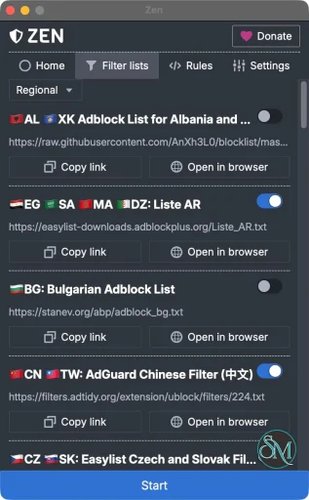
Zen comes with several preconfigured filter lists covering advertisements, tracking scripts, and malicious domains.
Its filtering engine supports commonly used ad-blocking formats, including hosts-style lists and EasyList-compatible rules.
Users can customize protection by:
Enabling or disabling individual filter lists.
Adding external filter lists through their URLs.
Using regional lists for websites in different languages.
Creating custom blocking rules.
Adding rules to hide unwanted page elements.
Excluding websites from filtering when necessary.
The project provides regional filter lists alongside established sources such as EasyList and privacy-focused filtering rules.
This flexibility makes Zen suitable for users who want more control over what gets blocked instead of relying entirely on a fixed collection of domains.
Custom Filtering Rules
Zen supports more than simple domain blocking. Its rule engine understands individual URL patterns, request types, and page-element hiding rules.
For example, users can block a specific third-party tracking domain or hide an advertising element on a particular website.
Custom rules are useful when built-in filter lists do not cover a particular website or application.
The filtering engine also supports rule exceptions, allowing users to restore access to websites or resources that are incorrectly blocked.
This is important because aggressive filtering can occasionally interfere with legitimate website functionality.
Request History and Filtering Transparency
Zen includes a request history interface that shows network requests handled by its filtering engine.
Users can inspect blocked requests and identify the filter list and rule responsible for blocking them.
This makes troubleshooting considerably easier. Instead of guessing why a website is missing content or why an application cannot connect to a service, users can examine the filtering history and adjust the relevant rules.
The interface also provides visibility into the types of advertising and tracking requests being blocked across the system.
Application and Host Exclusions
Not every application should necessarily route its traffic through a filtering proxy.
Some software relies on custom network configurations, certificate pinning, or connections that can break when intercepted.
Zen provides application routing and ignored-host settings to address these situations.
Users can exclude specific hosts or applications from filtering when necessary. The project also maintains predefined exclusions for sensitive services, including categories such as banking, authentication gateways, password managers, messaging services, and cloud infrastructure.
This is particularly useful when working with development tools, container environments, VPN software, and applications that require direct network access.
Privacy-Focused Architecture
Zen is designed to process network traffic locally rather than sending browsing activity to an external filtering service.
Its published privacy policy states that the application does not collect browsing history, transmit analytics, or store browsing traffic on remote servers.
The application does maintain local filter caches and diagnostic logs. According to its documentation, debug logs redact hostnames and remain on the user's device.
There are still external connections for infrastructure purposes:
Cloudflare serves update manifests.
GitHub hosts releases, source code, and application updates.
Public filter-list providers supply the filtering rules.
These services may process ordinary connection metadata when users download updates or filter lists. Zen's privacy model should therefore be understood as local traffic filtering without browsing-data collection, rather than an application that never makes external connections.
Cross-Platform Support
Zen supports three major desktop operating systems.
Windows
x64 and ARM64 builds.
Installer and portable packages.
Installation through Windows Package Manager is also documented, although the Winget package is community-maintained.
macOS
Intel and Apple Silicon support.
Installer and portable packages.
Homebrew installation support.
Linux
x64 and ARM64 portable builds.
Installation script for supported distributions.
Arch Linux AUR package.
Nix installation support.
Automatic system proxy configuration on GNOME and KDE desktop environments.
Linux users running other desktop environments may need to configure their system proxy manually. The standard installation script also expects glibc, so distributions based on musl or NixOS should use the alternative installation methods.
Performance and Compatibility
Zen is written primarily in Go, with a web-based frontend and Wails desktop application framework. Its local proxy architecture allows it to process network requests without depending on an external filtering server.
Because it examines HTTP and HTTPS traffic, it introduces some processing overhead. The actual impact depends on network activity, enabled filter lists, and the applications being monitored.
There is also a potential performance benefit: blocking advertisements and tracking resources means fewer unnecessary requests and less content being downloaded.
Compatibility is generally strongest with browsers and applications that respect the operating system's proxy configuration. However, applications with independent networking implementations or certificate pinning can bypass Zen or encounter connection problems.
VPN compatibility is supported, although the project notes that behavior can vary depending on the operating system and VPN implementation.
The biggest compatibility consideration is HTTPS inspection. Installing a root certificate is necessary for full encrypted traffic filtering, but some applications may require additional configuration or exclusions.
Overall, Zen provides a practical system-wide filtering solution, particularly for desktop environments where browser extensions alone are insufficient.
System Requirements
The project does not publish a universal minimum CPU, memory, or storage specification. Its supported platforms include:
Windows: x64 and ARM64 systems.
macOS: Intel and Apple Silicon systems.
Linux: x64 and ARM64 systems.
Linux desktop environments: Automatic proxy configuration for GNOME and KDE.
Linux libraries: The standard installation script requires glibc.
NixOS and musl-based distributions: Use alternative installation methods.
HTTPS filtering: Requires installing Zen's locally generated root CA certificate.
A compatible desktop environment and permission to configure system proxy settings are necessary for the intended system-wide protection.
Pros and Cons
Pros
Free and open-source under the MIT license.
Blocks advertisements and trackers across supported desktop applications.
Works beyond browser extensions.
Supports HTTP and HTTPS traffic filtering.
Uses locally generated certificates for encrypted traffic inspection.
Includes preconfigured advertising, tracking, and malware filter lists.
Supports EasyList-style and hosts-based filtering rules.
Allows custom filter lists and individual blocking rules.
Provides request history and filtering diagnostics.
Supports application and hostname exclusions.
Does not collect browsing history or send browsing analytics according to its privacy policy.
Supports Windows, macOS, and Linux.
Provides x64 and ARM64 builds.
Includes experimental hardware-backed CA key storage on supported Windows and macOS systems.
Cons
Requires installing a root CA certificate for HTTPS inspection.
Applications with certificate pinning or independent networking stacks may bypass filtering.
Some websites and applications can break because of aggressive filtering rules.
Linux automatic proxy configuration is limited to GNOME and KDE.
System proxy configuration may require manual setup on other Linux desktop environments.
The standard Linux installer does not support musl-based distributions or NixOS.
Filtering introduces additional local network-processing overhead.
Hardware-backed CA key storage is experimental and unavailable on Linux.
How to Install
Windows
Visit the official GitHub repository or Zen website.
Download the installer matching your processor architecture.
Run the installer and launch Zen.
Follow the first-run instructions to install the local root certificate.
Start the proxy and configure filter lists as needed.
Alternatively, install it through Windows Package Manager:
winget install ZenPrivacy.ZenDesktopmacOS
Download the Intel or Apple Silicon installer.
Install and launch Zen.
Approve the required system configuration.
Install the local root certificate when prompted.
Start filtering and customize the available lists.
Homebrew installation is also supported:
brew install --cask irbis-zenLinux
The official installation script can install Zen on supported distributions:
curl -fsSL https://raw.githubusercontent.com/irbis-sh/zen-desktop/master/install.sh | shAfter installation, launch Zen and follow the certificate setup instructions.
GNOME and KDE users benefit from automatic system proxy configuration. Other desktop environments may require manual proxy configuration.
Final Verdict
Zen is an impressive open-source system-wide ad blocker that takes a different approach from traditional browser extensions. By using a local proxy and HTTPS inspection, it can filter advertisements, tracking scripts, and unwanted network requests across supported desktop applications.
Its customizable filter lists, request history, application exclusions, and cross-platform support make it a practical privacy tool. The ability to inspect blocked requests is particularly useful for troubleshooting, while the local processing architecture is appealing to users who prefer not to send browsing activity to external filtering services.
The main trade-off is its reliance on a locally installed root certificate for HTTPS filtering. This is a powerful capability, but it introduces additional trust and security considerations. Compatibility is also not universal, especially with applications that bypass system proxy settings or use certificate pinning.
Despite these limitations, Zen is a compelling option for users who want broader protection than browser-based ad blockers can provide. Its open-source development, customizable filtering, and system-wide coverage make it worth considering on Windows, macOS, and Linux.