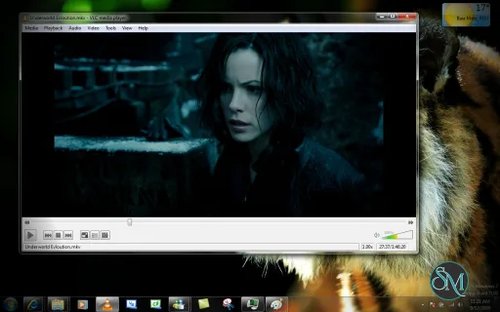

VLC for Windows is a free and open-source multimedia player from VideoLAN that can play a wide range of video and audio formats without requiring separate codec packs. It also supports DVDs, Audio CDs, VCDs, network streams, subtitles, and various capture devices.
Features
VLC supports most common multimedia formats and can handle video and audio files without requiring users to install separate codec packages.
It can play DVDs, Audio CDs, VCDs, and network streams. VLC also supports a wide range of streaming protocols and can open network media directly from the player.
Subtitle support includes common subtitle formats and configurable subtitle appearance. VLC also provides extensive audio and video controls, including playback speed, equalizer settings, video filters, audio effects, and synchronization controls.
VLC can also function as more than a basic media player. It includes streaming and transcoding capabilities, allowing media to be converted or streamed to other destinations.
The Windows version supports multiple distribution formats, including a standard installer, MSI package, ZIP package, and 7-Zip package. Separate 64-bit and ARM64 builds are available.
Performance and Compatibility
VLC is designed to handle a broad range of media formats and operating systems. VLC is generally more flexible than Windows' basic media playback applications because it includes its own multimedia framework and supports a much broader collection of formats and playback sources. The trade-off is that its large number of settings and advanced functions can make the interface less straightforward for users who only need basic playback.
System Requirements
VideoLAN states that VLC for Windows runs on Windows versions from Windows XP SP3 through Windows 11. Current releases also provide dedicated 64-bit and ARM64 packages.
Supported platforms:
Windows XP SP3
Windows Vista
Windows 7
Windows 8 and 8.1
Windows 10
Windows 11
64-bit Windows
ARM64 Windows
The current Windows download is approximately 38 MB for the listed package.
Pros and Cons
Pros
Free and open source
Supports a very large range of media formats
No separate codec packs required for normal use
DVD, Audio CD, and VCD playback
Network streaming support
Subtitle support
Audio and video filters
Playback speed controls
Audio equalizer
Media conversion and transcoding
Multiple Windows package formats
64-bit support
ARM64 support
Regular security and maintenance updates
Works on a wide range of Windows versions
Cons
Interface can feel complicated for basic playback
Some advanced features require technical knowledge
Large configuration menu can be overwhelming
Some newer media formats and features may depend on the capabilities of the bundled multimedia libraries
How to Install
Download VLC for Windows from the official VideoLAN website. Run the installer and follow the installation wizard. The default installation is sufficient for normal media playback.
After installation, open VLC and either drag media files into the player or use the Open File option. VLC can also open discs, network streams, and capture devices through its media menu.
Keeping VLC updated is recommended because recent releases include security fixes and updates to bundled multimedia libraries.
Final Verdict
VLC for Windows remains a highly capable media player because it combines broad format support with playback, streaming, transcoding, subtitle, and media-processing features in one free application.
Its main weakness is complexity. Users who only need simple video playback may find some of VLC's controls unnecessary, but that extensive functionality is also what makes it useful for more demanding playback and media tasks.
For Windows users who want a versatile open-source media player with broad format and streaming support, VLC remains a practical choice.