
VidBee is an open source video downloader that combines the power of yt-dlp with a polished desktop interface. It is designed for people who want the broad website compatibility of a command line downloader without having to work with terminal commands.
The application supports video and audio downloads from more than 1,000 websites, including popular platforms such as YouTube, TikTok, Instagram, and X. It also includes download queues, pause and resume controls, format selection, RSS automation, and a web interface that can be deployed with Docker.
VidBee was created around a fairly simple idea. yt-dlp is extremely capable, but its command line interface is not ideal for everyone. VidBee puts that same underlying downloading capability behind a modern graphical interface.
The desktop application is built with Electron and uses yt-dlp as its download engine. It runs locally, so users do not need to upload their media URLs or downloaded files to a third-party cloud service.
The project has also expanded beyond its original desktop application. The repository now contains a shared downloader core, API server, web client, browser extension, documentation, and Docker configuration.
Key Features of VidBee
Support for 1000+ Websites
The biggest advantage of VidBee is its use of yt-dlp. Instead of maintaining individual download implementations for every website, VidBee benefits from yt-dlp's extensive extractor ecosystem.
This provides compatibility with a huge range of video and audio websites, although support can change when websites modify their platforms.
Clean Desktop Interface
VidBee provides a much friendlier experience than using yt-dlp directly.
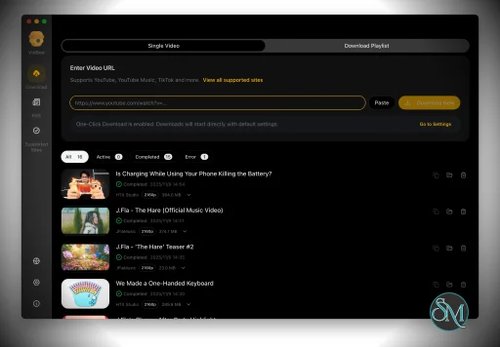
Users can paste a URL, select the desired format or quality, and start downloading without dealing with command line parameters. The interface also provides real-time progress information and download queue management.
Pause, Resume, and Retry
Downloads can be paused, resumed, or retried directly from the interface. This is useful when handling large files or multiple downloads simultaneously.
The queue-based workflow also makes VidBee more practical than simple browser-based download tools.
Audio Downloads
VidBee can download audio as well as video. This makes it useful for users who want to save audio from supported sources for legitimate offline use.
Flexible Containers
Users can choose between Auto, MP4, MKV, WebM, or yt-dlp's original format defaults.
Having explicit container options is useful because users can choose a format based on compatibility rather than accepting whatever format the source happens to provide.
RSS Auto Download
One of VidBee's more interesting features is RSS automation.
Users can subscribe to supported feeds and configure VidBee to automatically download new videos from selected creators in the background. This turns the application from a simple downloader into an automated media archiving tool.
Web and Docker Support
VidBee is no longer limited to the desktop application. The repository includes a Fastify API server and a TanStack Start web client, both of which can be deployed through Docker.
This opens up interesting possibilities for running VidBee on a home server or other machine and accessing the downloader through a browser.
Cross Platform
The official desktop builds cover Windows, macOS, and Linux. Debian and Ubuntu packages are also available, alongside AppImage and macOS builds.
There is also a community-maintained Android version, although that is separate from the official desktop project.
Download VidBee v2.3.0 - Software Mirrors |
|---|
VidBee v2.3.0 for Windowsvidbee-2.3.0-windows-portable.zip | 530.67 MB |
VidBee v2.3.0 for macOS |
VidBee v2.3.0 for Linux |
Others Download related to VidBee v2.3.0 |
VidBee v2.3.0 Source Code |
VidBee v2.3.0 Release Notes:View the full changelog at vidbee.org/changelog. Full Changelog: v2.2.4...v2.3.0 |
Performance and User Experience
VidBee's biggest strength is how it combines a powerful backend with an approachable interface.
Experienced users can already get excellent results from yt-dlp, but VidBee removes much of the complexity involved in constructing commands, choosing formats, managing queues, and monitoring downloads.
The Electron interface is modern and responsive, with real-time download progress and straightforward controls. The application also follows the system theme and supports both light and dark modes.
The project is still under active development. The repository currently has a substantial development history and frequent releases, while the official download page describes the software as still being improved.
There are occasional platform-specific issues, particularly around browser cookies and authenticated downloads. For example, a Windows issue involving Chrome's cookie database was reported for VidBee 1.3.10.
This is not necessarily a VidBee-specific weakness, since authenticated downloading depends heavily on browser security and yt-dlp behavior, but it is something users should keep in mind.
Pros
Free and open source.
Supports more than 1,000 websites through yt-dlp.
Modern and easy-to-use interface.
Windows, macOS, and Linux support.
Video and audio downloads.
Download queue management.
Pause, resume, and retry controls.
Multiple output container choices.
RSS automatic downloading.
Local-first desktop operation.
Docker-ready web and API version.
MIT licensed.
Active development.
Cons
Website compatibility ultimately depends on yt-dlp.
Some authenticated downloads can require browser cookie configuration.
Electron adds more resource usage than a native application.
The project is still evolving rapidly.
Some advanced functionality may still be easier to access directly through yt-dlp.
Who Should Use VidBee?
VidBee is a strong choice for anyone who regularly downloads media from websites but does not want to use command line tools.
It is particularly useful for users who want a graphical alternative to yt-dlp, people managing multiple downloads, and users who want to automatically archive new videos through RSS.
The Docker-based API and web interface also make VidBee interesting for homelab users who want to run a centralized downloader on a server rather than keeping the application open on their desktop.
As always, downloads should be limited to content you have the right to access and save. VidBee does not support DRM-protected content.
Final Verdict
VidBee is one of the more polished graphical front ends for yt-dlp. It keeps the impressive website compatibility of the underlying downloader while making everyday use considerably easier through a modern interface.
The RSS automation feature is especially useful, while the newer web and API architecture gives the project potential beyond being just another desktop downloader.
There are still some rough edges, particularly around authenticated downloads and the rapidly changing landscape of supported websites. However, the combination of open source development, excellent yt-dlp compatibility, cross-platform support, Docker deployment, and a genuinely pleasant interface makes VidBee a very compelling option.