TextureCraft is an open-source 3D texture painting application, developed entirely in Rust. It provides a comprehensive workflow for painting PBR materials directly onto 3D models, creating layer-based textures, generating procedural materials, producing mesh maps, and exporting assets for game engines and other 3D applications.
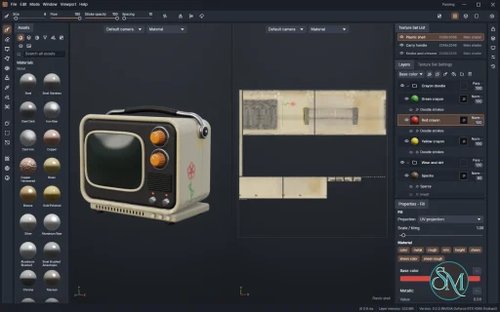
Its interface follows the standard workflow found in professional texturing software, featuring a 3D viewport, a 2D UV editor, texture sets, a layer stack, masks, and a material library. At the same time, TextureCraft introduces its own unique architecture, which includes a tile-based texturing engine, GPU-accelerated rendering, and automation tools.
The application runs on Windows, macOS, Linux, and FreeBSD, with an additional WebAssembly version available for modern web browsers.
Features
3D Texture Painting
TextureCraft allows artists to paint directly onto 3D model surfaces using a collection of brushes and painting tools. Brush settings include size, flow, opacity, spacing, hardness, angle, jitter, and alignment options.
Available tools include:
Paint and eraser brushes.
Image projection and stencil painting.
Polygon, path, and lasso fills.
Particle brushes and smudge tools.
Clone and material picker tools.
Text stamping and geometry decals.
Mirror and radial symmetry.
Direct painting in the 2D UV editor.
One particularly useful feature is seamless painting across UV seams. Brush strokes are projected onto the actual 3D surface rather than being restricted to individual UV islands.
Layer System and Masks
TextureCraft provides a non-destructive layer-based workflow for organizing complex materials. It supports paint, fill, folder, and instance layers, with per-channel blending and opacity controls.
Layers can be grouped, duplicated, reordered, flattened, and copied between texture sets. There are 32 blend modes, including specialized modes for normal maps.
Its masking system supports painted masks, procedural generators, filters, and geometry-based selection. Artists can combine multiple effects within a mask stack to control where materials and surface details appear.
Additional features include anchor points, which allow masks and fills to react to the contents of lower layers.
Smart Materials and Procedural Textures
The built-in asset library includes 72 materials, 21 smart materials, and 24 smart masks. These cover a variety of surfaces, including metals, plastics, wood, leather, fabric, stone, glass, and ceramics.
Smart materials can generate realistic surface effects such as rust, worn paint, oxidized copper, weathered wood, and dirt. Their procedural nature allows them to adapt to different texture resolutions.
Fill layers also support 23 procedural texture generators, including clouds, scratches, wood grain, bricks, fabric patterns, marble, and Voronoi patterns.
Users can create their own smart materials and save them to the asset library for reuse.
PBR Material Channels
TextureCraft supports a comprehensive set of physically based rendering channels:
Base color
Metallic and roughness
Height and normal
Emissive and opacity
Ambient occlusion
Specular level
Clear coat and sheen
Anisotropy
Subsurface scattering
Transmission
Each channel can be configured independently, allowing artists to create detailed materials with different surface properties.
Mesh Map Baking
TextureCraft includes GPU-accelerated mesh-map baking for generating information used by smart materials and procedural masks.
Supported maps include ambient occlusion, curvature, thickness, world-space normals, position, ID, bent normals, opacity, color, and direction. It can also generate normal and height maps from high-poly geometry.
The resulting maps can drive effects such as edge wear, dirt accumulation, surface damage, and material variation.
Baking can use the GPU or CPU, with a live preview that displays completed maps as they become available.
3D Viewport and Path-Traced Rendering
The 3D viewport provides physically based rendering with metallic-roughness and specular-glossiness workflows. It supports image-based lighting, environment maps, shadows, displacement, parallax occlusion, bloom, depth of field, and several post-processing effects.
Rendering mode provides a progressive path-traced preview with multi-bounce lighting, environment importance sampling, displaced geometry, and denoising.
Both GPU and CPU rendering are supported. The project reports that its GPU path tracer can be approximately 25 times faster than its CPU implementation, although actual performance depends on hardware and scene complexity.
Import and Export Support
TextureCraft supports a wide range of 3D model formats, including:
glTF and GLB
FBX
COLLADA
USD
Alembic
OBJ
PLY
STL
It can export textures in PNG, JPEG, TGA, TIFF, BMP, WebP, EXR, and HDR formats at 8, 16, or 32 bits.
Additional capabilities include UDIM tiles, custom output templates, channel packing, UV padding, and export presets for popular rendering and game-development workflows.
Available presets include Unreal Engine, Unity, Blender, Godot, glTF, and OpenPBR.
Textured models can also be exported as OBJ, GLB, and USD.
MaterialCraft Integration
TextureCraft integrates with MaterialCraft, another application from the ArtCraft ecosystem.
Users can import MaterialCraft materials and use them as fill layers. Exposed material parameters remain editable inside TextureCraft, including numerical values, colors, options, and presets.
Material graphs can use baked mesh maps as inputs, allowing procedural materials to react to the geometry of the model being textured.
This integration is particularly useful for artists who want to build reusable procedural materials and apply them across different projects.
CLI and AI Agent Integration
One of TextureCraft's most distinctive capabilities is its automation architecture.
The application exposes editing operations through a command registry, allowing the desktop application, command-line interface, JSON control channel, and MCP server to execute the same commands.
The CLI supports project creation, rendering, and headless texture export. The MCP server allows compatible AI assistants, including Claude Code, to inspect and manipulate texture projects.
For example, you can register the MCP server with Claude Code:
claude mcp add texturecraft -- /path/to/texturecraft-cli mcp \
  --read-root /work/project \
  --write-root /work/project
You can also connect an MCP server to a running desktop application through its control interface:
claude mcp add texturecraft-app -- /path/to/texturecraft-cli mcp \
  --bridge 7878
This opens up interesting possibilities for AI-assisted texturing, automated material creation, and batch asset production.
For security, the read and write roots should be restricted to the project directories that an agent actually needs.
WebAssembly Support
TextureCraft is not limited to desktop operating systems. It also provides a WebAssembly build that runs in modern browsers.
The web version shares the same application interface and underlying engine architecture, although some platform-dependent features may differ from the desktop experience.
This makes it possible to host TextureCraft as a static web application without requiring users to install a traditional desktop application.
Performance and Compatibility
TextureCraft is written in Rust and uses a custom tiled texture engine designed for efficient memory usage and parallel processing.
Its rendering system is built on wgpu, providing graphics backend support through Vulkan, Metal, DirectX 12, and WebGPU. The project also uses a CPU-based compositor with parallel processing across available CPU cores.
The developers report that GPU baking can be approximately 12 times faster than CPU baking, while GPU path tracing can reach approximately 25 times the CPU rendering performance. These are project-reported benchmarks rather than independent comparisons.
Supported platforms include:
Windows x64, ARM64, and x86.
macOS on Intel and Apple Silicon.
Linux x86_64 and ARM64.
FreeBSD x86_64.
Modern browsers through WebAssembly.
TextureCraft is still actively evolving. Some limitations remain, including hardware ray tracing in Rendering mode, pen tilt support, and full pen-pressure support on Linux, macOS, and desktop browsers. Alembic support also has gaps involving older HDF5 files and animation.
The project is dual-licensed under MIT or Apache-2.0.
System Requirements
Desktop:
Windows, macOS, Linux, or FreeBSD.
A compatible GPU and graphics driver supporting an available wgpu backend.
Sufficient memory and GPU resources for the complexity and resolution of the texture projects.
Additional GPU resources are recommended for high-resolution textures, baking, and path-traced rendering.
Browser:
A modern browser with WebAssembly and supported graphics capabilities.
WebGPU or WebGL2 support, depending on the rendering path.
Building from source:
Rust 1.95 or newer.
Cargo and the required platform development dependencies.
Trunk for building and serving the web application.
Pros and Cons
Pros
Free and open-source under MIT or Apache-2.0.
Native support for Windows, macOS, Linux, and FreeBSD.
Comprehensive 3D painting and PBR texturing tools.
Non-destructive layers, masks, and procedural effects.
Built-in smart materials, smart masks, and procedural textures.
GPU-accelerated mesh-map baking and path tracing.
Supports UDIM workflows and multiple export formats.
Integrates with MaterialCraft.
CLI and MCP support for AI-assisted automation.
WebAssembly version available.
Cons
Still under active development, with some workflow gaps.
Pen pressure and tilt support varies by platform.
Hardware ray tracing is not yet available in Rendering mode.
Some Alembic features remain incomplete.
Advanced functionality may require learning its custom workflow.
GPU performance depends heavily on available hardware and drivers.
How to Install
The easiest way to install TextureCraft is to download a prebuilt package from its official GitHub releases or the ArtCraft website.
1. Download the application
Choose the appropriate build for your operating system:
Windows: MSI installer or portable ZIP.
macOS: Universal DMG for Intel and Apple Silicon.
Linux: AppImage, Flatpak, DEB, RPM, or tarball.
FreeBSD: x86_64 tarball.
Web: WebAssembly static-site package.
2. Install and launch
For Windows, run the MSI installer or extract the portable archive.
For macOS, open the DMG and install the application.
For Debian or Ubuntu, install the downloaded package:
sudo apt install ./texturecraft-*-linux-x86_64.debFor Fedora-based distributions:
sudo dnf install ./texturecraft-*-linux-x86_64.rpmFor Flatpak:
flatpak install --user ./texturecraft-*-linux-x86_64.flatpak3. Start a project
After launching TextureCraft, you can open an existing model or create a new project using a built-in mesh or template.
You can also open a model directly from the command line:
texturecraft model.glb4. Build from source
If you prefer compiling the application yourself, clone the repository and build it using Cargo:
git clone https://github.com/storytold/texturecraft
cd texturecraft

cargo run --release -p texturecraft
The project also provides separate CLI and WebAssembly build targets.
Final Verdict
TextureCraft is an ambitious open-source alternative for 3D texture painting and PBR material creation. It combines familiar professional texturing workflows with procedural materials, mesh-map baking, GPU rendering, and extensive export capabilities.
Its strongest advantage is the depth of its feature set. The layer system, smart materials, UDIM support, and painting tools make it suitable for serious 3D asset workflows rather than simple texture editing. The addition of CLI and MCP support is another significant advantage, especially for developers exploring AI-assisted 3D production.
However, TextureCraft is still developing, and some features remain incomplete compared with established commercial texturing applications. Hardware ray tracing and cross-platform pen support are notable areas for improvement.
Overall, TextureCraft is a promising project for 3D artists, game developers, and technical artists looking for an open-source texturing workflow with modern GPU acceleration and automation capabilities.