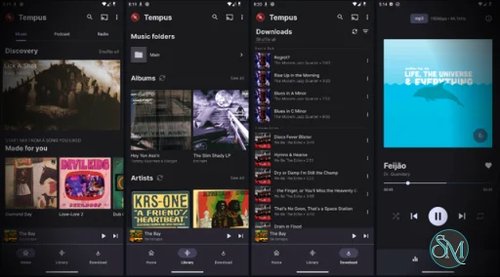
Tempus Music Player is an open-source, privacy-focused Android music client for Subsonic-compatible servers. It is designed for people who maintain their own music library and want a polished native Android app for streaming and offline playback rather than relying on a commercial music service.
Tempus is a fork of Tempo and is released under the GPL-3.0 license.
Tempus connects directly to your Subsonic server and gives you access to your own music collection from Android.
It supports:
Music streaming
Offline playback
Multiple libraries
Playlists
Search and browsing
Gapless playback
ReplayGain
Transcoding
Internet radio
Podcasts
Scrobbling
Equalizers
Android widgets
Android Auto
Chromecast
Key Features of Tempus Music Player
Subsonic Integration
The core purpose of Tempus is accessing a self-hosted Subsonic music library.
It supports browsing by:
Artists
Albums
Genres
Playlists
Decades
Search
This makes it a good client for servers such as Navidrome and other Subsonic-compatible implementations.
Streaming and Offline Playback
You can stream music directly from your server and download music for offline listening.
Offline functionality is still being actively developed, and the project notes that there can be limitations when using multiple servers.
Gapless Playback
Tempus supports gapless playback, making it appropriate for albums where tracks are intended to flow continuously without pauses.
ReplayGain
ReplayGain support provides:
Volume normalization
Preamp adjustment
Clipping prevention
when the relevant ReplayGain metadata is available in your music library.
Transcoding
Tempus can request transcoding from the Subsonic server.
This allows the server to convert tracks into a format or bitrate appropriate for the Android device or network connection.
This is particularly useful when your original library contains large lossless files and you don't want to stream them at full size over mobile data.
Multiple Libraries
Tempus supports multiple Subsonic libraries and presents them as library folders.
This is useful if your server exposes multiple music collections.
Instant Mix
The application includes an Instant Mix feature that uses Subsonic's similarity APIs, including similarSongs2 and similarSongs, to build larger play queues.
This provides some automatic music discovery without turning Tempus into a Spotify-style recommendation service.
Last.fm and ListenBrainz
Tempus can optionally scrobble played tracks to Last.fm or ListenBrainz, provided the Subsonic backend supports the necessary functionality.
This is entirely optional, which fits well with the project's privacy-focused philosophy.
Podcasts and Internet Radio
Tempus isn't limited to music.
It can play podcasts when supported by the Subsonic server, and it can search and save Internet radio stations locally even when the backend doesn't provide radio API support.
Download Tempus Music Player v4.28.0 - Software Mirrors |
|---|
Tempus Music Player v4.28.0 for Android |
Others Download related to Tempus Music Player v4.28.0 |
Tempus Music Player v4.28.0 Source Code |
Tempus Music Player v4.28.0 Release Notes:What's Changed
New Contributors
|
GitHub vs F-Droid / de-Googled Version
This is one of the more interesting aspects of Tempus.
The project provides different APK variants:
GitHub app-tempus
Android Auto
Chromecast
Full feature set
app-degoogled
Google-free
Available through IzzyOnDroid
32-bit and 64-bit APKs are available on GitHub
The developer explicitly recommends the GitHub version if you want full Android Auto and Chromecast support.
So if you're specifically looking for a de-Googled Subsonic client, Tempus has a particularly attractive option.
Pros
Open source.
GPL-3.0 licensed.
Privacy focused.
Native Android application.
Excellent Subsonic integration.
Works with self-hosted music libraries.
Streaming.
Offline playback.
Gapless playback.
ReplayGain.
Server-side transcoding.
Multiple libraries.
Playlists.
Instant Mix.
Last.fm integration.
ListenBrainz integration.
Podcasts.
Internet radio.
Equalizer support.
Android widget.
Android Auto support.
Chromecast support.
De-Googled build available.
32-bit and 64-bit APKs.
Active development.
Cons
Requires a Subsonic-compatible music server.
Offline functionality is still being actively developed.
Multiple-server offline behavior has limitations.
Chromecast implementation is still described as rudimentary.
Android Auto and Chromecast are only in the GitHub version.
Not intended as a standalone music service.
Some features depend on capabilities provided by the Subsonic backend.
Final Verdict
Tempus Music Player is one of the more compelling open-source Android clients for the Subsonic ecosystem.
Its combination of self-hosted music, offline playback, gapless audio, ReplayGain, transcoding, multiple libraries, Android Auto, Chromecast, and de-Googled builds makes it considerably more capable than a basic Subsonic player.
If you already run a Subsonic-compatible server, Tempus is an easy recommendation. The main reason not to use it would be if you need a feature that depends on a backend API Tempus doesn't currently support, or if you prefer a more mature alternative with a different UI.