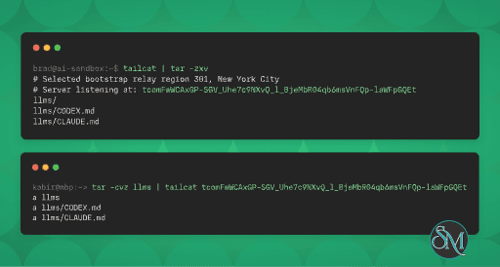




Tailcat is an open-source networking utility developed by Tailscale that functions much like Netcat, but built upon Tailscale’s networking technology. It creates encrypted connections between computers without the need for a Tailscale account, a centralized control plane, or administrative privileges.
Instead of relying on conventional VPN setups, Tailcat establishes connections using WireGuard encryption, NAT traversal, and DERP relays. Users exchange connection addresses out-of-band, allowing two machines to communicate securely even when they are on different networks.
Tailcat is particularly useful for developers, system administrators, and anyone in need of a simple way to transfer files, expose local services, access remote machines, or establish temporary network connections.
Download Tailcat v0.7.0 - Secure Peer-to-Peer Networking - Software Mirrors |
|---|
Tailcat v0.7.0 - Secure Peer-to-Peer Networking for Windows |
Tailcat v0.7.0 - Secure Peer-to-Peer Networking for Linuxtailcat_0.7.0_linux_armv7.tar.gz | 6.6 MB tailcat_0.7.0_linux_armv7.rpm | 6.59 MB tailcat_0.7.0_linux_armv7.deb | 6.58 MB tailcat_0.7.0_linux_arm64.tar.gz | 6.32 MB tailcat_0.7.0_linux_arm64.rpm | 6.3 MB tailcat_0.7.0_linux_arm64.deb | 6.3 MB tailcat_0.7.0_linux_amd64.tar.gz | 6.94 MB |
Tailcat v0.7.0 - Secure Peer-to-Peer Networking Source CodeTailcat v0.7.0 - Secure Peer-to-Peer Networking Source code (zip) Tailcat v0.7.0 - Secure Peer-to-Peer Networking Source code (tar.gz) |
Tailcat v0.7.0 - Secure Peer-to-Peer Networking Release Notes:tailcat changelogv0.7.0 (2026-09-19)
TCP was forwarded, so DNS, QUIC, and other UDP traffic through an exit node went nowhere.
as Ubuntu 22.04's. Those versions still speak the legacy SCP protocol unless
connected client, with
TCP and UDP ports in the standard
browser to the forwarded local port;
for each incoming connection with the connection as its stdin and stdout, like inetd. With the
way a stranger would, with no credentials, and refuses to connect if the server hands out a shell to anyone, since an address published in DNS is public;
the executable's path as an extra argument. (#92, @shaunlee)
Termux,
which brings data path performance work from wireguard-go and gVisor. wireguard-go now moves each batch of packets through one buffer of about 128 KiB instead of a separate buffer per packet, which in upstream's iperf3 benchmarks between two Linux machines raised throughput by 7% to 35% depending on the workload and cut peak memory for TCP transfers by half to three quarters. Small outbound packets such as keepalives and handshakes now use 2 KiB buffers, so packets waiting on a peer with no active session hold at least 97% less memory than before. gVisor's TCP stack, which carries every tailcat connection, now uses CUBIC congestion control and RACK loss detection; both had been switched off because of gVisor bugs that have since been fixed upstream.
community-maintained, strictly confined snap; see INSTALL.md for where its config lives.
Changelog
|
Features
Encrypted Peer-to-Peer Connections
Tailcat uses Tailscale's networking components to establish secure connections between machines. WireGuard encrypts traffic, while its networking layer attempts to establish direct peer-to-peer UDP connections through NAT traversal.
When direct connectivity is unavailable, traffic can continue through a DERP relay. This makes it possible to connect machines across different networks without manually configuring port forwarding.
Unlike a conventional VPN, Tailcat operates entirely in userspace. It does not create a system-wide network interface or modify routing tables and DNS settings.
File Transfer and Sharing
Tailcat provides several ways to exchange files between computers.
Send files to another machine using
tailcat cp.Receive files through a temporary write-only drop box.
Share directories in read-only or read-write mode.
Browse remote directories using
tailcat ls.Access shared files through SFTP.
Use existing SSH and SCP clients through Tailcat connections.
The drop-box functionality is particularly useful for securely receiving files. Senders can upload content but cannot list the directory, retrieve existing files, or modify previously uploaded files.
Directory sharing also includes path restrictions to prevent access outside the configured directory.
SSH Access Without Public Port Forwarding
Tailcat can expose an SSH server through its encrypted tunnel without requiring an inbound port to be opened on the remote machine.
It supports public-key authentication through existing authorized_keys files, OpenSSH public keys, and GitHub accounts.
There is also a no-auth-ssh mode that relies on the encrypted tunnel identity rather than a separate SSH authentication step. However, this should only be used when possession of the Tailcat address is sufficient authentication. Anyone who obtains that address can access the shell.
For more permanent or publicly discoverable SSH access, additional client authentication is essential.
TCP and UDP Port Forwarding
Tailcat can expose local TCP services through its networking tunnel. This is useful for accessing applications and services that normally listen only on localhost.
For example:
# Remote machine
tailcat serve 8080,3306

# Client machine
tailcat forward tcXXXXXXXXX 18080:8080 3306
The client can then access the remote services through local ports.
The application also supports UDP forwarding and SOCKS5 UDP association. This makes it useful for more than ordinary web traffic and TCP-based applications.
SOCKS Proxy and Browser Access
Tailcat includes a SOCKS proxy that allows compatible applications to connect to remote services through the encrypted tunnel.
It also provides a browser command that automatically establishes a local port forward and opens the remote web service.
This is convenient when accessing a development server, administration interface, or internal web application without exposing its port directly to the internet.
Exit Node Support
Tailcat can operate as an exit node, allowing a connected client to access network resources reachable from the server.
This is useful when accessing devices or services inside a remote private network. Users can define individual forwarding mappings to reach specific remote IP addresses and ports.
DNS-Based Address Discovery
Tailcat addresses can be published in DNS TXT records and resolved by clients. This provides a convenient way to reference a server without manually exchanging its full connection address every time.
However, DNS records are public. Publishing a Tailcat address effectively shares its connection capability with anyone who can read the record. Servers using public DNS discovery must enforce additional authentication, such as restricting access to known client keys or requiring SSH public-key authentication.
Go Library and WebAssembly Demo
Beyond its command-line interface, Tailcat provides a Go library that developers can integrate into their own applications.
It also includes an experimental browser-based WebAssembly demo that can send and receive files or text and interoperate with the CLI. Browser connections currently rely on DERP relays rather than direct peer-to-peer connectivity.
This makes Tailcat interesting not only as a standalone networking utility but also as a foundation for applications requiring encrypted communication between devices.
Performance and Compatibility
Tailcat is built using Go and reuses several components from Tailscale, including its WireGuard implementation, magicsock networking layer, and gVisor-based userspace network stack.
Its connection architecture first establishes communication through a DERP relay, then attempts NAT traversal to upgrade to a direct peer-to-peer connection. Direct connections generally offer better performance, while relayed connections provide a fallback when network conditions prevent direct communication.
The public DERP relays are free but rate-limited. Users who require more predictable performance can operate their own relay infrastructure.
Tailcat does not require root or administrator privileges for its normal networking operation. This is a practical advantage over solutions that depend on configuring system-level VPN interfaces.
The command-line application supports Linux, Windows, macOS, and several other platforms through available installation methods. Prebuilt binaries and packages are available for common operating systems, while building from source provides broader platform coverage.
One limitation is that Tailcat is primarily a command-line networking tool rather than a graphical VPN client. Users need to understand basic networking concepts and work with terminal commands to configure connections.
System Requirements
Linux, Windows, or macOS.
A supported 64-bit processor architecture for the available prebuilt packages.
Internet connectivity for DERP relay communication and NAT traversal.
A Go toolchain if building from source.
OpenSSH client for workflows that rely on external SSH or SCP commands.
Tailcat does not require a Tailscale account, root access, a kernel WireGuard module, or system-wide VPN configuration.
Pros and Cons
Pros
Free and open-source under the BSD 3-Clause license.
End-to-end encrypted connections using WireGuard.
Works without a Tailscale account or control plane.
Supports direct peer-to-peer connections and DERP relaying.
No root privileges required for normal operation.
Secure file transfers and directory sharing.
Supports SSH, TCP and UDP forwarding, and SOCKS proxying.
Can provide access to remote private networks through an exit node.
Available as a Go library for developers.
Supports multiple operating systems.
Cons
Primarily command-line based, with no conventional desktop interface.
Public DERP relays are rate-limited.
Connection addresses must be shared securely.
Publicly exposing an address requires additional authentication.
Some advanced workflows require familiarity with SSH and networking.
Browser-based connectivity is experimental and currently relies on DERP relays.
How to Install
Tailcat offers several installation methods depending on the operating system.
Linux
Download the appropriate static binary or Debian/RPM package from the GitHub Releases page.
For Debian or Ubuntu, install the downloaded package:
sudo apt install ./tailcat_*_linux_amd64.debAlternatively, install through Snap:
sudo snap install tailcatmacOS
Install Tailcat through Homebrew:
brew install tailcatWindows
Install through Scoop:
scoop install tailcatInstall Using Go
If Go is already installed, Tailcat can be installed directly from its repository:
go install github.com/tailscale/tailcat/cmd/tailcat@latestAfter installation, verify that the executable is available:
tailcat --helpFinal Verdict
Tailcat is an interesting networking utility that brings Tailscale's encrypted networking technology into a lightweight, control-plane-free command-line application. Its ability to establish peer-to-peer connections without a Tailscale account or system-wide VPN configuration makes it particularly attractive for developers and system administrators.
The combination of file sharing, SSH access, TCP and UDP forwarding, SOCKS proxying, and exit-node functionality gives it considerably more flexibility than a basic Netcat replacement. Its Go library also makes it useful for developers building their own networking applications.
However, Tailcat is not a direct replacement for a traditional VPN or a managed remote-access platform. Its command-line workflow and address-based authentication model require users to understand how connections are established and how access should be protected.
Overall, Tailcat is a capable and flexible tool for secure temporary connectivity, remote administration, and file transfers between machines.