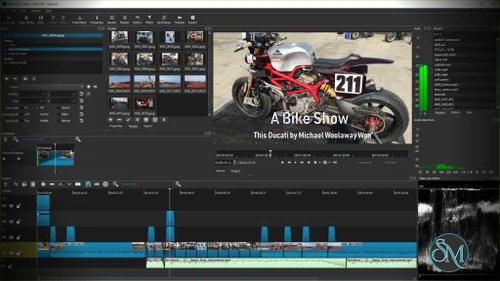
Shotcut is a cross platform video editor that allows users to edit videos without converting files beforehand. It is built on the FFmpeg framework, which gives it strong format compatibility and reliable performance.
Because it is open source, Shotcut is continuously improved by the community.
Download Shotcut 26.9.27 - Software Mirrors |
|---|
Download Shotcut 26.9.27
Windows x64 Installer Download Shotcut 26.9.27
Windows x64 Portable Download Shotcut 26.9.27
Windows x64 Installer Download Shotcut 26.9.27
Windows x64 Portable | Download Shotcut 26.9.27
macOS Universal dmg | Download Shotcut 26.9.27
Linux AppImage Download Shotcut 26.9.27
Linux Portable |
Shotcut 26.9.27 Release Notes: What's Changed
See a nicely formatted page on the web site.
- Fixed security flaws in upgrade and Whisper downloads (failed HTTPS was retried over HTTP, certificate errors could be ignored, and a downloaded file could be used without a trusted digest).
- Fixed Mask: Draw (Glaxnimate) filter, Operation > Subtract for 8-bit processing mode (broke in version 25.12).
- Fixed using Size, Position & Rotate with Mask: Apply filters (broke in version 25.12).
- Improved audio quality by removing a conversion to 16-bit integer and keeping the pipeline in 32-bit float.
- Fixed LV2 external audio plugins not loading on Windows (unless
LV2_PATH environment var set explicitly).
- Fixed VA-API HEVC hardware encoder on Linux.
- Fixed Show in Folder not working with non-ASCII characters on Linux.
- Fixed Import Subtitles from File not working on Windows.
- Fixed Subtitles view shows incorrect duration (broke in version 26.8).
- Fixed moving Timeline clip next to another with snap while zoomed out may insert 1 blank frame.
- Fixed copy and pasting a Timeline transition corrupt audio in the pasted transition.
- Fixed window title bar missing on Linux with Settings > Display Method > Vulkan.
- Fixed marker unexpectedly deleted when moving a clip to the left with Ripple Markers on.
- Fixed keyframes on Timeline > Split after a transition.
- Fixed Export job may report failure even though file was completed successfully.
- Fixed some buffer overflow security issues in PGM/wipe reading in MLT and Set Equirectangular in Shotcut.
- Fixed projects deleted from disk still appear in Projects.
- Fixed
Ctrl+Up and Ctrl+Down cannot change current track when Timeline loses focus.
- Fixed Player > External Monitor > DeckLink (and related such as UltraStudio) HDMI/SDI may deadlock.
- Fixed MLT XML nested clip's length (duration) not updated, now updates when selected but needs manual trim to increase clip.
- Fixed redundant context menu on text edit controls in filters on Windows (broke in v26.8).
- Fixed open project on a mounted CIFS/SMB share on Linux kernel 7.1 and above.
- Fixed possible crash when trying to add subtitle item in the last half second of the timeline.
- Hardened MP4 parsing in Set Equirectangular in Properties and export job context menu.
- Changed Settings > Leave Safe Mode to an always-present Allow External Plugins checkbox that defaults to off.
This helps prevent the problem that some VST2 plugins on Windows and macOS are causing startup and shutdown (including export) problems.
- Detect a stuck application startup to automatically disable external plugins.
- Added Automatic Audio Ducking for audio to timeline track Properties.
- Changed Adjust Clip Gain for timeline clips to require
Ctrl+Alt (option+command on macOS) to drag.
This makes it safe from inadvertent changes while selecting and dragging clips. So, now that setting
defaults on again. Also, a tooltip was added to the clip's audio line.
- Added volume control and audio level meter/indicator to Timeline track headers.
This effectively makes the track header column a mixing console without needing to clutter the UI with a new panel.
The gain filter this adds to the track is keyframable.
- Added Timeline > Generate > Adjustment Clip. This is a dummy video clip that contributes no video.
Instead, its filters apply to the composite of all video tracks below it.
- Added
application.triggerAction(name), multitrack.clipStart(), and timeline.split() functions for scripts.
- Added a context menu with Copy to Missing Files dialog and View > Resources.
- Improved the performance of the Timeline: moving clips to another track, zooming, undo for many operations (except for ripple move/trim).
- Improved the appearance of the user interface to be more modern with rounded corners in many places.
- Upgraded FFmpeg to version 9.0
Full Changelog: v26.8.1...v26.9.27 |
Key Features of Shotcut
Shotcut provides essential and advanced editing tools in a simple package.
Main features include:
Native timeline editing without import conversion
Support for 4K and high resolution video
Wide format support for video and audio files
Advanced video and audio filters
Keyframe animation support
Audio waveform and scopes
Multi track timeline
Hardware encoding support
These features make Shotcut suitable for many types of video projects.
Supported Platforms and Formats
Shotcut is available on:
It supports common and professional formats such as MP4, MKV, MOV, AVI, WebM, MP3, AAC, FLAC, and more.
Performance and Editing Experience
Shotcut performs well on modern systems and can handle high resolution footage, including 4K. Proxy editing and preview scaling help improve performance on lower end hardware.
The interface is clean but may feel different from traditional editors, which can require some adjustment for new users.
Ease of Use
Shotcut is beginner friendly once the basics are understood, but it has a learning curve. Some workflows are less guided compared to commercial editors, which may confuse first time users.
However, the software offers strong control for users who take time to learn it.
Is Shotcut Safe to Use
Yes, Shotcut is safe to use when downloaded from the official website. It contains no ads, no watermarks, and no hidden restrictions.
As open source software, it is transparent and trusted by the community.
Pros and Cons of Shotcut
Pros:
Completely free and open source
No watermark or time limits
Cross platform support
Strong format compatibility
Suitable for 4K editing
Cons:
Interface may feel unconventional
Limited built in effects compared to premium editors
Occasional performance drops on very large projects
Despite these limitations, Shotcut remains a strong free option.
Common Use Cases
Shotcut is commonly used for:
YouTube and social media videos
Basic to intermediate video editing
Educational and personal projects
Simple color correction and effects
Cross platform editing workflows
It is ideal for users who want control without cost.
Final Verdict
Shotcut is a solid free video editor that delivers reliable performance and useful features without forcing users into subscriptions or watermarks. While it may not replace high end professional editors, it is more than capable for most everyday video editing needs.
For users looking for a free, open source, and cross platform video editor, Shotcut is a smart choice. Shotcut is a free and open source video editing software designed for users who want powerful editing tools without paying for a subscription. It is suitable for beginners, content creators, and hobbyists who need a reliable editor for everyday video projects.
Shotcut supports a wide range of formats and runs smoothly on multiple operating systems.