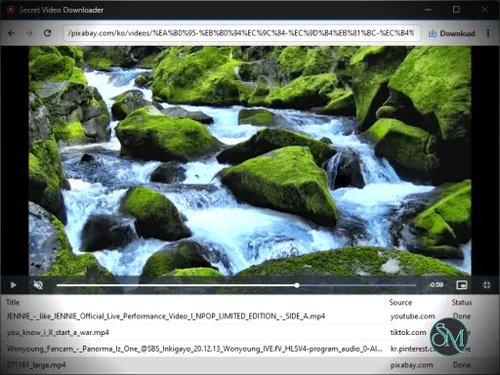

Secret Video Downloader is a free Windows video downloader from Kilho.net that makes it easy to save videos from a wide range of websites. It is built around yt-dlp and can also capture media directly from network playback when a website is not supported normally.
One of its biggest advantages is simplicity. There is no account or registration requirement, and the program is available as a portable application, so it can be used without a traditional installation.
What Is Secret Video Downloader?
Secret Video Downloader is designed for downloading online video and audio content.
The application supports various websites through yt-dlp. When a website isn't directly supported, it can attempt to extract media files that are being played through the network.
It can also use browser cookies and authentication information when downloading content that requires a login. This makes it more flexible than basic URL-based downloaders.
Easy Video Downloads
The basic workflow is straightforward.
Open the webpage containing the video, launch Secret Video Downloader, and use the download function. The application detects available media and handles the download without requiring users to manually locate the underlying media URL.
This approach is particularly convenient for users who don't want to deal with command-line tools such as yt-dlp directly.
Support for Multiple Websites
Secret Video Downloader uses yt-dlp as its primary download engine.
That gives it access to the broad website compatibility provided by yt-dlp rather than limiting it to a small collection of individually supported services.
The developer also claims that unsupported sites can sometimes be handled by extracting media that is being played through the network.
This makes the program more versatile when dealing with websites that don't work with conventional video downloaders.
Login-Protected Content
Another useful feature is support for content that requires authentication.
The application can use cookies and authentication information stored by the browser to access videos that aren't publicly available.
This can be useful for privately accessible content that you are authorized to view.
Users should be careful when granting an application access to browser authentication data. Cookies can provide access to logged-in sessions, so the software should only be obtained from a trusted source.
Highest Available Quality
Secret Video Downloader is designed to download video and audio at the highest available quality rather than forcing users to choose a quality level manually.
The developer's FAQ notes that there is currently no separate quality selection feature. Downloads default to the highest quality, with a quality selection feature planned for a future release.
This is convenient for users who simply want the best available version, although users who want to save bandwidth or storage may prefer more control.
Portable Version
Secret Video Downloader is available as a portable application.
That means you can run it without going through a conventional installation process. The developer also states that the software can be used without installation.
The portable approach makes it convenient to keep the application on a USB drive or in a dedicated utilities folder.
Recent Development
The project is still being actively updated.
Version 1.1.8 was released on August 12, 2026. The update added a screenshot feature for saving entire pages. Previous releases improved WebView2 support, installation stability, download reliability, and compatibility with websites using newer web security environments.
Version 1.1.7 also improved WebView2 installation guidance and reduced crashes during installation and execution.
This recent development is encouraging for a relatively lightweight freeware utility.
Download Limits
Secret Video Downloader currently supports up to three simultaneous downloads according to the developer's FAQ.
For normal personal downloading, this should be sufficient. Users managing large download queues may find the limit restrictive compared with dedicated download managers.
Performance
The application uses WebView2 for its web-related functionality, and recent updates have specifically improved WebView2 installation and execution stability.
Because the program can interact directly with webpages and authenticated browser sessions, its resource usage can be higher than a simple command-line yt-dlp invocation.
For ordinary video downloads, however, the convenience of having a graphical interface makes that trade-off worthwhile.
Download Secret Video Downloader - Software Mirrors |
|---|
Pros
Freeware
No account required
Supports many websites through yt-dlp
Can handle some unsupported websites
Supports authenticated content
Can use browser cookies
Downloads video and audio
Highest available quality
Portable version available
No traditional installation required
Simple workflow
Up to three simultaneous downloads
Active development
Recent WebView2 improvements
Cons
Windows focused
No manual quality selection yet
Maximum of three simultaneous downloads
Some websites may still fail
Authenticated downloads require access to browser session information
Network-based extraction may not work with every unsupported website
More advanced users may prefer using yt-dlp directly
Who Should Use Secret Video Downloader?
Secret Video Downloader is a good choice for Windows users who want a simple graphical video downloader without having to learn command-line tools.
It is especially useful if you regularly download videos from different websites and want broad compatibility through yt-dlp while retaining a straightforward graphical workflow.
The portable version also makes it attractive as a utility that can be kept alongside other Windows maintenance and media tools.
For advanced users who want complete control over formats, codecs, quality, download arguments, authentication methods, and automation, directly using yt-dlp will still provide considerably more control.
Final Verdict
Secret Video Downloader is a useful freeware utility that combines the broad website support of yt-dlp with a much simpler graphical workflow.
Its ability to work with authenticated content, download at the highest available quality, and fall back to network-based media extraction gives it more flexibility than many basic video downloaders.
The lack of manual quality selection is probably its biggest weakness. Users who want to deliberately choose 1080p instead of 4K, for example, currently don't have that level of control. The three-download concurrency limit may also be restrictive for heavy users.
Still, for someone who wants a free, portable, easy-to-use Windows video downloader, Secret Video Downloader is a strong option. Its continued updates in 2026 also suggest that the developer is actively maintaining compatibility with the constantly changing web.