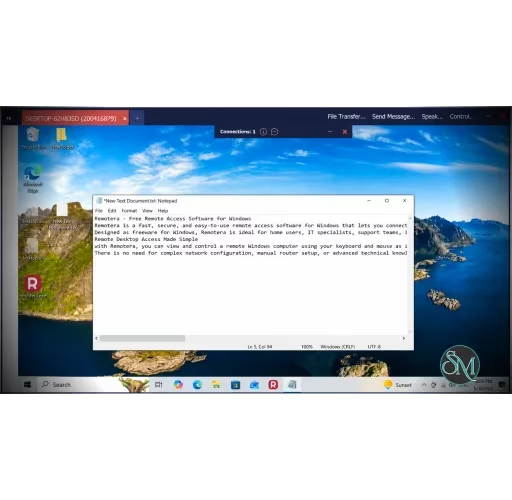


Remotera is a free remote desktop and remote access solution developed by TkoSoft. Designed for Windows users, it aims to provide an easy way to access remote computers, transfer files, offer technical support, and manage unattended systems without the complexity often associated with enterprise remote access platforms.
Remotera focuses on simplicity. The software is distributed as a portable executable, allowing users to launch it without going through a traditional installation process. Users can connect to another computer using a generated ID and password, making setup straightforward even for non-technical users.
Unlike many commercial remote desktop solutions that restrict free usage or impose session limits, Remotera is offered as freeware for both personal and commercial use.
Key Features of Remotera
Remote Desktop Control
The core functionality allows full remote control of another Windows computer over the internet. This makes it suitable for technical support, remote work, and accessing personal devices while away from home.
File Transfer
Remotera includes built-in file and folder transfer capabilities, allowing users to move documents and other files directly between local and remote machines during a session.
Unattended Access
For users who need access to systems without someone present to approve connections, Remotera supports unattended access and static passwords. This is useful for administrators and remote workers.
Contact Management
Frequently accessed computers can be saved in a contact list, reducing the need to repeatedly enter connection credentials.
Remote Printing
The software supports remote printing, enabling documents opened on a remote machine to be printed locally.
Multiple Connections
Remotera can handle multiple remote sessions simultaneously, making it practical for support technicians and administrators managing several systems.
Performance and User Experience
The application emphasizes ease of use over advanced enterprise functionality. The interface is clean and accessible, with connection information clearly displayed and essential options available without excessive menus.
Its lightweight portable design is particularly attractive for quick support sessions because there is no installation wizard or complicated deployment process.
While it may not yet offer the extensive ecosystem found in larger competitors such as TeamViewer or AnyDesk, it covers the essential features most users need for everyday remote access.
Pros
Completely free for personal and commercial use.
Portable executable with no mandatory installation.
Supports unattended access.
Includes file transfer and remote printing.
Allows multiple simultaneous connections.
Simple interface suitable for beginners.
Cons
Currently available only for Windows.
Newer product with a smaller user base than established competitors.
Limited public documentation and community resources compared to mature remote access platforms.
Who Should Use Remotera?
Remotera is a good fit for IT support providers, small businesses, freelancers, remote workers, and home users who need a free remote desktop solution without licensing restrictions. It is especially appealing for those seeking a lightweight alternative to larger commercial remote access tools.
Final Verdict
Remotera delivers a surprisingly complete remote access experience for a free product. Its combination of remote desktop control, unattended access, file transfer, remote printing, and portable deployment makes it a practical choice for many Windows users. While it lacks the maturity and ecosystem of long-established competitors, it offers excellent value for users who want a straightforward and unrestricted remote desktop solution.