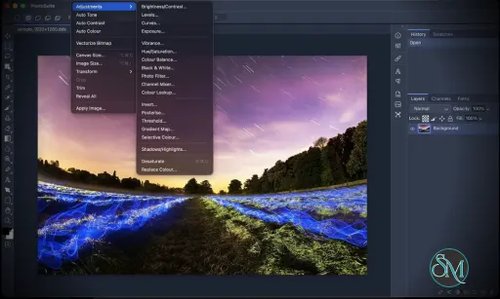
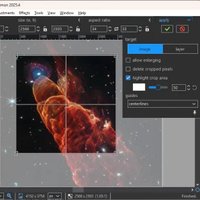
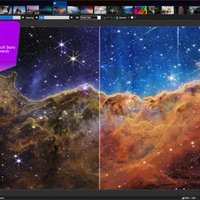
PhotoSuite is an open-source desktop raster and vector graphics editor designed to replicate the workflow and behavior of classic Adobe Photoshop while maintaining native PSD and PSB compatibility.
Rather than creating another simplified Photoshop alternative, PhotoSuite focuses heavily on familiar workflows, interface behavior, keyboard shortcuts, document structure, and compatibility with existing Photoshop files. It runs locally as a Tauri desktop application and does not require an online account or cloud service.
For users who regularly exchange layered PSD files but want a free and open-source desktop application, PhotoSuite is an especially interesting project.
Features
PhotoSuite provides a surprisingly comprehensive collection of professional image-editing features:
Native PSD and PSB document support
Raster and vector layers
Layer groups, masks and clipping masks
Smart Objects and Smart Filters
Layer Comps
Photoshop-style layer effects
Brush, Clone Stamp and Healing Brush
Marquee, Lasso and Magic Wand selection tools
Crop, Gradient, Dodge, Burn, Blur and Sharpen tools
Pen and vector shape tools
Editable text
Guides, rulers, pixel grid and canvas rotation
History palette with snapshots
Filter Gallery
Liquify
Lens Correction
Advanced typography
Type along path and text warp
OpenType ligatures and kerning
Photoshop Actions support
JavaScript and JSX scripting
Sandboxed sidebar plugins
Native printing
Drag-and-drop file handling
The PSD implementation is the project's biggest selling point. PSD is treated as a native document format rather than merely an import format, with support for layers, masks, blending modes, channels, layer effects, smart filters, text information, vector paths and color profiles.
PhotoSuite also supports PSB for large Photoshop documents.
Download PhotoSuite v0.9.16 - Software Mirrors |
|---|
PhotoSuite v0.9.16 for Windows |
PhotoSuite v0.9.16 for macOS |
PhotoSuite v0.9.16 for LinuxPhotoSuite_0.9.16_x86_64.flatpak | 66.5 MB PhotoSuite_0.9.16_arm64.deb | 69.69 MB PhotoSuite_0.9.16_amd64.deb | 69.26 MB PhotoSuite_0.9.16_amd64.AppImage.zsync | 250.68 kB PhotoSuite_0.9.16_amd64.AppImage | 143.11 MB PhotoSuite-0.9.16-1.x86_64.rpm | 69.27 MB |
PhotoSuite v0.9.16 Source Code |
PhotoSuite v0.9.16 Release Notes:What's Changed
New Contributors
Full Changelog: v0.9.15...v0.9.16 |
Performance and Compatibility
PhotoSuite uses Tauri for its desktop shell, combining an HTML5/WebAssembly/WebGL editor with a lightweight Rust native layer. This provides native filesystem access, menus, dialogs, clipboard integration and printing without requiring a large Electron runtime.
Several computationally intensive components use WebAssembly, including image processing and compression. Typography is also supported by WebAssembly-based HarfBuzz and FriBidi components, while vector geometry uses Paper.js.
The application is designed to run completely offline. The project states that it does not require cloud services or telemetry, which is a significant advantage for users working with sensitive images or proprietary design files.
PhotoSuite supports Windows, macOS and Linux. Current releases provide Windows x64, universal macOS builds, and multiple Linux packages including DEB, RPM, AppImage and Flatpak. Linux ARM64 packages are also available for selected formats.
The main concern is project maturity. PhotoSuite is still a relatively young project and its repository is actively evolving. Users should therefore test their important PSD workflows before relying on it as the sole production editor.
System Requirements
PhotoSuite supports:
Windows x64
macOS Intel and Apple Silicon
Linux x86_64
Linux ARM64 for selected packages
Building from source requires:
Node.js
A current stable Rust toolchain
Tauri platform dependencies
The project also provides prebuilt packages, making source compilation unnecessary for normal users.
Pros and Cons
Pros
Open-source Photoshop alternative
Native PSD and PSB workflow
Extensive layer and masking support
Smart Objects and Smart Filters
Photoshop-style layer effects
Strong typography capabilities
Vector editing support
Filter Gallery and Liquify
Camera RAW support
Photoshop Actions support
JavaScript and JSX scripting
Plugin architecture
Offline-first design
No cloud account required
Windows, macOS and Linux support
Native desktop integration through Tauri
Broad file-format support
Cons
Still a young project
Compatibility should be tested with important production PSD files
Some format support is still marked as work in progress
Not every Photoshop feature is necessarily implemented
Linux packaging and hardware compatibility can vary
Building from source requires both Node.js and Rust
The interface intentionally follows an older Photoshop workflow, which may feel dated to users accustomed to newer applications
How to Install
For normal users, the simplest method is to download the appropriate prebuilt package from the project's GitHub releases.
Windows users can install the Windows package, while macOS users can use the universal disk image. Linux users have DEB, RPM, AppImage and Flatpak options depending on their distribution.
Developers can build PhotoSuite from source:
git clone --recursive https://github.com/eolix/photosuite.git
cd photosuite
npm install
npm run dev
If the repository was cloned without its submodules, they can be initialized with:
git submodule update --init --recursiveThe project also provides automated tests and verification commands for contributors.
Final Verdict
PhotoSuite is an impressive open-source Photoshop alternative with an unusually strong focus on PSD compatibility.
Its biggest advantage is not simply the number of tools it provides. The project attempts to reproduce an established professional workflow, including layer behavior, effects, typography, document structure, Actions, scripting and familiar interface conventions. That makes it considerably more interesting for existing Photoshop users than many open-source image editors.
The native PSD/PSB approach is particularly valuable. Users who regularly receive or exchange layered Photoshop documents can potentially use PhotoSuite without converting everything into a different project format.
The application also benefits from its offline-first architecture and cross-platform support. Tauri, Rust, WebAssembly and WebGL provide a modern technical foundation while keeping the application relatively lightweight compared with traditional Electron-based desktop applications.
Its main weakness is maturity. PhotoSuite is still developing rapidly, so compatibility and feature completeness should be evaluated against your specific workflow before replacing an established production application.
For designers looking for a free, open-source Photoshop-style editor, PhotoSuite is one of the more promising projects to watch.