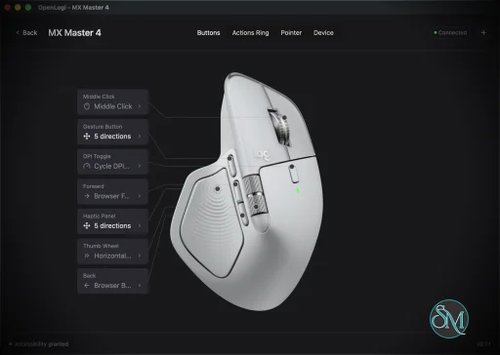



OpenLogi is an open source alternative to Logitech Options+ that gives you much more control over compatible Logitech mouse, keyboards, and webcams without requiring the official Logitech software.
Built with Rust, OpenLogi takes a local first approach. There is no Logitech account requirement, no telemetry, and configuration is stored as plain TOML that you can move between computers. It supports Windows, macOS, and Linux.
For Linux users in particular, OpenLogi is interesting because Logitech's official software does not provide the same level of native support.
What Is OpenLogi?
OpenLogi is a native desktop application for managing Logitech peripherals.
It communicates with supported Logitech devices through HID++ and UVC rather than depending on Logitech Options+. Compatible devices can connect through Logitech Bolt receivers, Unifying receivers, Bluetooth, or USB.
The project is designed to provide many of the features normally associated with Logitech's configuration software while keeping everything local.
You can use it to remap buttons, configure DPI, control SmartShift, create application-specific profiles, configure Logitech webcams, and manage supported lighting features.
Logitech Options+ Alternative
The biggest reason to try OpenLogi is that it provides a genuine alternative to Logitech Options+.
You don't need to keep Logitech Options+ running alongside it. In fact, the project specifically recommends quitting Options+ because both applications can compete for access to the same HID++ receiver.
This makes OpenLogi particularly attractive if you don't want Logitech's official software constantly running in the background.
Download OpenLogi v0.8.11 - Software Mirrors |
|---|
OpenLogi v0.8.11 for WindowsOpenLogi-v0.8.11-windows-x86_64.zip | 25.6 MB OpenLogi-v0.8.11-windows-x86_64.msi | 20.12 MB |
OpenLogi v0.8.11 for macOSOpenLogi-v0.8.11-macos-x86_64.dmg | 21.09 MB OpenLogi-v0.8.11-macos-arm64.dmg | 18.41 MB |
OpenLogi v0.8.11 for Linuxopenlogi-v0.8.11-linux-arm64.rpm | 35.33 MB openlogi-v0.8.11-linux-arm64.deb | 35.69 MB |
Others Download related to OpenLogi v0.8.11 |
OpenLogi v0.8.11 Source Code |
OpenLogi v0.8.11 Release Notes:What's Changed
|
Button Remapping
OpenLogi provides button remapping through its operating system input hook.
You can assign supported buttons to predefined actions or create custom keyboard shortcuts through the TOML configuration.
This is useful for turning additional mouse buttons into shortcuts for applications, media controls, productivity actions, or custom workflows.
The project also supports gestures on capable buttons, allowing a button to perform different actions depending on the direction of the gesture.
DPI Control
Mouse DPI can be controlled directly through OpenLogi.
You can configure DPI presets and use actions to cycle between or switch to specific presets.
This is particularly useful for users who regularly switch between different sensitivity settings, such as when moving between general desktop work and gaming or graphics applications.
SmartShift Support
For Logitech mouse that support SmartShift, OpenLogi can control the wheel behavior.
You can configure SmartShift mode, sensitivity, and permanent ratchet behavior.
This is one of the features that makes OpenLogi particularly interesting for MX-series mouse owners. Instead of relying on Logitech's software to configure the wheel, the settings can be managed through OpenLogi.
Per Application Profiles
OpenLogi supports application-specific profile overlays.
This allows different applications to use different button configurations automatically when you switch between them.
For example, you could configure your mouse differently for a browser, code editor, image editor, or game.
The feature currently has platform-specific limitations. It works on macOS and Windows, while Linux support is available on X11 and XWayland.
Keyboard Support
OpenLogi isn't limited to Logitech mouse.
Supported keyboards can use global F-key remapping, including custom keyboard shortcuts and more advanced actions such as typed text and multi-step workflows on macOS and Windows.
It also supports static RGB lighting on compatible Logitech keyboards.
This makes OpenLogi more useful as a general Logitech peripheral manager rather than simply a mouse configuration utility.
Logitech Webcam Support
One of OpenLogi's more interesting features is Logitech webcam support.
Compatible UVC webcams such as Brio, StreamCam, and C920-series models can be used directly.
OpenLogi provides controls for:
Zoom
Focus
Exposure
Brightness
Contrast
Saturation
Sharpness
White balance
Tint
Anti-flicker
Low-light compensation
It also supports automatic modes for focus, exposure, and white balance.
The settings are written directly to the webcam hardware, meaning the configuration can apply to applications such as Meet, Zoom, and OBS rather than being limited to OpenLogi itself.
Camera Profiles
OpenLogi provides built-in camera profiles including Default, Streaming, and Video Call.
You can also create custom snapshots.
The application saves camera settings and can write them back to the hardware when the camera is used again.
This is convenient if you frequently switch between different webcam setups.
Actions Ring
OpenLogi includes an Actions Ring feature.
It provides an eight-slot cursor-centered overlay that can contain different actions. Profiles can also have different Actions Ring layouts.
This is a useful feature for power users because it turns a mouse button into a small command launcher rather than simply assigning one action to one button.
Local Configuration
One of the things I particularly like about OpenLogi is its configuration approach.
Instead of hiding everything behind a proprietary settings database, configuration is stored in a plain TOML file.
That makes it easy to:
Back up your configuration
Version it with Git
Synchronize it between computers
Edit advanced settings manually
Inspect exactly what has been configured
For technical users, this is considerably more appealing than clicking through a graphical configuration interface every time you want to reproduce a setup.
Command Line Interface
OpenLogi also includes a real CLI.
You can list connected devices, inspect HID++ capabilities, diagnose controls, test DPI functionality, test SmartShift, and perform other device operations from the command line.
This is especially useful for Linux users and anyone who wants to automate peripheral configuration.
For example, the CLI can list paired devices and show their connection state and battery information.
That makes OpenLogi much more interesting for scripting and system administration than a typical graphical peripheral manager.
Linux Support
Linux support is one of OpenLogi's biggest advantages.
The project treats Linux as a first-class platform rather than an afterthought.
Packages are available for Debian and Ubuntu, Fedora and RHEL, and Arch Linux. Both x86_64 and ARM64 packages are provided.
NixOS users also have a dedicated module.
There are some limitations, particularly around application profiles and platform-specific actions, but the overall Linux support is considerably more ambitious than what Logitech itself provides.
Windows and macOS
OpenLogi also supports Windows and macOS.
macOS 13 or newer is required, and the project provides signed and notarized application packages.
Windows users can use OpenLogi as an alternative to keeping Logitech Options+ installed.
This makes it possible to maintain a similar configuration workflow across different operating systems.
Privacy
Privacy is another major selling point.
OpenLogi does not require a Logitech account and does not use telemetry as part of its design. The project describes itself as local first.
By default, device image fetching is the main automatic network activity. Update checks and downloads are performed when requested or explicitly enabled.
For users who prefer applications that don't require cloud accounts simply to configure a mouse, this is a major advantage.
Performance
Because OpenLogi is written in Rust and uses a native desktop architecture with GPUI, the project aims to stay lightweight compared with larger proprietary peripheral-management suites.
This is particularly appealing for users who only want a small utility controlling their hardware rather than a large application suite running continuously.
Pros
Open source
Free to use
No Logitech account
No telemetry
Windows support
macOS support
Linux support
Rust based
Native desktop application
Logi Bolt support
Unifying receiver support
Bluetooth support
USB support
Button remapping
DPI control
SmartShift configuration
Application profiles
Keyboard remapping
RGB lighting
Logitech webcam support
Camera controls
Camera profiles
Actions Ring
Plain TOML configuration
Command line interface
Scriptable
Good Linux support
Cons
Still under active development
Not yet considered stable by the developers
Device compatibility can vary
Some features have platform-specific limitations
Linux application profiles currently require X11 or XWayland
Some Logitech features may still require the official software
Options+ and OpenLogi cannot comfortably manage the same receiver simultaneously
Manual TOML configuration may be intimidating for casual users
Who Should Use OpenLogi?
OpenLogi is especially attractive to Logitech hardware owners who are tired of relying on Logitech Options+.
It is an excellent option for Linux users who want proper Logitech peripheral configuration without having to depend on unofficial workarounds.
It is also worth considering on Windows and macOS if you prefer open source software, local configuration, and minimal background services.
Power users will probably get the most out of it because of the CLI, TOML configuration, scripting capabilities, application profiles, and advanced device controls.
Final Verdict
OpenLogi is one of the more interesting open source alternatives to proprietary hardware configuration software.
Its biggest strength is that it doesn't simply copy the basic functionality of Logitech Options+. It provides a local first architecture, plain text configuration, a CLI, Linux support, application profiles, advanced mouse controls, keyboard configuration, and Logitech webcam management.
The project is still young and the developers openly warn that it is not yet stable. That is the main reason I would not give it a perfect score. Hardware compatibility is also something you should verify before completely replacing Logitech's official software.
For Logitech users, especially Linux users and technically inclined power users, however, OpenLogi is an excellent project to watch.
If your main goal is to replace Logitech Options+ with a lightweight, open source, local first alternative, OpenLogi is already a very compelling choice.