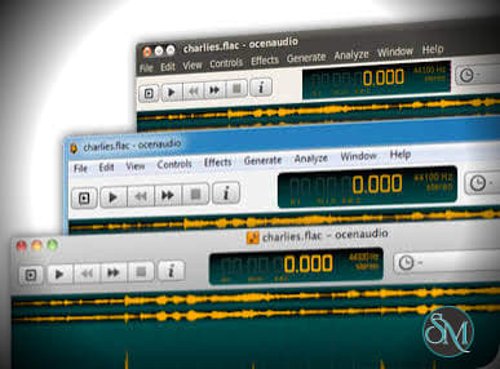



ocenaudio is a cross-platform audio editor designed to make everyday audio editing and analysis straightforward without sacrificing useful tools for more advanced users. It is available for Windows, macOS, and Linux and focuses on responsiveness, efficient editing, and a relatively clean interface.
The application is particularly well suited to users who need to cut, clean, analyze, or enhance audio without the complexity of a full digital audio workstation.
Features
ocenaudio provides the core tools needed for editing audio files, including selection, cutting, copying, pasting, trimming, and applying audio effects.
One of its strongest features is real-time effect preview. Effects such as equalization, gain adjustment, and filtering can be previewed while changing their parameters, making it easier to find the desired result before applying the processing.
The software supports VST plugins, giving users access to a much larger selection of audio effects beyond its built-in processing tools. VST effects can also be previewed in real time.
Multi-selection is another useful feature. Multiple separate sections of an audio file can be selected simultaneously and then edited or processed as a group. This can be particularly useful for cleaning interviews, podcasts, recordings, and other speech-heavy material.
ocenaudio also includes a spectrogram for examining the frequency content of audio. Spectrogram settings can be adjusted interactively, allowing users to change parameters such as frequency bands, window type, window size, and dynamic range while observing the results.
The application is designed to handle large audio files efficiently. Its memory management system allows lengthy recordings to remain open without loading the entire file into memory, while common editing operations can remain responsive even with files several hours long.
Performance and Compatibility
Performance is one of ocenaudio's main strengths. Time-consuming operations such as opening, saving, and applying effects can run in the background, allowing users to continue working with other open files.
The software provides native applications for Windows, macOS, and Linux, with a consistent interface and feature set across platforms. This makes it convenient for users who work across different operating systems.
It is also relatively lightweight compared with full-featured digital audio workstations. The interface concentrates on waveform editing and audio processing rather than music production features such as multitrack sequencing, MIDI composition, or virtual instruments.
That focus is both an advantage and a limitation. For editing individual recordings, voice files, podcasts, or samples, the streamlined design works well. Users looking for a complete music-production environment will need a more specialized DAW.
System Requirements
Windows 10 or later, 64-bit
macOS with Intel or ARM 64-bit support
Linux 64-bit with a supported distribution or AppImage environment
At least 64-bit system architecture on current supported builds
Additional storage for audio files and exported recordings
The official download page currently provides Windows, macOS, and Linux packages, including a Windows portable build and multiple Linux package formats.
Pros and Cons
Pros
Simple and intuitive interface
Fast and responsive audio editing
Windows, macOS, and Linux support
Real-time effect preview
VST plugin support
Powerful spectrogram
Multi-selection editing
Efficient handling of large audio files
Background processing for time-consuming operations
Suitable for both basic editing and advanced audio analysis
Consistent interface across platforms
Portable Windows version available
Cons
Not designed to replace a full digital audio workstation
Limited multitrack and music-production functionality compared with dedicated DAWs
Advanced users may find the editing workflow less extensive than professional audio-production software
Linux users may need to choose between different package formats depending on their distribution
How to Install
Download the appropriate ocenaudio package for your operating system from the official website.
Windows users can choose between the standard installer and portable package. macOS users can install the appropriate universal package, while Linux users can choose an AppImage or distribution-specific package where available.
After installation, open an audio file and begin editing directly from the waveform view. Effects can be applied through the processing tools, while the spectrogram can be used when more detailed frequency analysis is required.
VST plugins can also be configured when additional audio effects are needed.
Final Verdict
ocenaudio is an excellent choice for users who want a fast and uncomplicated audio editor without moving to the complexity of a full digital audio workstation.
Its real-time effects, VST support, multi-selection editing, spectrogram, and efficient handling of large recordings give it considerably more capability than a basic waveform editor. At the same time, its focused interface keeps common editing tasks relatively straightforward.
The main limitation is its scope. ocenaudio is primarily an audio editor and analyzer rather than a complete music-production environment. Users who need extensive multitrack recording, MIDI, virtual instruments, or sophisticated mixing workflows will need a dedicated DAW.
For editing recordings, podcasts, voice files, samples, and general-purpose audio, however, ocenaudio offers an excellent combination of simplicity, performance, and useful professional features.