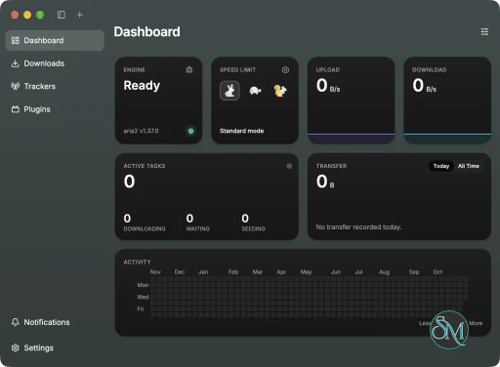
Motrix is a free, open-source download manager designed to handle file downloads, torrents, and magnet links through an intuitive desktop interface. Built upon a custom version of the aria2 download engine, it provides capabilities including download management, speed control, browser integration, and automatic tracker updates.
The project has evolved beyond a traditional desktop application. Its architecture now supports a headless server with a web interface, a command-line client, browser extensions, and a plugin ecosystem. This makes Motrix useful not only for everyday downloading but also for users who wish to manage downloads on a NAS or a remote server.
Features
Multi-Protocol Download Support
Motrix supports several common download protocols and sources, including:
HTTP and HTTPS for standard file downloads.
FTP for downloading files from FTP servers.
BitTorrent for downloading torrent files.
Magnet links for starting torrent downloads without manually downloading a torrent file.
Its download engine is based on a Motrix-maintained aria2 fork. This provides support for concurrent download connections and resumable transfers where the remote server allows them.
BitTorrent and Magnet Management
Motrix includes built-in BitTorrent functionality, making it more than a conventional HTTP download manager. Users can add torrent files or magnet links, manage active transfers, and select individual files within a torrent.
Additional torrent-related features include:
Automatic tracker list updates and health checks.
UPnP and NAT-PMP port mapping.
Upload and download speed limits.
Torrent session recovery.
Download task management through the main interface.
These features make Motrix suitable for users who regularly download large files through BitTorrent.
Download Speed Controls
Motrix provides controls for managing network usage without relying on external bandwidth-limiting tools.
Users can configure upload and download limits and create multiple speed-limit profiles. This is useful when downloads need to run in the background without consuming all available bandwidth.
The underlying aria2 engine also supports multi-connection downloads. However, actual download speeds depend on the source server, network conditions, and the connection limits imposed by the hosting service.
Browser Integration
Motrix provides an official browser extension for Chrome, Microsoft Edge, and Firefox. A Safari extension is also available separately for macOS.
The extension connects the browser to Motrix and allows users to:
Send download links directly to Motrix.
Automatically hand off eligible browser downloads.
Download selected media resources detected on a webpage.
Manage download progress from the extension.
Connect to a local desktop application or a remote Motrix Server.
The extension can also detect supported HLS and DASH media resources. Motrix uses FFmpeg to combine downloaded audio and video segments when necessary.
Browser integration has some limitations. Local pairing is not available through the Linux AppImage package, and authenticated downloads can still fail when sessions expire or websites require additional protection. DRM-protected content and live streams are not supported as ordinary downloadable media.
Headless Server and Docker Support
One of the most useful additions is Motrix Server, which allows the download engine to run without a desktop environment.
It can run directly through Node.js or inside Docker, making it suitable for NAS devices, home servers, and other always-on systems.
The server includes a web interface for managing downloads remotely. It also supports device-code pairing for command-line clients and compatible browser extensions.
This architecture separates the download engine from the desktop interface, allowing users to manage downloads without keeping a desktop application open.
For remote access, HTTPS through a properly configured reverse proxy is recommended. The project also documents the additional configuration required for trusted local HTTP connections.
Command-Line Interface
Motrix includes an official command-line client distributed through npm. It can communicate with a local desktop application or connect to a paired remote server.
The CLI supports operations such as:
Adding new downloads.
Listing existing tasks.
Monitoring download progress.
Connecting to remote Motrix instances.
It is particularly useful for automation, shell scripts, and AI agent workflows. The command-line client requires Node.js 22 or later.
Plugin Ecosystem
Motrix includes a plugin system that extends its functionality without requiring changes to the download engine.
Its plugin architecture uses QuickJS-based sandboxing, permission controls, and a dedicated SDK. Plugins can participate in download creation, processing, completion notifications, and error handling.
The project also provides an in-app marketplace and official plugins for tasks such as filename formatting, extracting links from webpages, and resolving supported media URLs.
This modular approach makes Motrix more extensible than a download manager limited to its built-in features.
Modern Interface and Download Management
Motrix provides a straightforward interface with dark mode and a customizable dashboard.
Its interface includes:
Download progress and transfer statistics.
Task status and activity monitoring.
Download notifications.
System tray integration.
Automatic session restoration after restarting the application.
Protocol handlers for Motrix links, magnet links, and torrent files.
The application stores download sessions using SQLite, allowing existing tasks to be restored after a restart.
Download Motrix v2.4.8 - Software Mirrors |
|---|
Motrix v2.4.8 for WindowsMotrix-Setup-2.4.8.exe | 127.36 MB Motrix-Setup-2.4.8-arm64.exe | 121.56 MB |
Motrix v2.4.8 for macOS |
Motrix v2.4.8 for LinuxMotrix_2.4.8_arm64.deb | 102.62 MB Motrix_2.4.8_amd64.deb | 107.47 MB Motrix-Native-Host-2.4.8-linux-x64.tar.gz | 406.6 kB Motrix-Native-Host-2.4.8-linux-arm64.tar.gz | 382.77 kB Motrix-2.4.8.x86_64.rpm | 95.46 MB Motrix-2.4.8.aarch64.rpm | 90.94 MB Motrix-2.4.8-x86_64.flatpak | 99.16 MB Motrix-2.4.8-x86_64.AppImage.zsync | 220.61 kB Motrix-2.4.8-x86_64.AppImage | 125.93 MB Motrix-2.4.8-x64.pacman | 127.46 MB Motrix-2.4.8-arm64.AppImage.zsync | 221.16 kB Motrix-2.4.8-arm64.AppImage | 126.25 MB |
Others Download related to Motrix v2.4.8Motrix-2.4.8-x64.zip | 134.7 MB Motrix-2.4.8-fnos-x64.fpk | 57.27 MB Motrix-2.4.8-fnos-arm64.fpk | 57.48 MB Motrix-2.4.8-arm64.zip | 127.65 MB |
Motrix v2.4.8 Source Code |
Motrix v2.4.8 Release Notes:Motrix 2.4.8English | 简体中文 Changes since 2.4.7
Upgrade compatibilityBack up your profile and download files before upgrading. The bundled engine uses SQLite schema 6. When upgrading an older engine database, retain its complete pre-upgrade backup; older engines cannot open schema 6. Stop all engines before restoring a verified backup to a separate path for a downgrade. Do not reset or delete the upgraded database as a substitute for recovery. Users migrating from Motrix v1 should follow the migration guide and retain the original profile and engine database backups. Downloads and updates Desktop packages support macOS 13 or later, Windows 10 or later, and Linux, with native x64 and ARM64 builds. No 32-bit desktop packages are provided. Official macOS packages require signing and notarization. Windows NSIS installers and ZIP archives are unsigned and may trigger SmartScreen; use official Release downloads. Stable publication updates both What's Changed
Full Changelog: v2.4.7...v2.4.8 |
Performance and Compatibility
Motrix uses a customized aria2 download engine rather than implementing its own transfer engine from scratch. This gives it access to established download capabilities, including concurrent connections, resumable transfers, and BitTorrent support.
The desktop application is built with Electron, React, and TypeScript. Although Electron applications generally consume more memory than lightweight native utilities, Motrix benefits from a modern interface and a shared application core that also powers its headless server.
Its separation between the user interface and download engine is particularly useful. The same core can serve desktop users, remote clients, and server deployments.
Motrix supports Windows, macOS, and Linux, with native x64 and ARM64 desktop packages. Browser extensions provide additional integration, although some packaging options have limitations.
Overall, Motrix offers a good balance between download functionality, usability, and extensibility. Its server mode is especially valuable for users who want a centralized download manager rather than relying exclusively on a desktop application.
System Requirements
Motrix does not publish a single minimum hardware specification. Its supported operating systems and installation packages include:
Windows: Windows 10 or later, with x64 and ARM64 packages.
macOS: macOS 13 or later, with Apple Silicon and Intel builds.
Linux: x64 and ARM64 packages, including AppImage, DEB, RPM, Flatpak, and supported Snap distribution.
Arch Linux: Native packages are available.
Headless server: Node.js runtime or Docker-compatible environment.
Command-line client: Node.js 22 or later.
There are no official 32-bit desktop packages. Linux users should also consider the browser integration limitations of the AppImage package.
Pros and Cons
Pros
Free and open-source under the MIT license.
Supports HTTP, HTTPS, FTP, BitTorrent, and magnet links.
Uses a customized aria2 engine for download management.
Supports concurrent downloads and speed limits.
Includes torrent file selection and automatic tracker updates.
Browser extensions for Chrome, Edge, and Firefox.
Supports media resource detection and HLS/DASH downloads.
Provides a headless server with a web interface.
Includes an official command-line client.
Extensible plugin architecture with sandboxing.
Available for Windows, macOS, and Linux.
Supports x64 and ARM64 desktop platforms.
Cons
Electron can consume more resources than lightweight native download managers.
Windows installers and ZIP packages are unsigned and may trigger SmartScreen warnings.
No official 32-bit desktop builds.
Local browser integration is unavailable in the Linux AppImage package.
Some authenticated downloads may fail because of expired sessions or website restrictions.
DRM-protected content and live streams cannot be downloaded through its media integration.
Migrating from the original Motrix installation requires attention to profile and download database compatibility.
How to Install
Visit the official Motrix GitHub repository or website.
Open the Releases page and download the package matching your operating system and processor architecture.
Install the application using the appropriate installer or package manager.
Launch Motrix and configure the default download directory.
Add an HTTP, HTTPS, FTP, torrent, or magnet link to start downloading.
Optionally, install the official browser extension and pair it with the desktop application.
For server deployments, use the official Docker Compose configuration and configure persistent storage for application data and downloaded files. Remote access should be protected with HTTPS and appropriate firewall rules.
Final Verdict
Motrix is a capable open-source download manager that combines traditional file downloading with BitTorrent support, browser integration, and remote download management. Its customized aria2 engine provides a solid foundation, while the command-line client and plugin system make it useful for more advanced workflows.
The headless server is a particularly strong feature. It allows Motrix to work as a centralized download service on a NAS or home server, rather than requiring users to keep a desktop application running. This makes it more versatile than many conventional download managers.
There are still some limitations, including Electron's resource consumption, the lack of 32-bit builds, and differences in browser integration across Linux packages. Users upgrading from the original application should also back up their profiles and download data before migrating.
Despite these drawbacks, Motrix is an excellent choice for users looking for a modern, free download manager with support for multiple protocols, browser extensions, automation, and self-hosted deployments.