

MobiKin Doctor for iOS is a data recovery application for Windows and Mac designed to help users retrieve lost or deleted information from iPhones, iPads, and iPod touch devices. It offers three recovery methods: scanning a connected iOS device, extracting information from an iTunes backup, and accessing supported data from iCloud.
The application can recover or extract contacts, messages, photos, notes, calendars, call history, voice memos, Safari data, and WhatsApp conversations, depending on the recovery method. Its preview interface lets users inspect available files before saving selected items to a computer.
MobiKin Doctor for iOS is useful for people who have accidentally deleted important information or need to extract specific files from an existing backup. However, recovery success depends on the available data, device security, backup contents, and iOS compatibility. It should be treated as a recovery aid rather than a guarantee that permanently deleted files can be restored.
Features
Three Data Recovery Methods
MobiKin Doctor for iOS provides three recovery modes for different situations.
Recover from an iOS device: Connect an iPhone or iPad to scan for supported data without relying on an existing backup.
Recover from an iTunes backup: Browse available backup files and extract selected information without restoring the entire backup to the device.
Recover from iCloud: Access supported data associated with an iCloud account and save selected items to the computer.
These options offer flexibility when a user does not have a recent backup or needs to retrieve only a small amount of information. Extracting individual files can be more convenient than restoring an entire device.
The available data types differ between recovery modes. Users should check which categories are supported by their chosen method before beginning a recovery operation.
Recover Contacts and Messages
The software supports contacts, SMS messages, iMessages, and message attachments. Depending on the recovery source, it can also access call history and other communication-related information.
Contacts can be exported in formats such as CSV, HTML, and VCF. Messages can be saved in readable formats for archiving or further use.
These features are helpful when important contact details have disappeared, conversations were accidentally deleted, or information needs to be preserved outside the iPhone.
However, direct recovery of deleted data is not guaranteed. Modern iOS security and storage behavior can limit what recovery software can access, especially after data has been permanently removed or overwritten.
Recover Photos, Videos, and Other Files
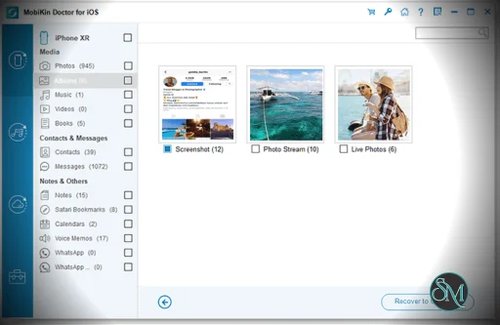
MobiKin Doctor for iOS supports a range of personal data, including photos, camera roll items, videos, music, books, and voice memos.
It can also handle notes, note attachments, calendars, reminders, Safari bookmarks, and browsing history, depending on the recovery method.
The preview interface helps users identify relevant items before exporting them. This is particularly useful when searching through a large backup for a specific photo, note, or contact.
Selective export also reduces the need to restore an entire backup just to retrieve a few files.
WhatsApp Data Recovery
The application supports WhatsApp conversations and attachments through supported recovery sources.
This can help users retrieve available chat information, photos, and other attachments or preserve conversations outside WhatsApp.
Results depend on the recovery method and the data that remains accessible. The presence of WhatsApp recovery in the feature list does not mean every deleted conversation can be restored.
Preview and Selective Export
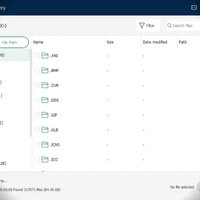
Before recovering files, users can preview supported content and select the items they want to save. Existing and deleted items are distinguished in the scanning interface.
This makes the recovery process more manageable and helps users avoid exporting unnecessary data.
The ability to save selected information to a computer is particularly useful for archiving contacts, preserving messages, and maintaining a separate copy of important personal files.
The free trial allows users to inspect recoverable content before purchasing a license. According to the vendor's FAQ, saving recovered files requires the registered version.
Support for iPhone and iPad
MobiKin advertises support for a broad range of Apple mobile devices, including older iPhone and iPad generations and newer models.
Its compatibility information includes multiple iOS releases. Nevertheless, actual device recognition and recovery results may depend on the installed iOS version, macOS or Windows environment, USB connection, and backup format.
Users should confirm compatibility with their particular device before purchasing the software.
Performance and Compatibility
MobiKin Doctor for iOS is designed for desktop use and connects to Apple devices through USB. Users generally need to unlock their device and approve the computer connection before scanning can begin.
The software also supports recovery from local iTunes backups and supported iCloud data, offering alternatives when direct device access is unavailable.
Its performance depends on the amount of data being scanned, the condition of the device, and the selected recovery method. Large backups may take time to inspect, and some files may be unavailable because of encryption, synchronization settings, or incomplete backups.
An important limitation is that a successful scan does not guarantee successful recovery. Permanently deleted data may no longer be accessible, and the vendor acknowledges that data from a damaged or disabled device cannot necessarily be recovered directly. An available backup may provide another recovery option.
Because the application can access personal messages, photos, and account-related information, download it from the official website and carefully review any permissions or account credentials requested during recovery.
System Requirements
The vendor's published Mac requirements include:
Operating system: macOS 10.10 or later.
Processor: Intel processor running at 1 GHz or faster.
Storage: At least 1 GB of available disk space.
Supported devices: Compatible iPhone, iPad, and iPod touch models.
Recovery sources: Connected iOS devices, supported iTunes backups, and supported iCloud data.
These are the vendor's published requirements and do not guarantee compatibility with every current Mac, Apple silicon configuration, or recent macOS release.
The Windows edition has separate system requirements. Check the appropriate download page before installation.
Pros and Cons
Pros
Three recovery methods for connected devices, iTunes backups, and iCloud.
Supports a broad range of personal data categories.
Selective recovery avoids the need to restore an entire backup.
Preview functionality helps identify relevant files.
Exports contacts into CSV, HTML, and VCF formats.
Supports messages, photos, notes, and WhatsApp data.
Compatible with many generations of Apple mobile devices.
Free trial lets users inspect recoverable content before purchasing.
Cons
Recovery of permanently deleted files is not guaranteed.
Available data types vary by recovery method.
Device recognition and backup access may require troubleshooting.
iCloud recovery requires account authentication.
Current Mac hardware and operating system compatibility should be verified.
Saving recovered files requires a paid license.
It is not a substitute for regular iCloud or computer backups.
How to Install
Visit the official MobiKin Doctor for iOS website.
Download the installer for Windows or Mac.
Install and launch the application.
Connect your iPhone or iPad using a USB cable.
Unlock the device and approve the computer connection if prompted.
Select the appropriate recovery method.
Choose the data categories you want to scan.
Preview the results and select the files to recover.
Export the selected data to your computer.
If you are recovering from an iTunes backup or iCloud, choose the corresponding recovery mode and follow the application's instructions.
Whenever possible, save recovered files to your computer or an external drive. Keep a separate backup of your current device before attempting recovery operations.
Final Verdict
MobiKin Doctor for iOS is a useful option for Windows and Mac users who need to retrieve or extract personal information from an iPhone, iPad, or existing backup. Its three recovery methods, selective export, and support for messages, contacts, photos, notes, and WhatsApp data make it more flexible than a basic backup browser.
Its main strength is convenience. Users can inspect available data and recover selected items without necessarily restoring an entire backup. The free trial is also helpful for checking whether the software can locate the missing information before purchasing a license.
The biggest limitation is the uncertainty inherent in iOS data recovery. Encryption, overwritten storage, incomplete backups, and device compatibility can all affect the results. Users should evaluate the trial carefully and avoid assuming that a scan will restore every deleted file.
For people who have lost important information and need an alternative to a full-device restore, MobiKin Doctor for iOS is worth considering. Regular iCloud or computer backups remain the more dependable way to protect important data.