
MaterialCraft is a free, open-source procedural material designer built entirely in Rust. It provides a node-based workspace for creating materials and textures, complete with real-time 2D and 3D previews. Instead of painting every texture by hand, users can combine primitives, features, and procedural patterns to generate highly customizable material maps.
The application is designed for 3D artists, game developers, texture designers, and technical artists who require precise control over procedural material creation. Its workflow centers on connecting nodes, fine-tuning parameters, and previewing results before exporting textures for use in other applications.
MaterialCraft also offers a command-line interface, an MCP server, and WebAssembly support. These capabilities elevate it beyond a conventional desktop material editor, providing options for automation and AI-assisted workflows.
Features
1. Node-Based Material Creation
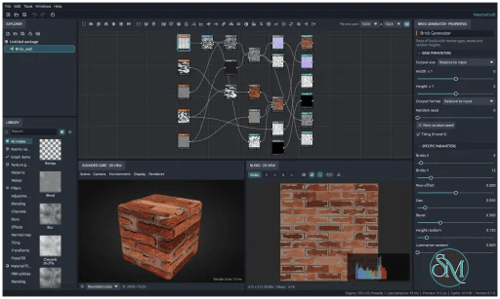
MaterialCraft uses a visual node graph to construct procedural materials. Users connect nodes to define how textures are generated and processed, rather than relying entirely on manual painting.
The interface includes:
A package explorer for organizing material projects.
A node library with previews.
A visual graph editor.
Live node thumbnails.
A 2D texture preview.
A 3D material preview.
A properties panel for editing node parameters.
Graph search for quickly finding available nodes.
Users can create a new graph from a PBR template or an available sample material. The graph can then be expanded by adding primitives and connecting their inputs and outputs.
This approach makes it easier to experiment with different material combinations. Changing an upstream node automatically updates the dependent parts of the graph.
2. Procedural Primitives and Functions
MaterialCraft provides a collection of native primitives and function operations for constructing procedural materials.
The current catalog includes:
25 main-graph primitives.
Four graph input/output items.
85 native function operations.
Four FX-Map graph node types: Quadrant, Switch, Iterate, and Dot.
These components provide the building blocks for creating and processing procedural patterns, images, and material properties.
Function graphs can contain operations, constants, and connections between nodes. Users can edit function bodies through a dedicated canvas and designate an output node to determine the resulting value.
The application also supports typed connections, helping prevent incompatible values from being connected accidentally.
One important distinction is that MaterialCraft's current procedural catalog is undergoing a transition. Its previous Rust-based procedural library was removed in favor of a clean-room implementation using native primitives and graph operations. This means some previously demonstrated materials are historical examples rather than ready-to-use templates in the current build.
3. Live 2D and 3D Material Preview
MaterialCraft provides both 2D and 3D previews, allowing users to inspect generated textures and evaluate how materials appear on a model.
The 2D view is useful for examining individual texture maps and identifying problems such as unwanted patterns, uneven gradients, or visible seams.
The 3D view provides a more practical representation of the resulting material.
Its preview workflow helps users:
Inspect generated material maps.
Evaluate surface appearance.
Review material changes while editing nodes.
Identify problems before exporting.
Understand how procedural patterns affect a 3D surface.
The combination of both views reduces the need to repeatedly export textures and open them in another application just to check the results.
4. Seamless and Tileable Textures
MaterialCraft is designed around tileable procedural patterns.
Its noise and pattern generation uses whole-number lattices, allowing supported procedural materials to repeat seamlessly across a surface.
This is particularly useful for creating textures used in:
Game environments.
Architectural visualization.
3D models.
Repeating surface materials.
Large terrain environments.
Modular assets.
The application supports texture generation at different resolutions, ranging from small images to 8K output.
Seamless textures are valuable when building materials for large surfaces because they reduce visible repetition boundaries and make it easier to create repeating patterns.
However, tileability depends on the selected nodes and graph configuration. Users should still inspect the final output when combining different operations.
5. PBR Material Map Generation
MaterialCraft supports exporting the main texture maps used in physically based rendering workflows.
Available map types include:
Base Color.
Normal.
Roughness.
Metallic.
Height.
Ambient Occlusion.
These maps can be used in compatible game engines, 3D applications, and material workflows.
The ability to generate multiple maps from one procedural graph is particularly useful because it keeps related material properties together.
For example, a procedural metal surface can use the same underlying pattern to influence its base color, roughness, metallic response, and surface height.
This helps maintain consistency between different material channels.
6. Flexible Texture Export
MaterialCraft provides several image formats and bit-depth options for exporting generated material maps.
Supported formats include:
PNG.
JPEG.
TGA.
BMP.
WebP.
EXR.
HDR.
Users can export images at 8-bit, 16-bit, or 32-bit depth, depending on the output format and intended workflow.
Additional export controls include custom filename patterns and output resolution.
The command-line interface also supports exporting texture sets, making it possible to generate multiple material maps without manually exporting each one through the graphical interface.
This flexibility is useful for both general-purpose texture creation and workflows that require higher-precision image data.
7. Native Project and SBS Support
MaterialCraft uses native SBS project files for saving material graphs, functions, parameters, and resources.
Projects can be organized into packages with folders and reusable graph components.
The application supports:
Creating and editing SBS packages.
Saving and reopening native graphs.
Managing package folders.
Editing function graphs.
Organizing reusable functions.
Preserving graph positions and connections.
Undoing graph editing operations.
It also supports portable .mcmat material packages for transferring materials into TextureCraft.
However, its SBS compatibility is still developing. The project documents limitations involving version-header compatibility, unsupported parameter variants, arbitrary package interoperability, and numerical differences in some node operations.
It should therefore not be considered a fully compatible replacement for every existing SBS material library.
8. Integration with TextureCraft
MaterialCraft is part of the ArtCraft collection of creative applications, which includes TextureCraft for 3D texture painting.
The two applications can exchange procedural materials through the .mcmat format.
Users can send a material from MaterialCraft to TextureCraft through the application's File menu.
This integration provides several advantages:
Materials can be transferred without manually exporting individual maps.
Graph inputs remain available as adjustable parameters.
TextureCraft can provide baked mesh maps as graph inputs.
MaterialCraft can recalculate materials at the texture set's resolution.
Artists can combine procedural material generation with direct texture painting.
This is one of MaterialCraft's more interesting features because it connects procedural material creation with a separate 3D painting workflow.
9. Performance and Rendering Architecture
MaterialCraft is built in Rust and uses a modular architecture that separates its material engine from the graphical interface.
Its processing system includes:
Parallel node evaluation across CPU cores.
Content-addressed caching.
Recalculation of affected downstream nodes.
Background processing on worker threads.
GPU rendering through wgpu.
CPU reference rendering.
Tiled stage rendering.
The caching system is particularly useful when editing complex graphs. Rather than recalculating every node after each adjustment, the application can reuse unchanged results and process the affected parts of the graph.
This helps reduce unnecessary work during iterative material design.
The separation between the engine and interface also makes it possible to use the same underlying functionality through the desktop application, command-line tools, and WebAssembly build.
10. Command-Line Interface
MaterialCraft includes a command-line application called materialcraft-cli.
It allows users to create projects, render previews, export material maps, and automate material production without opening the graphical interface.
Example commands include:
# Create a new PBR material
materialcraft-cli new pbr surface.sbs --name Surface

# Render a material preview
materialcraft-cli render surface.sbs surface.png --scene sphere --full --hq

# Export texture maps
materialcraft-cli export surface.sbs textures --format png --depth 16

# Change a graph input before exporting
materialcraft-cli export surface.sbs output --set wear=0.7

# Publish a material for TextureCraft
materialcraft-cli publish surface.sbs surface.mcmat --graph Surface

# Export a material using the MaterialX profile
materialcraft-cli export surface.mcmat build/surface --profile materialx --size 512
This makes MaterialCraft useful for developers and technical artists who want to integrate material generation into build scripts or automated asset pipelines.
For example, a game development workflow could generate different material variations by changing graph inputs and exporting the resulting texture maps automatically.
11. MCP Integration and AI Automation
MaterialCraft includes Model Context Protocol support, allowing compatible AI assistants to interact with its material engine.
Instead of relying exclusively on manual graph editing, users can connect an AI assistant to the application and use structured commands to create or modify material projects.
Its automation architecture includes:
MCP server support.
JSON control channel.
Command-based document editing.
Project inspection.
Graph modification.
Rendering and export operations.
Synthetic mouse and keyboard input for driving the desktop interface.
The MCP server can also restrict which directories an AI assistant is allowed to read and write.
For example, users can register MaterialCraft with Claude Code:
claude mcp add materialcraft -- /path/to/materialcraft-cli mcp \
  --read-root /work/materials \
  --write-root /work/materials
Users can also connect an MCP client to an already running application through its control interface.
This integration makes MaterialCraft particularly interesting for AI-assisted procedural design and automated material production.
12. WebAssembly Support
MaterialCraft is not limited to desktop operating systems. It also provides a WebAssembly build that can run in a modern browser.
The web application uses the same general interface and underlying engine architecture as the desktop version.
This provides an alternative for users who want to access the material editor through a browser without installing a traditional desktop application.
The WebAssembly build can be hosted as a static website on a compatible web server.
However, the web version is distributed separately and requires users to host the supplied files themselves. It should not be confused with a fully managed cloud service.
Performance and Compatibility
MaterialCraft is designed for procedural material creation rather than general-purpose image editing or 3D modeling.
Its node-based architecture, parallel processing, and caching system provide a practical foundation for experimenting with complex material graphs.
The application supports Windows, macOS, Linux, FreeBSD, and WebAssembly.
Available desktop packages include:
Windows x64, ARM64, and x86.
macOS universal builds for Apple Silicon and Intel.
Linux x86_64 and ARM64.
FreeBSD x86_64.
WebAssembly for modern browsers.
One of its main advantages is the ability to use the same material engine through multiple interfaces. Users can work through the graphical editor, automate operations through the CLI, or connect AI assistants through MCP.
However, the project's development status deserves attention. MaterialCraft is still under active development, and its current native procedural implementation is not yet fully compatible with arbitrary SBS libraries.
The documentation specifically identifies remaining gaps in filter behavior, numerical precision, function execution, FX-Map rendering, and package interoperability.
This means users should test important materials before adopting it for production pipelines, particularly when migrating existing SBS projects from other applications.
System Requirements
MaterialCraft provides prebuilt packages for several operating systems and processor architectures.
Windows
Windows x64.
Windows ARM64.
Windows x86.
Compatible graphics hardware for GPU acceleration.
macOS
Apple Silicon.
Intel processors.
Universal application package.
Linux
x86_64.
ARM64.
AppImage, Flatpak, DEB, RPM, and compressed archive packages.
FreeBSD
x86_64.
ARM64.
Web
Modern browser supporting WebAssembly.
Static web hosting for the distributed browser build.
Additional requirements
Rust 1.95 or later when building from source.
FFmpeg for supported WebM and MP4 video workflows, where applicable.
Sufficient memory for high-resolution texture generation and complex material graphs.
Compatible graphics hardware for GPU-accelerated rendering.
Actual resource requirements depend on texture resolution, graph complexity, image processing operations, and rendering settings.
Pros and Cons
Pros
Free and open-source under MIT or Apache-2.0.
Native Rust implementation.
Visual node-based procedural material creation.
Live 2D and 3D previews.
Supports seamless procedural textures.
Generates Base Color, Normal, Roughness, Metallic, Height, and Ambient Occlusion maps.
Exports PNG, JPEG, TGA, BMP, WebP, EXR, and HDR.
Supports 8-bit, 16-bit, and 32-bit output.
Parallel node processing and content-addressed caching.
Native SBS project support.
Integrates with TextureCraft through portable materials.
Includes CLI and MCP automation.
Supports Windows, macOS, Linux, FreeBSD, and WebAssembly.
Cons
Still under active development.
Full numerical compatibility with other procedural material applications is not established.
Arbitrary SBS package interoperability remains incomplete.
Some node behaviors and parameter combinations still require validation.
The current native primitive catalog is more limited than the former procedural library.
Historical sample materials are not all included in the current build.
FFmpeg must be installed separately for supported video workflows.
The WebAssembly version requires separate hosting.
How to Install
MaterialCraft provides prebuilt installers and portable packages for supported operating systems.
Windows
Open the MaterialCraft GitHub repository.
Navigate to the Releases section.
Download the MSI installer or portable ZIP package.
Select the appropriate x64, ARM64, or x86 build.
Run the installer or extract the portable archive.
Launch MaterialCraft from the Start menu or extracted directory.
macOS
Download the universal DMG package.
Open the downloaded disk image.
Drag MaterialCraft into the Applications folder.
Launch the application.
The macOS application is signed and notarized.
Linux
MaterialCraft provides several Linux package formats:
AppImage.
Flatpak.
DEB.
RPM.
Compressed tarball.
For Debian or Ubuntu, install the downloaded package using:
sudo apt install ./materialcraft-*-linux-x86_64.debFor AppImage:
chmod +x materialcraft-*-linux-x86_64.AppImage
./materialcraft-*-linux-x86_64.AppImage
Build from Source
Developers can also compile MaterialCraft from its Rust source code.
git clone https://github.com/storytold/materialcraft.git
cd materialcraft

cargo run --release -p materialcraft
Building from source requires Rust 1.95 or later.
To build the CLI application, use:
cargo build --release -p materialcraft-cliFinal Verdict
MaterialCraft is a promising open-source procedural material designer that combines node-based editing, live previews, PBR texture generation, and automation in a native Rust application.
Its biggest strengths are the visual node workflow, seamless texture generation, multiple export formats, and integration with TextureCraft. The CLI and MCP support also make it more versatile than a conventional material editor, particularly for developers who want to automate texture generation or experiment with AI-assisted workflows.
However, its current development stage is an important consideration. The native procedural catalog is still evolving, and compatibility with arbitrary SBS projects and existing material libraries is not yet complete. Users looking for a fully mature replacement for established procedural material tools may encounter limitations.
Nevertheless, MaterialCraft offers an interesting foundation for artists and developers who prefer open-source software and want a flexible procedural material workflow. It is worth exploring, especially for new projects that do not depend on complete compatibility with existing SBS libraries.
Sources: