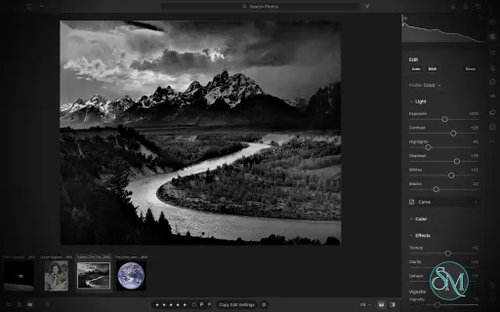

LightCraft is a free, open-source photo management and RAW development application designed as an alternative to Adobe Lightroom. Built in Rust, it combines photo library organization with a comprehensive set of image editing tools, allowing photographers to adjust exposure, refine colors, apply local corrections, and prepare images for export without modifying their original files.
LightCraft is designed for desktop use on Windows, macOS, and Linux, with a WebAssembly version that runs in a browser. It also supports automation through a command-line interface and the Model Context Protocol (MCP), making it an interesting option for photographers who want local control over their workflow.
Features
Non-Destructive Photo Editing
LightCraft keeps original images intact and stores editing operations separately. You can experiment with different adjustments without permanently changing the source files.
Its editing tools include exposure, contrast, highlights, shadows, whites, blacks, tone curves, white balance, vibrance, and saturation. The application uses a wide-gamut, 32-bit floating-point processing pipeline designed to preserve tonal and color information throughout editing.
Color Grading and Presets
The color tools include an eight-band Color Mixer, RGB tone curves, and separate color grading controls for shadows, midtones, and highlights. These features provide flexibility for natural photo correction as well as creative color treatments.
LightCraft also includes built-in presets and lets users save custom looks. You can copy, paste, or synchronize selected adjustments across multiple photos, which is useful when editing a collection of images from the same shoot.
Local Masking and Adjustments
LightCraft supports brush masks, linear gradients, and radial gradients, along with selection tools for luminance, color, sky, subject, and background. Masks can be combined, subtracted, intersected, and inverted.
Local adjustments let you change exposure, contrast, color, texture, sharpness, and other properties in specific parts of an image. This helps users refine skies, brighten subjects, or create more controlled lighting effects without applying every adjustment globally.
Crop, Geometry, and Black-and-White Editing
The cropping tools support common aspect ratios, straightening, rotation, flipping, and manual geometric transformations. Composition overlays help photographers align images and refine framing.
For monochrome photography, LightCraft includes black-and-white conversion, an eight-band monochrome mixer, and additional color grading controls for creating tinted or split-tone results.
Photo Library Management
LightCraft includes tools for organizing photo collections, including folders, albums, smart albums, stacks, virtual copies, ratings, flags, labels, filtering, searching, and sorting.
Its local-first approach avoids requiring an online account or cloud catalog. The project describes its catalog as a human-readable log of editing operations, making it easier to inspect, back up, and replay changes.
Command-Line and AI Automation
In addition to its graphical interface, LightCraft provides a command-line application for rendering images and applying adjustments. MCP support allows compatible AI agents to interact with the application through an automation interface.
These capabilities are useful for repeatable editing tasks, scripted workflows, and experimentation with AI-assisted photo processing.
Download LightCraft v0.4.0 - Software Mirrors |
|---|
LightCraft v0.4.0 for Windowslightcraft-0.4.0-windows-x86.msi | 48.48 MB lightcraft-0.4.0-windows-x86-portable.zip | 58.97 MB lightcraft-0.4.0-windows-x64.msi | 49.46 MB lightcraft-0.4.0-windows-x64-portable.zip | 61.34 MB |
LightCraft v0.4.0 for macOS |
LightCraft v0.4.0 for Linuxlightcraft-0.4.0-linux-x86_64.tar.gz | 61.47 MB lightcraft-0.4.0-linux-x86_64.rpm | 62.04 MB lightcraft-0.4.0-linux-x86_64.flatpak | 44.41 MB lightcraft-0.4.0-linux-x86_64.deb | 62.35 MB lightcraft-0.4.0-linux-x86_64.AppImage.zsync | 203.82 kB lightcraft-0.4.0-linux-x86_64.AppImage | 58.16 MB lightcraft-0.4.0-linux-aarch64.tar.gz | 58.45 MB lightcraft-0.4.0-linux-aarch64.rpm | 59.54 MB lightcraft-0.4.0-linux-aarch64.flatpak | 41.45 MB lightcraft-0.4.0-linux-aarch64.deb | 59.93 MB |
LightCraft v0.4.0 for BSD |
Others Download related to LightCraft v0.4.0 |
LightCraft v0.4.0 Source Code |
LightCraft v0.4.0 Release Notes:What's Changed
New Contributors
Full Changelog: v0.2.1...v0.4.0 |
Performance and Compatibility
LightCraft is written in Rust and uses background rendering to keep the interface responsive during common editing operations. The project reports that it can display embedded camera previews or cached renders quickly while preparing full-resolution images in the background.
The application supports Windows, macOS, and Linux, as well as a browser-based WebAssembly build. Available Linux packages include AppImage, DEB, and RPM formats, with builds for x86-64 and ARM64 systems.
However, LightCraft is still a developing project. Its feature list should not be interpreted as proof of complete Adobe Lightroom compatibility. Photographers with established Lightroom workflows should verify RAW camera support, editing results, and catalog migration before moving their primary library.
System Requirements
Operating systems: Windows, macOS, and Linux.
Browser support: A WebAssembly build is available.
Processor architectures: Linux releases include x86-64 and ARM64 builds.
Build requirements: Rust and the project's documented dependencies are needed to compile from source.
The project does not establish a comprehensive minimum hardware specification in the information reviewed. Actual performance will depend on image resolution, RAW processing requirements, and available system resources.
Pros and Cons
Pros
Free and open-source under the MIT and Apache 2.0 licenses.
Non-destructive editing preserves original photos.
Extensive controls for exposure, tone curves, color grading, and local adjustments.
Photo library organization tools for managing larger collections.
Native applications for major desktop operating systems.
Browser-based build for experimentation without a traditional desktop installation.
Command-line and MCP support for automation.
Local-first workflow without a mandatory cloud account or subscription.
Cons
Still under active development, so feature completeness and reliability may vary.
Compatibility with existing Lightroom catalogs and established workflows needs verification.
RAW format support may not cover every camera model or file variation.
Users accustomed to Lightroom may encounter differences in editing behavior and output.
Advanced automation and browser workflows may require additional setup.
Published minimum hardware requirements are limited.
How to Install
The simplest option is to download a suitable package from the project's GitHub Releases page. Linux users can choose the available AppImage, DEB, or RPM package, while macOS and Windows packages are also provided.
For users who prefer to build from source, install Rust and the required development tools, then run:
git clone https://github.com/storytold/lightcraft
cd lightcraft
cargo run --release -p lightcraft
To open a specific photo folder, pass its path when launching the application:
cargo run --release -p lightcraft -- ~/Pictures/tripTo try the browser-based build, follow the project's WebAssembly setup instructions and run:
cargo xtask web --serveThe project also provides a command-line renderer for scripted workflows. Consult the official documentation for supported formats, available adjustment parameters, and platform-specific installation details.
Final Verdict
LightCraft is a promising open-source alternative for photographers who want a local photo library and RAW editing workflow without relying on a commercial subscription. Its combination of non-destructive editing, color grading, masking, presets, and catalog management makes it more ambitious than a basic image editor.
Its strongest differentiators are its Rust-based architecture, local-first design, and automation support. These features may appeal to technical users and photographers interested in building repeatable editing workflows.
The main reservation is maturity. Before switching from Lightroom, users should test their own camera RAW files, compare exported images, and confirm that the library features they depend on are available and reliable. LightCraft is worth trying, but photographers with demanding production workflows should evaluate it alongside their existing tools rather than assume full feature parity.