


Kernel for Outlook PST Repair is designed to recover data from corrupted, damaged, inaccessible, or otherwise problematic Microsoft Outlook PST files. It can recover emails, contacts, calendars, tasks, journals, notes, attachments, and other mailbox information while preserving the original folder structure.
Beyond PST repair, the software includes tools for exporting recovered data to multiple file formats and transferring mailbox contents to services such as Microsoft 365, Exchange Server, Gmail, and other supported email platforms.
Features
Kernel for Outlook PST Repair can process single or multiple PST files and supports both ANSI and Unicode PST files, including password-protected PST files.
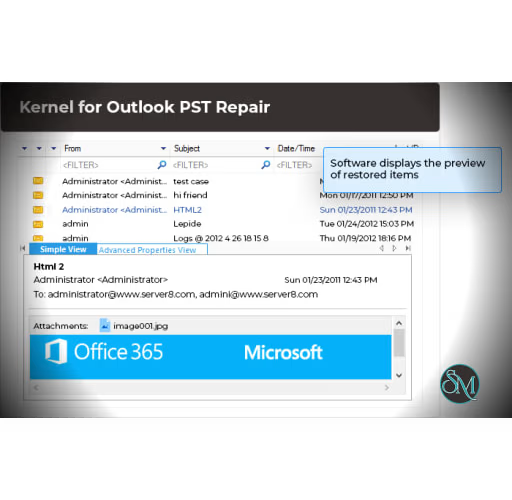
The software provides a preview of recovered mailbox data before saving. Users can browse folders, emails, attachments, contacts, calendars, and other recovered items in a hierarchical structure.
Its filtering and search features are useful when only specific information needs to be recovered. Items can be filtered using fields such as sender, recipient, subject, folder, item type, and date.
Recovered data can be saved in several formats, including PST, MSG, EML, PDF, HTML, TXT, MHTML, RTF, MBOX, and other supported formats. The software can also transfer repaired mailbox data directly to Microsoft 365, Exchange Server, GroupWise, IBM Domino, Gmail, Yahoo, AOL, iCloud, and supported IMAP accounts.
Another useful feature is PST splitting. Large PST files can be divided into smaller files based on selected size limits, making oversized mailboxes easier to manage.
The application also works in read-only mode against the original PST file and creates a separate repaired output, helping protect the source file during recovery.
Performance and Compatibility
Kernel for Outlook PST Repair is focused specifically on Outlook PST recovery rather than general email management. Its ability to process multiple PST files and work with large or severely corrupted files makes it suitable for recovery and migration scenarios.
The preview and filtering features also make the recovery process more controlled. Instead of simply generating a replacement PST, users can inspect recovered content and select what should be saved.
Compatibility covers a broad range of Microsoft Outlook releases and Windows versions. However, the software is Windows-only, which limits its usefulness for users working primarily on macOS or Linux.
Recovery results will naturally depend on the condition of the original PST file. Claims of recovering severely damaged or permanently deleted data should therefore be treated as capabilities of the software rather than a guarantee that every damaged or deleted item can always be recovered.
System Requirements
Windows operating system
32-bit or 64-bit Intel-compatible processor
At least 500 MB of memory
At least 1 GB of available disk space
Compatible Microsoft Outlook installations are supported across a wide range of releases
Additional space may be required for recovered PST files and exported data
Pros and Cons
Pros
Repairs corrupted, damaged, and inaccessible PST files
Supports multiple PST files
Handles ANSI and Unicode PST formats
Supports password-protected PST files
Can recover deleted mailbox items
Provides a preview before saving recovered data
Supports extensive export formats
Can transfer recovered data directly to Microsoft 365 and other email platforms
Includes filtering and search tools
Can split large PST files
Does not modify the original PST during repair
Cons
Windows-only
Recovery success depends on the condition of the source PST
The large number of export and migration options can make the product feel more specialized than necessary for simple PST repairs
The free trial limits the amount of data that can be saved
How to Install
Download the Kernel for Outlook PST Repair installer from the official website and run the setup program on Windows.
After installation, launch the application and select the damaged PST file. The software scans the file and displays the recoverable mailbox contents.
Review the recovered folders and items, apply filters if necessary, and select the required output format or destination. The repaired data can then be saved to a new PST file or exported to one of the supported formats and services.
Final Verdict
Kernel for Outlook PST Repair is a comprehensive recovery utility for users dealing with corrupted or inaccessible Outlook PST files. It goes beyond basic repair by providing preview, filtering, deleted-item recovery, PST splitting, multiple export formats, and direct migration to cloud and email platforms.
Its main limitation is its Windows-only design and the fact that successful recovery cannot be guaranteed for every severely damaged PST. For users who regularly deal with Outlook data recovery or PST migration, however, the combination of repair and export functionality makes it a capable specialist tool.