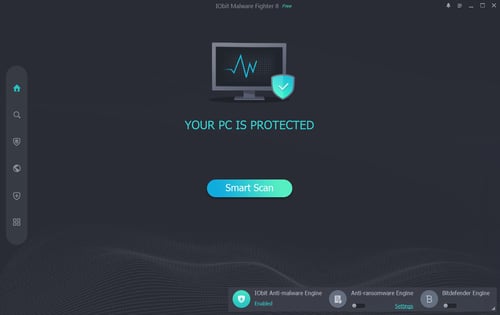



IObit Malware Fighter is a Windows security application designed to detect and remove malware while providing real-time protection against viruses, Trojans, spyware, ransomware, hijackers, and other threats. The current version also includes improvements to Camera Guard, malware detection databases, and scan reliability.
The free version provides IObit's own malware engine and real-time protection, while the Pro version adds the Bitdefender engine and additional security features.
Features
IObit Malware Fighter provides several layers of protection beyond traditional malware scanning.
Real-time malware protection
Smart, full, and custom scanning
Malware removal
Behavior Guard for suspicious activity
Browser and surfing protection
Phishing and malicious link protection
Download protection
Anti-tracking
DNS protection
Email protection
Ransomware protection
SafeBox for protecting sensitive files
Camera Guard
USB protection
System Guard
Browser password protection
Automatic and customizable scans in Pro
Bitdefender malware engine in Pro
The application also maintains an online malware database and can use cloud analysis for suspicious files.
Get Discount 20% OFF using "SWMR" Coupon code for the IObit Products below:
IObit Advanced SystemCare 19 PRO (1 year subscription / 3 PC) Discount 77% OFF
IObit Advanced SystemCare 19 PRO (2 year subscription / 3 PC) Black Friday Discount 70% OFF
Advanced SystemCare Ultimate 18 (1 year subscription / 3 PCs) - Discount 50% OFF
IObit Uninstaller 15 PRO (1 Year Subscription, 3 PCs)
IObit Driver Booster 13 PRO (1 Year Subscription, 3 PCs)
IObit Malware Fighter 13 PRO (1 year subscription / 1 PCs) - Discount 20% OFF
IObit Malware Fighter 13 PRO (1 Year Subscription, 3 PCs) - Discount 50% OFF
Performance and Compatibility
IObit Malware Fighter is designed specifically for Windows and supports Windows 11, 10, and 8 according to the current official system requirements.
The main limitation is that some of the more advanced protection features are restricted to the Pro edition. In particular, Bitdefender-powered protection, advanced ransomware protection, SafeBox, automatic scans, and several privacy and system protection features are not part of the free feature set.
System Requirements
According to IObit's current documentation:
Windows 11, 10, or 8
1 GHz processor or faster
2 GB RAM
1 GB available storage
1024 x 768 display resolution or higher
Pros and Cons
Pros
Free version available
Real-time malware protection
Multiple scanning modes
Browser and download protection
Ransomware protection features
Behavior-based threat detection
Privacy protection tools
Camera and USB protection
Bitdefender engine available in Pro
Regular malware database updates
Relatively modest stated hardware requirements
Cons
Several advanced security features require Pro
Bitdefender protection is not included in the free version
Windows-only
Some features overlap with protection already provided by modern Windows security software
How to Install
Download the IObit Malware Fighter installer.
Run
IObit-Malware-Fighter-Setup.exe.Follow the installation wizard.
Launch IObit Malware Fighter after installation.
Update the malware database before performing a scan.
Run a Smart Scan or Full Scan to check the system.
Final Verdict
IObit Malware Fighter is a feature-rich Windows anti-malware application with real-time protection, customizable scanning, browser security, ransomware defenses, and additional privacy tools. Its free edition provides a useful set of basic protections, while the Pro edition adds Bitdefender-based detection and substantially more security features.
Its biggest drawback is the division between the free and Pro editions. Users looking for the complete feature set need the paid version. For users specifically looking for an additional malware scanner with browser and privacy protection, however, IObit Malware Fighter provides a broad collection of security tools in a single application.