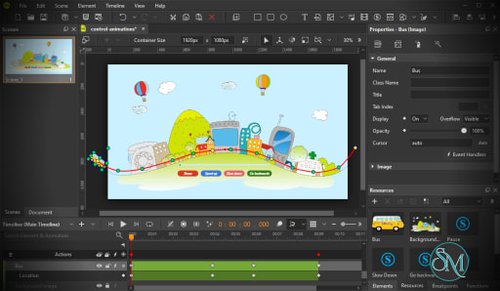




Incomedia WebAnimator is a visual HTML5 animation editor that enables users to create interactive web content without writing code. Designed for web designers, marketers, educators, and small businesses, it uses a drag-and-drop interface, timeline-based animation, and built-in effects to produce responsive HTML5 animations that work across modern browsers and devices.
Creating web animations traditionally requires knowledge of HTML5, CSS, and JavaScript. WebAnimator simplifies this process by providing a visual editor where users can design animations using familiar timeline and keyframe concepts.
The software can create animated banners, interactive presentations, slideshows, buttons, landing page effects, and animated backgrounds that can be embedded into websites. Since it exports standard HTML5, CSS, and JavaScript, the resulting animations work without Adobe Flash and are compatible with modern desktop and mobile browsers.
Key Features of Incomedia WebAnimator
Timeline-Based Animation
WebAnimator includes a timeline editor with keyframes, allowing users to control movement, rotation, scaling, opacity, and other animation properties much like traditional video editing software.
Drag-and-Drop Editor
Objects can be placed directly onto the canvas and animated visually. This approach makes animation creation accessible even for users with little or no programming experience.
Responsive HTML5 Output
Animations automatically export as HTML5 content that adapts to different screen sizes, making them suitable for desktops, tablets, and smartphones.
Preset Effects
The software includes numerous predefined animation effects that help users create professional-looking animations in just a few clicks. These presets can also be customized for more unique designs.
Interactive Elements
WebAnimator supports interactive objects, motion paths, buttons, image animations, sprite sheets, and event-based actions, allowing users to create engaging web experiences beyond simple motion graphics.
JavaScript Support
Advanced users can extend animations with custom JavaScript, enabling more sophisticated interactions and behavior while still benefiting from the visual editor.
Easy Export
Completed projects can be exported as HTML5 files that integrate with virtually any website, including sites created with content management systems or static site generators.
Download Incomedia WebAnimator - Software Mirrors | |
|---|---|
Performance and User Experience
WebAnimator has a clean interface that balances simplicity with flexibility. Beginners can quickly create animated banners or website effects using templates and presets, while more experienced users can build custom animations with multiple scenes, timelines, and interactive behaviors.
The exported HTML5 animations perform well in modern browsers without requiring additional plugins. Since the software works offline, users are not dependent on cloud services when designing projects.
The software is available for Windows and macOS, although recent versions of the macOS edition require Intel-based Macs rather than Apple Silicon-native builds.
Pros
Visual drag-and-drop animation editor.
No coding required for most projects.
Responsive HTML5 output.
Timeline and keyframe animation.
Motion paths and interactive elements.
JavaScript support for advanced users.
Works offline.
Suitable for websites, presentations, and digital marketing.
Cons
Interface feels less modern than some cloud-based design tools.
Limited built-in graphic design capabilities compared to dedicated design software.
macOS version currently targets Intel processors.
Better suited for web animations than full motion graphics production.
Who Should Use Incomedia WebAnimator?
WebAnimator is an excellent choice for web designers, digital marketers, educators, freelancers, agencies, and small businesses that need interactive HTML5 content without learning JavaScript animation libraries.
It is particularly useful for creating animated website elements, promotional banners, product showcases, landing page animations, and interactive presentations.
Professional motion designers producing cinematic animations may still prefer dedicated tools such as Adobe After Effects, but WebAnimator offers a much simpler workflow for web-focused projects.
Final Verdict
Incomedia WebAnimator successfully makes HTML5 animation accessible to users who do not have programming experience. Its timeline editor, responsive export, preset effects, and interactive features provide an efficient way to create engaging web content without relying on Flash or manually writing HTML, CSS, and JavaScript.
While it is not intended to replace professional motion graphics software, it excels at its primary purpose: helping users create attractive, responsive HTML5 animations quickly and easily.