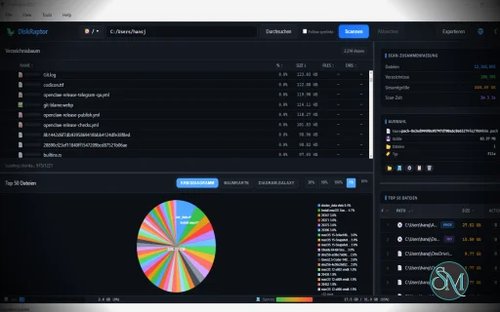
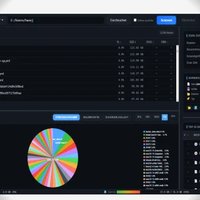
DiskRaptor is a modern open source disk space analyzer designed to help you quickly understand what is consuming storage on your computer. Built with Rust and Tauri 2, it is positioned as a faster, more modern alternative to tools such as WinDirStat and DaisyDisk.
What makes DiskRaptor particularly interesting is its focus on handling very large file systems. The project uses native Rust scanning components and a virtual tree interface designed to remain responsive even when working with millions of files.
What Is DiskRaptor?
DiskRaptor is a cross platform disk usage analyzer for Windows, macOS, and Linux.
Its main purpose is simple. You select a drive or directory, let DiskRaptor scan it, and then explore which folders and files are consuming the most space.
The project is built with Rust and Tauri 2. The native scanning engine handles file system traversal while the interface runs inside the operating system's native webview. This keeps the application relatively lightweight compared with applications that bundle an entire Chromium runtime.
Fast Disk Scanning
Performance is one of DiskRaptor's main selling points.
The project uses a parallel scanning engine on macOS and a reliable walkdir-based engine on Windows and Linux. It is designed to handle drives containing millions of files, with the project documenting support for scans involving up to 20 million nodes.
Access denied folders are handled gracefully as well. Instead of completely stopping a scan because it encounters a protected directory, DiskRaptor logs the problem and continues scanning.
For users with large SSDs, hard drives, external drives, or development machines containing huge numbers of files, this approach can make a significant difference.
Virtual Tree View
DiskRaptor uses a virtual tree interface that renders only the items currently visible on screen.
This is important when working with extremely large directory structures. Loading millions of files into a conventional browser interface would quickly become impractical.
The project claims that its virtual tree can handle more than 10 million files while remaining responsive.
You can navigate through folders, inspect file sizes, and identify which directories are responsible for consuming storage.
Multiple Visualization Options
DiskRaptor doesn't rely on a single visualization.
It provides several ways to understand disk usage, including:
Pie charts
Squarified treemaps
Bar charts
Galaxy 3D visualization
The application also provides a Top 50 list of the largest files. Selecting an item in the visualization can take you directly to the corresponding location in the directory tree.
The treemap is particularly useful when you want a quick visual overview of a large drive.
Find Large Files
Finding large files is one of the most practical reasons to use a disk analyzer.
DiskRaptor highlights the largest files and allows you to inspect their location directly.
This can quickly reveal things such as old installers, virtual machine images, Docker data, video files, build artifacts, backups, and other files that have quietly consumed hundreds of gigabytes.
Duplicate File Detection
DiskRaptor also includes duplicate detection.
It uses content hashing with xxHash3 to identify files that contain the same data.
This is more useful than simply comparing filenames because files with different names can still contain identical content.
Duplicate detection can be particularly helpful for large collections of photographs, videos, archives, downloads, and project backups.
Empty Folder Finder
The application can identify empty directories and allow you to jump directly to them.
This is a relatively small feature, but it can be useful when cleaning up development directories, extracted archives, or old project structures.
File Search and Filtering
DiskRaptor provides search functionality for scanned results.
You can search by filename pattern and filter results by file type, including:
Images
Video
Audio
Archives
PDF files
This makes it easier to locate specific categories of files without manually navigating the entire directory tree.
File Management
DiskRaptor isn't purely a visualization tool.
Its context menus provide actions such as opening a file in Explorer or Finder, opening a terminal, viewing properties, copying a path, moving an item to the trash, and scanning a particular folder.
The ability to move files to the trash directly from the application makes cleanup considerably more convenient.
Because file deletion is potentially destructive, users should still verify what they are removing before performing cleanup operations.
Trash Recovery
Another useful feature is trash management.
DiskRaptor can browse items in the operating system's trash, restore them, or permanently delete them.
This gives the application some basic recovery functionality rather than treating deletion as a one way operation.
Reports and Export
DiskRaptor can export disk analysis results in several formats.
Supported options include:
HTML reports
CSV
JSON
The HTML report can be shared as a standalone report containing statistics and charts. CSV and JSON exports are useful when you want to process the results with another application or script.
This is particularly useful for administrators who need to document storage usage rather than simply inspect it interactively.
Cross Platform Support
DiskRaptor supports:
Windows
macOS
Linux
The project provides a Windows NSIS installer, a universal macOS binary supporting both Intel and Apple Silicon, and a DEB package for Debian and Ubuntu.
This makes it considerably more versatile than Windows-only disk analyzers.
Interface and Customization
The interface supports both dark and light modes, with the selected setting saved for future sessions.
It also supports 25 languages with automatic language detection and a language switcher.
Drag and drop is supported as well, allowing folders to be dragged from Explorer or Finder into DiskRaptor for scanning.
The interface also has resizable panels, keyboard navigation, and contextual menus.
Technology
DiskRaptor is built around Rust and Tauri 2.
The architecture separates the native layer from the interface. Rust handles scanning and native operations while JavaScript handles the user interface through the operating system's webview.
That means DiskRaptor does not need to ship its own Chromium browser engine.
On Windows it uses WebView2, macOS uses WKWebView, and Linux uses WebKitGTK.
For a disk utility that needs to remain responsive while processing very large directory trees, this is a sensible architecture.
Download DiskRaptor v1.0.45 - Software Mirrors |
|---|
DiskRaptor v1.0.45 for WindowsDiskRaptor-1.0.45-windows-x64.msi | 7.91 MB DiskRaptor-1.0.45-windows-x64.exe | 5.88 MB |
DiskRaptor v1.0.45 for macOS |
DiskRaptor v1.0.45 for LinuxDiskRaptor-1.0.45-linux-x86_64.rpm | 6.97 MB DiskRaptor-1.0.45-linux-x86_64.deb | 6.97 MB |
DiskRaptor v1.0.45 Source Code |
DiskRaptor v1.0.45 Release Notes:Full Changelog: v1.0.44...v1.0.45 |
Pros
Open source
Free to use
Windows, macOS, and Linux support
Built with Rust
Tauri 2 architecture
Fast directory scanning
Designed for millions of files
Virtual tree view
Treemap visualization
Pie charts
Bar charts
Galaxy 3D view
Top 50 largest files
Duplicate file detection
Empty folder detection
Filename search
File type filtering
Trash recovery
Direct file management
HTML report export
CSV export
JSON export
Dark and light modes
25 languages
Drag and drop support
Apple Silicon support
Cons
The project is still relatively young
Some advanced features may need further refinement
Scanning very large drives can still consume substantial CPU and storage I/O
Deleting files directly from a disk analyzer requires caution
The visualization features may be more than users need for simple disk cleanup
Linux packaging currently focuses on DEB distributions
DiskRaptor vs WinDirStat
WinDirStat remains one of the best known Windows disk usage analyzers, but DiskRaptor takes a more modern approach.
DiskRaptor is cross platform, built with Rust and Tauri, supports multiple visualization modes, includes duplicate detection and trash recovery, and is designed around very large directory trees.
WinDirStat has the advantage of being a mature and well established Windows application.
For users who want a modern cross platform alternative, DiskRaptor is much more interesting.
DiskRaptor vs DaisyDisk
DaisyDisk is known for its polished macOS interface and strong visualization capabilities.
DiskRaptor brings a similar visual approach to Windows and Linux while also supporting macOS.
Its open source nature is another major difference.
For someone who wants a free and open source disk analyzer that works across multiple operating systems, DiskRaptor is a compelling alternative.
Who Should Use DiskRaptor?
DiskRaptor is a good choice for anyone who regularly needs to answer the question, "What is using all my disk space?"
It is especially useful for:
Developers
System administrators
Power users
NAS and storage users
Large media collections
Users managing external drives
People cleaning old project files
Anyone with a rapidly filling SSD
The large file and duplicate detection features are particularly useful for development machines where build artifacts, package caches, Docker files, virtual machines, and old repositories can accumulate surprisingly quickly.
Final Verdict
DiskRaptor is an impressive open source disk space analyzer with a clear focus on performance and usability.
Its Rust based scanning engine, virtual tree interface, multiple visualizations, duplicate detection, file filtering, and report export make it much more than a basic folder size viewer.
The cross platform support is another major advantage. You can use the same general workflow on Windows, macOS, and Linux rather than maintaining different disk analysis tools for each operating system.
The project is also under active development. The GitHub repository currently shows more than 800 commits, six open pull requests, and recent updates in August 2026.
It is still less mature than long established applications such as WinDirStat, so some users may encounter rough edges. Nevertheless, the architecture and feature set make DiskRaptor one of the more interesting modern alternatives in this category.
If you want a fast, open source, cross platform disk space analyzer, DiskRaptor is well worth trying.