

croc is a free and open source command-line utility that makes it incredibly easy to transfer files and folders securely between two computers. Developed by Schollz, it uses end-to-end encryption, requires no port forwarding, and works across Windows, macOS, Linux, Android, and many other platforms. With a simple one-command workflow, croc has become one of the most popular file transfer tools for developers and system administrators.
Sharing files between computers often involves cloud storage, SSH configuration, or complicated networking. croc eliminates these obstacles by using a relay server to establish the connection while encrypting all transferred data using Password-Authenticated Key Exchange (PAKE). The relay never has access to the contents of your files or the encryption keys.
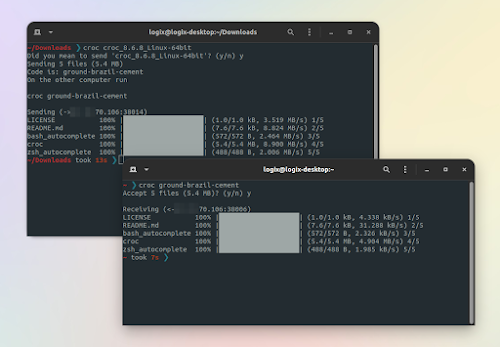
Sending a file is as simple as:
croc send myfile.zipThe sender receives a short code, which the recipient enters:
croc code-phraseOnce connected, the transfer begins automatically.
Key Features of croc
End-to-End Encryption
Every transfer is protected using PAKE, ensuring that only the sender and recipient can decrypt the transferred data. Neither the relay server nor third parties can access the file contents.
Extremely Simple Workflow
Unlike SCP, SFTP, or rsync, croc requires no SSH configuration, firewall changes, VPN, or account registration. Users only need to exchange a temporary code phrase.
Cross-Platform Support
croc runs on:
Windows
macOS
Linux
BSD
Android
Termux
Docker
NixOS
Installation is available through Homebrew, Winget, Chocolatey, Scoop, apt-compatible repositories, pacman, dnf, Conda, and Go.
Folder Transfers
Entire directories can be transferred while preserving their structure, making croc useful for sharing projects, backups, or datasets.
Resume Interrupted Transfers
If a transfer is interrupted due to a network issue, croc can resume the transfer instead of starting from the beginning.
Multiple File Support
Users can send multiple files and folders together in a single command without creating archives manually.
IPv6 and Proxy Support
The application prefers IPv6 when available, falls back to IPv4 when necessary, and supports SOCKS5 proxies, including Tor.
Self-Hosted Relay
Organizations that prefer not to use the public relay can deploy their own croc relay server, giving complete control over the transfer infrastructure. Docker support makes deployment straightforward.
Open Source
Released under the MIT License, croc is actively maintained on GitHub with frequent updates and a large open source community. Recent releases continue to improve stability and networking capabilities.
Performance and User Experience
One of croc's biggest strengths is its simplicity. Installation takes only a few minutes, and transferring files requires just two commands.
Transfer performance is generally excellent, especially on high-speed networks. The application automatically uses multiple TCP connections to improve throughput while maintaining encrypted communication. Since no manual networking configuration is required, it works well even when both users are behind NAT or firewalls.
For advanced users, croc also supports custom code phrases, QR codes, piping through standard input and output, scripting, proxy configuration, custom encryption curves, and fully self-hosted relay servers.
Pros
Free and open source.
End-to-end encrypted transfers.
Extremely easy to use.
No account registration required.
No port forwarding or firewall configuration.
Cross-platform compatibility.
Resume interrupted transfers.
Supports folders and multiple files.
Self-hosted relay option.
Active development.
Cons
Command-line interface may not appeal to non-technical users.
Transfer speed depends on network conditions and relay availability.
Public relay availability may vary, although self-hosting is supported.
Primarily designed for temporary file sharing rather than long-term synchronization.
Who Should Use croc?
croc is an excellent choice for developers, system administrators, DevOps engineers, IT professionals, and power users who frequently need to transfer files securely between computers.
It is particularly useful for sharing files with colleagues, moving data between personal devices, transferring backups, or sending project folders without relying on cloud storage services.
Final Verdict
croc is one of the best command-line file transfer tools available today. Its combination of strong encryption, effortless setup, cross-platform compatibility, and self-hosting capabilities makes it an outstanding solution for secure file sharing.
Whether you are sending a single document or an entire project directory, croc provides a fast, reliable, and privacy-focused experience that is difficult to match with traditional file transfer utilities.