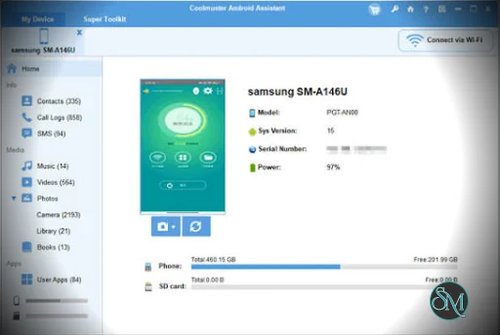


Coolmuster Android Assistant is a desktop utility for managing Android phones and tablets from Windows or macOS. It combines local backups, file transfers, contact management, SMS handling, application management, and data restoration in a single interface.
The software is designed for users who want more control over their phone data from a computer. Instead of relying entirely on cloud synchronization or managing everything through a small touchscreen, users can transfer selected files, export messages, organize contacts, and create local backups.
Features
Coolmuster Android Assistant provides several tools for managing Android devices:
One-click backup and restore: Back up supported phone data to a computer and restore it when needed.
Selective data transfer: Import and export contacts, SMS, call logs, photos, videos, music, documents, ebooks, and supported application data.
Contact management: Add, edit, delete, group, import, and export contacts from the desktop.
SMS management: View, send, forward, delete, and export text messages. Messages can be exported into formats such as HTML, CSV, XML, and TXT.
Call history management: View, export, back up, and restore supported call logs.
Application management: Install APK files, uninstall applications in batches, and back up supported apps.
Media management: Transfer photos, videos, and music between an Android device and a computer.
File organization: Manage supported documents and other files stored on the device.
Screen capture: Take screenshots of the connected Android device from the computer.
Outlook synchronization: Synchronize Android contacts with Outlook.
Multiple-device management: Connect and manage multiple Android devices through the desktop interface.
USB and Wi-Fi connections: Connect a phone using a USB cable or a supported wireless setup.
These features make the application particularly useful for people who regularly archive messages, move files between devices, or maintain local copies of important phone data.
The backup and restore functions are especially valuable when preparing to replace a phone or preserve information before troubleshooting a device.
Performance and Compatibility
Coolmuster Android Assistant supports Windows and macOS desktop systems and works with Android phones and tablets from major manufacturers, including Samsung, Xiaomi, OPPO, OnePlus, vivo, Motorola, and Google Pixel.
The software supports USB connections and wireless connections through a companion Android application. USB is generally the more straightforward choice for large transfers, while Wi-Fi can be convenient for routine file management.
Device access requires appropriate permissions. USB connections may require enabling USB debugging and authorizing the computer on the phone. Wireless connections require the phone and computer to be connected to the same network and configured using the supported companion application.
One limitation is that not every Android function is universally accessible. Application restoration, in particular, can be restricted by Android permissions or by the applications themselves. Users should also verify that their specific device and Android version work correctly before depending on the software for a complete backup.
Although the vendor describes the desktop software as read-only for device protection, several advertised functions explicitly modify phone data, including editing contacts, deleting messages, installing applications, and restoring backups. It is therefore more accurate to treat the software as a data-management utility with both read and write operations.
System Requirements
Coolmuster Android Assistant supports:
Windows
macOS
Android phones and tablets running supported Android versions
USB or compatible Wi-Fi connectivity
A companion Android application is required for the supported wireless workflow. USB connections may require device drivers and USB debugging.
The vendor's technical documentation lists Windows 7 or later and macOS 10.10 or later as desktop requirements. Because operating-system and device compatibility can change, check the current technical specifications before installing it on a newer system.
Pros and Cons
Pros
Convenient local Android backups
One-click backup and restore workflow
Selective file and data transfer
Desktop contact management
SMS export into several formats
Call history management
Batch APK installation and application removal
Photo, video, and music transfers
USB and Wi-Fi connection options
Outlook contact synchronization
Screenshot capture
Supports many Android manufacturers
Useful for phone migration and data archiving
Cons
Windows and macOS only
Some features require USB debugging or additional device permissions
Wireless setup requires a companion application
Certain application restoration operations may fail because of Android restrictions
Compatibility can vary between devices and Android versions
The trial version is limited to scanning and previewing data; importing, exporting, editing, and backup and restore require the full version
How to Install
Download Coolmuster Android Assistant from the official website and install the desktop application for your operating system.
To connect an Android phone through USB:
Launch the desktop application.
Connect the phone using a USB cable.
Select file-transfer mode on the phone if required.
Enable USB debugging if prompted.
Approve the computer-access request displayed on the phone.
Follow the on-screen instructions to finish connecting the device.
For wireless connectivity, select the Wi-Fi connection option in the desktop application and follow the instructions to install or configure the companion Android app. Keep both devices on the same local network.
Once connected, select the relevant data category to manage individual files or create a backup. Before restoring a backup or deleting data, verify the selected device and destination to avoid overwriting important information.
Final Verdict
Coolmuster Android Assistant is a practical Android management tool for users who prefer handling phone data from a desktop computer. Its combination of local backups, selective transfers, contact and SMS management, application handling, and file organization covers many common tasks that otherwise require several different tools.
Its biggest strength is convenience. Users can preserve important messages, export contacts, transfer media, and maintain local backups without relying entirely on cloud services.
However, it is not a complete solution for every Android backup scenario. Device permissions and operating-system restrictions can limit some operations, and users should test compatibility before relying on it for important data. The trial's preview-only restrictions also make it difficult to evaluate the full transfer and restore workflow without purchasing a license.
For Windows and Mac users who frequently transfer Android data or want a desktop-based phone-management utility, Coolmuster Android Assistant is a capable option.