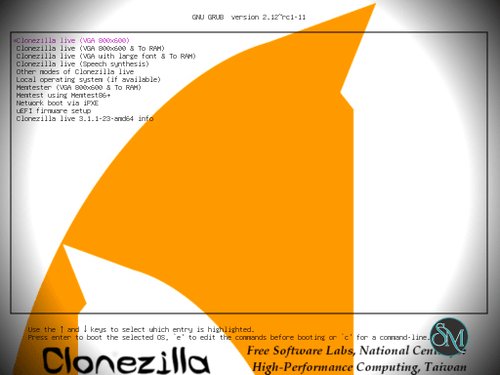


Clonezilla Live is a bootable Linux-based system imaging and disk cloning tool. Unlike typical software that runs within an operating system, Clonezilla boots from a USB drive, CD/DVD, or network server to perform imaging and cloning tasks outside the system being backed up.
It supports disk-to-image, image-to-disk, and disk-to-disk operations, making it ideal for backup, disaster recovery, and hardware migration.
Download Clonezilla Live 3.3.3-37 - Software Mirrors | |
|---|---|
Key Features
Full Disk Imaging and Cloning
Clonezilla Live can create exact images of disks or partitions, capturing all data and file system structures. These images can be stored on local drives, external storage, or network shares.
Cloning a source disk directly to a target disk is also supported for quick system duplication.
Support for Multiple File Systems
It supports many common file systems, including NTFS, FAT, EXT, HFS+, and more. Clonezilla automatically detects file systems and applies intelligent cloning, which helps avoid unnecessary copying of unused space.
Batch and Unattended Deployment
One of Clonezilla’s strong points is its ability to perform batch cloning across many machines using multicasting. This makes it highly useful for imaging large numbers of systems in organizational or lab environments.
Compression and Encryption
Clonezilla can compress images to save storage space. You can choose compression levels to balance speed and image size.
Optional encryption helps protect image contents, which is useful for sensitive data.
Command Line and Advanced Options
While Clonezilla Live includes menu-based navigation, it also supports advanced command line and scripting for automation, scheduling, and custom workflows.
Performance and Usability
Clonezilla is very fast for imaging and cloning operations, especially when operating with local storage or in a networked environment. Because it runs outside the host OS, system files and locked resources do not interfere with the process.
However, the interface is text-based and less intuitive than graphical tools. New users may require time to familiarize themselves with the menus and workflow.
Pros and Cons
Pros
Free and open source
Very reliable and consistent
Supports many file systems
Batch deployment and multicasting
Compression and optional encryption
Cons
Non-graphical interface can be intimidating
Not designed for real-time system use
Requires boot media and restart for operation
Who Should Use Clonezilla Live
Clonezilla Live is ideal for:
IT technicians managing backups and system deployment
Organizations imaging many machines at once
Users migrating to new drives or systems
Anyone needing robust disaster recovery tools
If you need a dependable disk imaging or cloning solution with advanced options and flexibility, Clonezilla Live delivers professional-grade performance in a free package.
Final Verdict
Clonezilla Live is one of the most powerful free tools for disk backups, system imaging, and cloning. While its interface is technical, its reliability and feature set make it invaluable for system administrators and experienced users.
Clonezilla Live is a free, open-source system imaging and cloning solution that lets you back up, restore, or replicate entire disks and partitions. It is widely used by IT professionals, technicians, and advanced users who need a powerful yet lightweight tool for system deployment, recovery, or migration.
Clonezilla Live earns high marks for reliability and performance, especially in batch deployment scenarios.