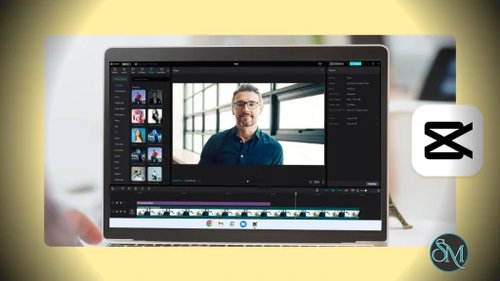


CapCut for macOS is a free video editing software developed by ByteDance. It allows users to create, edit, and export high quality videos directly on Mac computers. The software focuses on simplicity while still providing essential professional features such as timeline editing, filters, transitions, and audio tools.
CapCut is widely used by content creators on platforms like YouTube, TikTok, and Instagram due to its fast workflow and ready to use templates.
Key Features of CapCut for macOS
Intuitive Timeline Editing
CapCut provides a clean timeline interface that makes cutting, trimming, and arranging clips simple and efficient.
Built In Effects and Filters
Users can enhance videos using a wide range of visual effects, color filters, overlays, and animations.
Advanced Text and Subtitles
CapCut includes animated text styles and automatic subtitle generation, making it ideal for short form content and social media videos.
Audio Editing Tools
The software offers background music, sound effects, voiceover recording, and audio synchronization tools.
AI Powered Features
CapCut includes AI based tools such as background removal, smart captions, and visual enhancements that speed up the editing process.
High Quality Export
Videos can be exported in high resolution with optimized settings for different platforms.
Optimized for macOS
CapCut runs smoothly on macOS and takes advantage of modern hardware for fast rendering and playback.
Benefits of Using CapCut for macOS
Free and Feature Rich
CapCut offers advanced features without requiring a paid subscription, making it accessible to all users.
Beginner Friendly
The interface is easy to learn, even for users with no prior video editing experience.
Fast Content Creation
Templates and presets help creators produce engaging videos quickly.
Ideal for Social Media
CapCut is optimized for vertical and short form videos used on modern platforms.
Regular Updates
The software is frequently updated with new features and improvements.
CapCut for macOS is a powerful yet easy to use video editing solution that combines professional features with a beginner friendly workflow. Its wide range of effects, AI powered tools, and smooth performance make it an excellent choice for Mac users who want to create high quality videos quickly. Whether for social media, personal projects, or online content, CapCut for macOS delivers impressive results without complexity.
CapCut for macOS is a modern video editing application designed for creators who want professional results without a steep learning curve. Originally popular on mobile platforms, CapCut has evolved into a capable desktop editor for Mac users, offering advanced editing tools, smooth performance, and built in creative effects suitable for social media, content creation, and casual video projects.