

ArtCraft is a desktop creative application designed to give artists, designers, and filmmakers more control over AI-generated content. Instead of relying entirely on text prompts, it combines AI generation with visual composition tools, allowing users to plan scenes, arrange assets, control camera placement, and refine creative results.
The application supports image, video, audio, 3D mesh, and virtual-world generation through a catalog of AI models and external providers. Its workflow combines conventional creative tools with generative AI, making it useful for concept art, storyboarding, visual experimentation, and AI-assisted filmmaking.
ArtCraft is built with Rust and Tauri and is available as a desktop application. The project also includes a separate native Rust interface for image, video, and audio generation. While its ambitious toolset makes it worth exploring, some features remain under development, and many generation workflows depend on online services rather than running entirely on the user's computer.
Features
AI Image Generation
ArtCraft supports text-to-image generation through several model families, including Nano Banana, GPT Image, FLUX, and Seedream.
Users can start with a text prompt and select an appropriate model for the desired result. The application also supports prompted image editing, allowing users to describe changes to an existing image rather than generating an entirely new composition.
The ability to choose among different models gives creators flexibility when balancing visual style, prompt interpretation, and the needs of a particular project. However, results and available controls vary by model and provider.
AI Video Generation
The application supports image-to-video workflows and multiple video-generation model families, including Seedance, Kling, Veo, Sora, Vidu, and Flux.
Depending on the selected model, users can configure generation parameters such as duration, aspect ratio, resolution, and quality. Reference images and keyframes help guide the generation process, while the generation feed provides access to completed and ongoing jobs.
These tools are useful for producing animated concepts, short visual sequences, and experimental filmmaking assets. Availability varies across models, and some listed integrations may be disabled or restricted in the desktop application.
Visual Composition in 2D and 3D
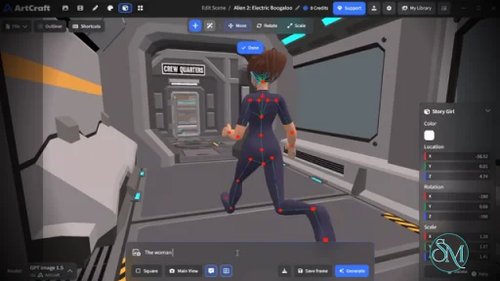
ArtCraft's main distinction is its emphasis on composition before generation. Rather than relying exclusively on prompt engineering, users can construct a scene and use it to guide the output.
Its visual tools include:
2D image compositing: Combine image layers, backgrounds, foreground objects, and drawing tools.
3D image compositing: Arrange backdrops, props, and other elements in a scene with depth.
Image-to-3D conversion: Turn an image into a 3D mesh that can be positioned, rotated, and framed.
Scene blocking: Use 3D assets to plan camera angles and object placement.
Character posing: Use posed figures to guide character placement and composition.
Background removal: Isolate subjects for reuse as scene elements.
These capabilities make ArtCraft more than a simple AI image generator. They give users ways to establish composition and spatial relationships before generating the final image or video.
Character Consistency and Scene Planning
Maintaining a consistent character or environment across multiple images can be difficult with prompt-only workflows. ArtCraft addresses this challenge with tools for character identity transfer, image-to-location workflows, and scene blocking.
Creators can plan a location, establish the positions of objects or characters, and set camera framing before generating individual shots. This approach is particularly useful for storyboards, recurring characters, and visual narratives that require a degree of spatial continuity.
These tools help guide the generation process, but they do not guarantee perfect character identity or scene consistency. The outcome still depends on the selected model and how effectively it follows the supplied references.
AI Music and Sound Generation
ArtCraft also integrates audio-generation models, including Suno and Seed Audio.
Supported workflows include music creation, remixing, sound generation, and audio references. Depending on the model, users can configure musical characteristics such as instrumental output, lyrics, tempo, key, and other generation settings.
Having image, video, and audio tools within one application can simplify experimentation when creating multimedia projects. However, model-specific controls and capabilities differ, and audio generation may require an account or access to the relevant provider.
3D Meshes and Virtual Worlds
The application supports 3D mesh generation through model families such as Hunyuan 3D, Tripo3D, Meshy, and Rodin.
It also integrates virtual-world generation services, including World Labs Marble and TripoSplat for workflows involving Gaussian splats.
These features allow users to explore AI-generated objects and environments for visualization, scene construction, and creative experimentation. Generated meshes should still be checked for topology, geometry quality, and suitability before being used in demanding production pipelines.
Model Selection and Provider Integrations
ArtCraft brings multiple AI model families into a unified creative interface. Users can select a model based on the task, configure available parameters, and manage generated assets through a shared workflow.
The project supports its own generation services as well as selected external integrations. Some workflows can use a user's own provider account or API key, depending on the integration.
This flexibility can reduce the need to switch between separate AI websites. However, model availability is not uniform: certain models are marked as disabled or restricted, and supported providers may change as the project evolves.
Generation History and Asset Library
ArtCraft includes a generation feed and library for managing creative work. Users can review completed jobs, preview outputs, revisit prompts, recreate results, download assets, and organize their workflow around generated content.
The interface also supports reference assets, batch downloads in applicable views, and media previews. These tools help creators iterate on previous results rather than treating every generation as a disconnected task.
For users producing many images or video clips, having generation history and asset management integrated into the application can make creative work easier to track.
Download ArtCraft v0.41.0 - Software Mirrors |
|---|
ArtCraft v0.41.0 for Windows |
ArtCraft v0.41.0 for macOS |
ArtCraft v0.41.0 Source Code |
ArtCraft v0.41.0 Release Notes:See the assets below to download this version and install. |
Performance and Compatibility
ArtCraft is built with Rust and Tauri, combining a native application shell with a modern frontend. The repository also includes a separate native Rust application that uses an egui interface instead of Tauri.
The main desktop application is available for Windows and macOS through stable releases. Linux users can build the application from source, although this requires additional development tools and configuration.
The separate native Rust interface currently focuses on image, video, and audio generation. Other creative tools are still being developed in that interface, so its functionality is not yet equivalent to the main application.
Performance depends on the selected AI model, the complexity of the scene, network conditions, and the generation provider. Many generation tasks rely on hosted services, so ArtCraft should not be considered a fully offline AI creation suite. Some integrations allow users to connect their own accounts or API keys.
The project is actively evolving, and model availability can change. Some models listed in the repository are disabled or restricted in the desktop application. Users should verify that their preferred models and workflows are currently supported before adopting ArtCraft for an important project.
System Requirements
The project does not publish one universal minimum hardware specification for all supported workflows. Its documented development requirements include:
Operating systems: Windows and macOS for stable desktop releases; Linux builds are available through the source-code workflow.
Development runtime: Rust and Cargo, Node.js 20 or later, and npm for building the main application.
Desktop framework: Tauri and its platform-specific dependencies.
Internet connection: Required for hosted AI generation, account authentication, and downloading assets from online providers.
API credentials: May be required for selected third-party integrations, depending on the provider and workflow.
Storage: Sufficient space for the application, generated media, downloaded assets, and project files.
For ordinary users, downloading a prebuilt release is easier than compiling the application. Developers who want to build from source should follow the repository's development setup guide.
Pros and Cons
Pros
Combines AI image, video, audio, and 3D asset generation in one creative environment.
Supports multiple AI model families and providers.
Offers 2D and 3D composition tools for greater control over generated content.
Includes scene blocking, character posing, and character identity workflows.
Supports reference images, keyframes, and configurable generation parameters.
Provides a generation feed and asset library for managing creative work.
Built with Rust and Tauri, with an additional native Rust interface under development.
Source code and build instructions are publicly available.
Supports Windows and macOS desktop releases, with a source-build path for Linux.
Cons
Many generation workflows depend on online services.
Some model integrations are disabled or restricted in the desktop application.
Certain creative tools remain incomplete, particularly in the separate native Rust interface.
Results and available controls vary across AI models and providers.
Generated 3D assets may require additional cleanup before professional production use.
Building from source requires familiarity with Rust, Node.js, and the desktop development toolchain.
The application's licensing and third-party notices should be reviewed before redistributing modified builds or using the code commercially.
How to Install
Option 1: Download a Desktop Release
Visit the ArtCraft GitHub repository.
Open the Releases section or follow the official download link.
Download the package appropriate for Windows or macOS.
Install or extract the package according to its format.
Launch ArtCraft and sign in if prompted.
Select an image, video, or audio generation workflow.
Choose an available model, enter a prompt, and configure the generation settings.
Generate your first asset and review the result in the generation feed.
Some integrations require additional account authentication or provider configuration before they can be used.
Option 2: Build from Source
Install Rust, Node.js, npm, and the prerequisites for Tauri on your operating system. Then clone the repository:
git clone https://github.com/storytold/artcraft.git
cd artcraft
Follow the project's development setup guide to install frontend dependencies and start the application.
For the separate native Rust interface, run:
cargo run -p artcraft_native --releaseThis launches the native interface, which currently supports image, video, and audio generation. Other tools may still direct users to the main application.
For platform-specific dependencies and build instructions, consult the official development documentation rather than relying on a generic build command alone.
Final Verdict
ArtCraft is a promising creative application for people who want more control over AI-generated images, videos, audio, and 3D assets. Its strongest feature is the emphasis on visual composition: users can plan scenes, position objects, and guide camera framing instead of relying exclusively on text prompts.
The broad model catalog and integrated generation feed also make it useful for creators who regularly experiment with different AI services. Artists, designers, and filmmakers can benefit from having multiple generation workflows in one application.
However, ArtCraft is not yet a complete replacement for established creative suites. Model availability varies, many workflows depend on online services, and some tools remain under development. Users should also distinguish between the publicly available source code and the terms governing commercial use, redistribution, and third-party components.
ArtCraft is worth trying if you want an AI creative workspace that combines image and video generation with more deliberate scene composition. Its visual tools make it more interesting than a basic prompt-based generator, although its evolving feature set and dependence on online providers may limit its suitability for established production pipelines.