
AOMEI Cloner is a Windows disk cloning utility designed to help users migrate operating systems, clone hard drives, transfer data to SSDs, and replace aging storage devices without reinstalling Windows. Unlike traditional backup software, AOMEI Cloner focuses specifically on cloning disks and partitions, making it a straightforward solution for hardware upgrades and drive replacements.
Replacing a hard drive or upgrading to an SSD often involves reinstalling Windows, applications, and personal files. AOMEI Cloner simplifies this process by copying an entire drive or selected partitions directly to another storage device.
The software supports HDDs, SATA SSDs, NVMe SSDs, external drives, USB storage devices, and removable media. It is compatible with Windows 11, Windows 10, Windows 8.1, Windows 8, Windows 7, and Windows Server editions.
Key Features of AOMEI Cloner
System Clone
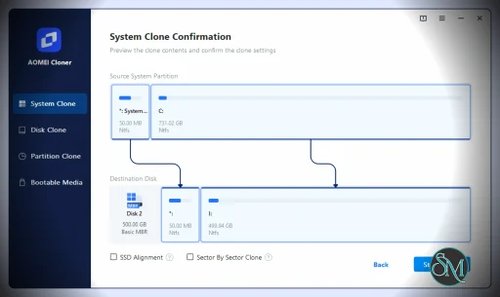
One of the most useful features is System Clone, which copies only the partitions required to boot Windows.
This allows users to migrate Windows to a new SSD without copying unnecessary data from the original drive. It is especially helpful when moving from a large hard drive to a smaller SSD, provided the used space fits on the destination drive.
Disk Clone
Disk Clone copies an entire storage device, including:
Windows installation
Applications
Personal files
Boot information
Hidden partitions
Partition layout
This option is ideal when replacing an old drive or upgrading to a larger SSD.
Partition Clone
If only a specific partition needs to be transferred, Partition Clone allows individual partitions to be copied without cloning the entire disk.
This provides greater flexibility for users managing multiple drives or storage configurations.
Intelligent Clone
AOMEI Cloner includes Intelligent Clone, which copies only sectors containing data instead of every sector on the source drive.
This reduces cloning time and makes it possible to migrate to a smaller destination drive when enough free space is available.
Sector-by-Sector Clone
For situations where every sector must be duplicated exactly, Sector-by-Sector Clone performs a complete copy of the source disk, including unused sectors.
This can be useful for forensic work, exact disk replication, or preserving specialized partition layouts.
SSD Alignment
When cloning to an SSD, the software offers SSD Alignment to optimize partition alignment for better performance and reduced wear.
This helps maximize SSD read and write performance after migration.
Wide Hardware Support
AOMEI Cloner supports a broad range of storage hardware, including:
SATA HDD
SATA SSD
NVMe SSD
M.2 SSD
USB drives
External hard drives
Memory cards
This flexibility makes it suitable for both desktop and laptop upgrades.
Bootable Clone
After cloning, the destination drive is intended to be bootable without reinstalling Windows or restoring from a backup.
For most users, this is the primary benefit of using dedicated cloning software instead of manually copying files.
Get Discount 20% OFF using "SWMR" Coupon code for the AOMEI Products below:
AOMEI Cloner Professional (Lifetime Upgrades / 1 Computer)
AOMEI Cloner Professional (Yearly / 1 Computer)
AOMEI Cloner Professional (1 Year / 1 Computer)
AOMEI Backupper Server (Current Version)
AOMEI Backupper Professional + Lifetime Upgrades(2 PCs )
AOMEI Backupper Professional (1Year Upgrade)
AOMEI Backupper Technician + Lifetime Upgrades (Unlimited PCs)
AOMEI Backupper Technician Plus (Current Version / Unlimited PCs & Servers)
AOMEI Backupper Technician Plus + Lifetime Upgrades (Unlimited PCs & Servers)
AOMEI OneKey Recovery Professional
AOMEI OneKey Recovery Professional (Family License)
FoneTool Professional (1 Year / 5 PCs)
FoneTool Professional (Lifetime Upgrades / 5 PCs)
AOMEI Partition Assistant Professional (Lifetime Upgrades / 2 PCs)
FoneTool Professional (Yearly / 5 PCs)
Performance and User Experience
AOMEI Cloner is designed for simplicity. The interface guides users through selecting the source drive, destination drive, cloning method, and optional settings.
The cloning wizard minimizes the chance of mistakes, although users should still verify they have selected the correct destination drive because cloning overwrites existing data.
Performance largely depends on the speed of the source and destination drives. SSD-to-SSD cloning is generally much faster than HDD-to-HDD transfers, while Intelligent Clone helps reduce unnecessary copying.
The software is particularly suitable for users upgrading from mechanical hard drives to SSDs because the migration process usually requires only a few steps.
Pros
Easy-to-use interface.
System, disk, and partition cloning.
Intelligent Clone reduces cloning time.
Sector-by-sector cloning available.
SSD optimization and alignment.
Supports HDDs, SATA SSDs, and NVMe SSDs.
Bootable cloned drives.
Compatible with modern Windows versions.
Good hardware compatibility.
Cons
Windows only.
Focused solely on cloning rather than complete backup management.
Some advanced features require the Professional edition.
Cloning permanently overwrites the destination drive.
No support for macOS or Linux.
Who Should Use AOMEI Cloner?
AOMEI Cloner is an excellent choice for home users, IT technicians, and small businesses that frequently replace or upgrade storage devices.
It is especially useful when migrating Windows from an HDD to an SSD, replacing a failing drive, or transferring an existing installation to larger storage without reinstalling the operating system.
Users looking for a simple migration tool rather than a full backup suite will likely appreciate its focused design.
Final Verdict
AOMEI Cloner delivers exactly what its name suggests. It is a dedicated disk cloning solution that focuses on migrating Windows systems quickly and reliably.
Its support for Intelligent Clone, SSD optimization, bootable disk cloning, and multiple cloning modes makes it a practical tool for both beginners and experienced users performing storage upgrades.
While it does not replace comprehensive backup software, it excels at one specific task: moving an existing Windows installation to another drive with minimal effort.