


Antamedia Enterprise WiFi Premium is an enterprise-oriented WiFi management solution designed for businesses that need centralized control over guest access, network authentication, billing, and customer engagement. It is particularly relevant to hotels, Internet service providers, system integrators, retail chains, and organizations operating multiple WiFi locations.
Rather than providing only basic wireless access management, the platform combines captive portals, RADIUS authentication, Internet access plans, vouchers, marketing campaigns, and network analytics. This allows businesses to manage guest WiFi services while controlling how users connect, how much bandwidth they consume, and how access is monetized.
The Enterprise Premium offering is designed for larger deployments, supporting multiple gateways, access points, businesses, and locations. It also connects WiFi management with additional Antamedia services, including WiFi Tickets, hotel PMS integration, Engage, and Digital Guide.
Features
1. Centralized WiFi Management
Antamedia provides a centralized management platform for controlling WiFi access across multiple locations.
Administrators can manage network access, user accounts, Internet plans, authentication settings, and connected hardware from a single dashboard.
Key capabilities include:
Centralized management of multiple WiFi locations.
Multiple gateway and router management.
Access point monitoring and administration.
Multiple SSIDs and network configurations.
Centralized user and customer account management.
Network usage monitoring and reporting.
Remote management of supported network devices.
The Enterprise Premium subscription supports up to 10 gateways or routers and 100 access points, with unlimited users according to the published plan specifications.
This makes it suitable for organizations that operate several venues or provide managed WiFi services to multiple customers.
2. Captive Portal and Custom Splash Pages
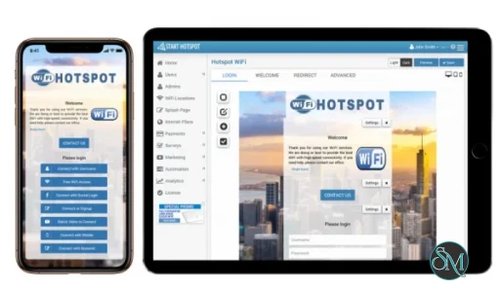
The captive portal is one of the platform's main components. It allows businesses to present a branded login page before granting users Internet access.
Instead of providing unrestricted WiFi connectivity, administrators can require guests to authenticate, accept terms, provide contact information, or select an Internet plan.
Captive portal capabilities include:
Custom logos, colors, backgrounds, and page layouts.
Multiple authentication methods.
Custom login forms and guest registration.
Terms of service and consent collection.
Redirect pages after successful authentication.
Promotional content and advertising.
Different splash pages for individual locations or businesses.
This is particularly useful for hotels, restaurants, shopping centers, airports, and other public venues that want to maintain a consistent customer experience across their WiFi networks.
3. RADIUS Authentication and Access Control
Antamedia includes AAA/RADIUS functionality for authenticating users and controlling network access.
RADIUS authentication allows supported routers and access points to communicate with the management platform when users connect to a wireless network.
Administrators can use this functionality to:
Authenticate users through username and password credentials.
Manage user sessions.
Track connection and disconnection activity.
Apply access policies.
Control bandwidth consumption.
Enforce Internet usage limits.
Manage user accounts across multiple locations.
RADIUS accounting also provides information about user sessions and network consumption, making it useful for billing and operational reporting.
Hardware compatibility depends on the supported authentication and network configuration of the access point, router, or controller.
4. Vouchers and Paid WiFi Access
Businesses can use Antamedia to provide free, prepaid, or paid Internet access.
Its voucher system is useful for venues that sell temporary Internet access or distribute WiFi credentials to guests.
Available capabilities include:
Generating username and password accounts.
Creating prepaid access vouchers.
Defining Internet access plans.
Applying time-based restrictions.
Setting bandwidth quotas.
Controlling upload and download speeds.
Limiting the number of connected devices.
Managing account expiration and session rules.
This makes the platform suitable for hotels, cafés, public hotspots, and ISPs that want to monetize their wireless infrastructure.
Administrators can also configure different Internet packages for different customer categories, allowing businesses to offer basic free access alongside paid premium connectivity.
5. Internet Plans and Bandwidth Management
Antamedia provides Internet plan management for controlling how users consume network resources.
Administrators can define different access policies based on speed, usage, and session duration.
Available controls include:
Download and upload speed limits.
Bandwidth quotas.
Time-based access restrictions.
Daily and monthly usage limits.
Login schedules.
Device connection limits.
Session management.
Internet plan expiration rules.
These controls help prevent individual users from consuming excessive network resources and allow businesses to provide different connectivity packages.
For example, a hotel could provide complimentary access with limited bandwidth while offering a premium plan for guests who require faster connectivity.
6. Multi-Business and Multi-Location Management
The Enterprise Premium plan is designed for organizations that manage more than one business or physical location.
Instead of configuring every venue independently, administrators can manage multiple locations through a centralized platform.
Its multi-business capabilities are useful for:
Hotel groups and resort chains.
Retail chains and shopping centers.
Internet service providers.
Managed WiFi operators.
System integrators.
Organizations operating public hotspots.
Each location can have its own branding, splash pages, Internet plans, and access settings.
The platform also supports customer hierarchy and partner management workflows, allowing service providers to organize customers and locations under a centralized administration structure.
This is particularly valuable for companies that want to offer WiFi services to other businesses under their own management model.
7. WiFi Marketing and Customer Engagement
Antamedia extends WiFi management beyond authentication by providing customer engagement and marketing capabilities.
The captive portal can become a communication and promotional channel, allowing businesses to interact with guests before or after they connect.
Marketing functionality includes:
Image and video advertisements.
Promotional splash pages.
Customer data collection.
Email campaigns.
Customer surveys and feedback forms.
Social WiFi authentication.
Promotional redirects.
Customer engagement workflows.
Businesses can use these tools to promote products, collect customer feedback, and encourage repeat visits.
For example, a restaurant could display promotional content on its WiFi login page, collect customer contact information with appropriate consent, and use follow-up campaigns to promote special offers.
8. Hotel PMS Integration
Antamedia provides a Property Management System integration for hospitality environments.
This allows WiFi access management to become part of a hotel's guest service workflow.
Depending on the supported PMS integration, hotels can connect guest access with their existing property management operations.
This is useful for:
Guest authentication.
Room-based Internet access.
Managing guest connectivity.
Integrating WiFi services with hotel operations.
Providing a more convenient Internet experience.
The Enterprise Premium plan includes PMS interface functionality. However, compatibility depends on the supported PMS system and the integration configuration.
9. WiFi Tickets Application
The platform includes access to the WiFi Tickets application, which helps front-desk employees and venue staff generate physical WiFi access credentials.
This is particularly useful in environments where guests receive printed Internet access tickets instead of registering through a digital portal.
The application supports:
Creating voucher tickets.
Printing username and password credentials.
Reprinting previously generated tickets.
Issuing multi-device access tickets.
Managing guest connectivity at service counters.
The Enterprise Premium offering includes up to 10 WiFi Tickets applications for supported Android devices.
This can simplify guest WiFi distribution in hotels, airports, cafés, and other public venues.
10. HotspotOS and Access Point Management
Antamedia provides HotspotOS for supported access points, allowing compatible hardware to become part of its centrally managed WiFi environment.
The integrated controller provides additional network management capabilities.
Depending on the hardware and deployment, administrators can manage:
SSID configurations.
Access point status.
Connected users.
Network traffic.
Device performance.
Remote restarts.
Firmware and software updates.
Wireless settings.
The platform also supports integration with established networking vendors, including Ubiquiti, Aruba, MikroTik, Cisco, Ruckus, TP-Link, and other compatible devices.
However, not every access point supports every management feature. Some capabilities require compatible hardware or HotspotOS installation.
11. Analytics and Reporting
Antamedia provides centralized reporting tools for monitoring WiFi usage and understanding guest activity.
Administrators can review network and customer information to evaluate how their wireless infrastructure is being used.
Reporting capabilities include:
User activity monitoring.
Login and session information.
Bandwidth consumption.
Access statistics.
Location-based reporting.
Customer engagement data.
Network usage analytics.
These reports can help businesses identify usage patterns, monitor network performance, and evaluate the effectiveness of their WiFi marketing campaigns.
For managed WiFi providers, centralized reporting is particularly useful for monitoring multiple customer locations.
12. Digital Guide and Engage Integration
The Enterprise Premium plan also includes access to additional Antamedia services, extending its capabilities beyond WiFi authentication.
Digital Guide provides a digital concierge experience for hospitality businesses. Guests can access information and services through a browser without installing a dedicated mobile application.
Depending on configuration, Digital Guide can provide:
Hotel and resort information.
Restaurant and service information.
Guest service requests.
Local recommendations.
Digital menus and offers.
Booking and purchasing workflows.
Antamedia Engage provides customer engagement functionality, including contact management, campaigns, and communication tools.
These integrations allow businesses to combine guest WiFi with additional customer-facing services instead of operating separate systems for every interaction.
Performance and Compatibility
Antamedia Enterprise WiFi Premium is designed for multi-location WiFi deployments where centralized administration and reliable authentication are important.
Its architecture supports multiple gateways, access points, and locations, allowing businesses to manage their wireless services without maintaining an independent management system at every venue.
The platform supports compatible RADIUS-capable networking equipment from several manufacturers, including:
Ubiquiti.
Aruba.
MikroTik.
Cisco.
Ruckus.
TP-Link.
LigoWave.
Alcatel.
Actual compatibility depends on the hardware model, firmware, controller configuration, and supported authentication methods.
One important distinction is that Antamedia offers both hosted WiFi Hotspot services and a self-hosted Enterprise WiFi System. The hosted option is managed through Antamedia's infrastructure, while the self-hosted Enterprise WiFi System runs on a customer-controlled server or private cloud VM.
Organizations requiring complete infrastructure and database control should evaluate the self-hosted deployment separately rather than assuming every Enterprise Premium subscription provides the same deployment architecture.
System Requirements
System requirements depend on the selected Antamedia deployment model.
Hosted WiFi platform
Supported web browser for dashboard administration.
Internet connectivity for accessing the management platform.
Compatible gateways, routers, and access points.
RADIUS configuration where required.
Supported Android devices for WiFi Tickets applications.
Self-hosted Enterprise WiFi System
Dedicated Windows server or compatible virtual machine, according to the current deployment requirements.
Multi-core processor.
Sufficient memory for connected users and network services.
SSD storage for application data and databases.
Network connectivity between the server and managed gateways.
Supported RADIUS-capable networking equipment.
Antamedia's published deployment documentation recommends a virtual machine with approximately 4 CPU cores, 16 GB RAM, and 128 GB SSD storage as a starting configuration. Actual requirements depend on the number of access points, concurrent users, and enabled services.
Pros and Cons
Pros
Centralized WiFi management for multiple locations.
Supports up to 10 gateways and 100 access points in the Enterprise Premium plan.
Unlimited user accounts according to the published plan.
Captive portal with customizable branding.
AAA/RADIUS authentication and accounting.
Free and paid Internet access management.
Voucher generation and prepaid WiFi access.
Bandwidth, quota, and session controls.
WiFi marketing, video advertisements, and customer surveys.
Multi-business and multi-location management.
Hotel PMS integration.
WiFi Tickets application support.
Integration with Digital Guide and Engage.
Supports networking equipment from multiple manufacturers.
Suitable for ISPs, hotels, system integrators, and managed WiFi providers.
Cons
Advanced configuration may require networking and RADIUS experience.
Hardware compatibility varies between access point models.
Some access point management features require HotspotOS-compatible hardware.
Self-hosted deployments require server infrastructure and maintenance.
PMS and third-party integrations depend on supported systems.
Additional marketing and engagement functionality may require configuration and operational effort.
The distinction between hosted Enterprise Premium and the self-hosted Enterprise WiFi System can be confusing when selecting a deployment.
How to Install
The installation process depends on whether you choose the hosted WiFi platform or the self-hosted Enterprise WiFi System.
Hosted Deployment
Visit the official Antamedia website.
Register for an account or request an Enterprise demonstration.
Select the appropriate Enterprise subscription.
Add your supported gateways, routers, and access points.
Configure the RADIUS authentication settings where required.
Create WiFi locations and customize their captive portals.
Configure Internet plans, vouchers, and access restrictions.
Test authentication and connectivity before deploying the service to guests.
Self-Hosted Enterprise WiFi
For organizations requiring their own infrastructure:
Contact Antamedia to confirm the Enterprise WiFi deployment requirements.
Prepare a dedicated Windows server or compatible virtual machine.
Confirm the required CPU, memory, storage, and network configuration.
Arrange the Enterprise WiFi installation with Antamedia.
Configure the domain, database, RADIUS services, and network controller.
Connect supported gateways and access points.
Configure customer accounts, Internet plans, and captive portals.
Test authentication, bandwidth policies, and reporting before production deployment.
The self-hosted Enterprise WiFi System is a larger deployment than simply connecting access points to the hosted platform. Installation and infrastructure requirements should be confirmed with Antamedia before implementation.
Final Verdict
Antamedia Enterprise WiFi Premium is a comprehensive WiFi management solution for organizations that need more than basic guest wireless access. Its combination of captive portals, RADIUS authentication, vouchers, bandwidth controls, multi-location management, and marketing tools makes it suitable for hotels, ISPs, retail chains, and managed WiFi providers.
The ability to manage multiple businesses and locations from one platform is particularly valuable. Its integration with hotel PMS systems, WiFi Tickets, Digital Guide, and Engage also provides additional functionality for hospitality and customer-facing businesses.
However, the platform is not a simple plug-and-play WiFi controller. Organizations need compatible networking equipment, appropriate RADIUS configuration, and a clear understanding of the hosted versus self-hosted deployment models.
For businesses operating multiple WiFi locations or providing managed guest connectivity, Antamedia Enterprise WiFi Premium offers a broad set of tools for controlling access, monetizing wireless services, and managing customer interactions.
Sources: