


Aiseesoft Data Recovery is a desktop application designed to help users recover deleted or lost files from computers and external storage devices. It can help with common data loss situations, including accidental deletion, emptied Recycle Bins, formatted partitions, corrupted file systems, and computer crashes.
The software provides a straightforward recovery process. Users select a drive, scan for recoverable files, preview the results where supported, and choose which items to restore. It supports a broad range of file formats and storage devices, making it suitable for home users who need to retrieve important files without using command-line recovery utilities.
Features
Recover Deleted and Lost Files
Aiseesoft Data Recovery can scan storage devices for deleted or missing photos, videos, audio files, documents, emails, and other supported data. It is intended for situations such as accidental deletion, partition problems, formatting, and certain system failures.
Recovery success depends on the cause of data loss, the condition of the storage device, and whether the original data has been overwritten.
Support for Multiple File Types
The software advertises support for more than 2,000 file types. These include common image formats, office documents, PDFs, audio files, videos, email files, and compressed archives.
This broad format coverage makes it useful for recovering different types of personal and work-related files from a single interface. However, support for a file format does not guarantee that every file can be recovered intact.
Hard Drive and External Storage Recovery
Aiseesoft can scan internal and external hard drives, USB flash drives, memory cards, and other supported storage devices. This allows users to attempt recovery from removable media as well as computer storage.
The software also provides recovery options for disk partition problems and certain crashed-computer scenarios.
Quick Scan and Deep Scan
The application offers a quick scan for finding potentially recoverable files and a deep scan for searching more extensively when the initial results are incomplete.
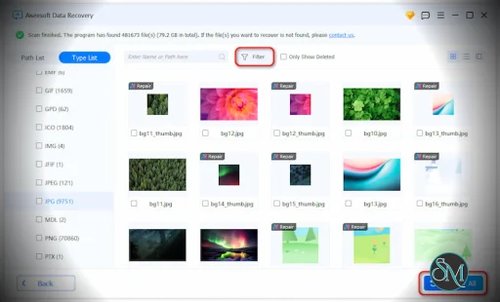
Users can filter scan results by file type and other available criteria to locate specific items. Previewing recoverable files, when supported, can also help identify the correct files before restoration.
Crashed Computer Recovery
Aiseesoft includes a crashed-PC recovery workflow that uses a bootable USB drive to help access data when a computer cannot start normally.
This feature can be useful when the operating system is damaged but the storage device remains readable. It is not a substitute for professional recovery when a drive has physical damage or is failing.
Windows and macOS Support
The product is offered for both Windows and Mac computers. Users can select the appropriate installer for their operating system and follow the application's recovery workflow.
Check the current system requirements before installation, particularly when using a newer operating system or Apple silicon Mac.
Performance and Compatibility
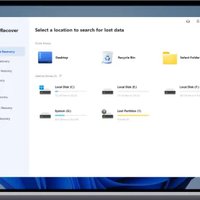
Aiseesoft Data Recovery is designed around a graphical interface rather than a complicated manual recovery process. Selecting a drive, scanning its contents, filtering the results, and restoring selected files makes the application accessible to users with limited technical experience.
Scan time depends on storage capacity, drive speed, the amount of data being examined, and the selected scan mode. A quick scan may finish relatively quickly, while a deep scan of a large or damaged drive can take considerably longer.
The software advertises compatibility with common storage devices and a wide range of file types. Nevertheless, actual recovery results vary. Deleted data may become unrecoverable after being overwritten, and modern SSDs may use TRIM to make deleted data unavailable. File-system damage and hardware faults can also affect results.
For the best chance of recovery, stop writing new data to the affected drive. Install the recovery software on a different drive and, where possible, save recovered files to another storage device. This reduces the risk of overwriting the files you are trying to restore.
System Requirements
Aiseesoft provides separate Windows and macOS editions. Its technical specifications should be checked on the official product page because supported operating systems and hardware requirements can change.
General requirements include:
A supported Windows PC or Mac.
Sufficient free disk space to install and run the application.
A connected storage device that the operating system can access.
An additional destination drive or partition for saving recovered files.
For crashed-computer recovery, you may also need a USB drive to create bootable recovery media.
Pros and Cons
Pros
Straightforward graphical interface suitable for beginners.
Supports common documents, photos, videos, audio files, and other data.
Can scan internal drives, USB storage, and memory cards.
Includes quick-scan and deep-scan options.
Provides file filtering and preview features.
Offers a bootable recovery workflow for certain crashed-computer situations.
Available for Windows and macOS.
Cons
Successful recovery is not guaranteed, particularly when data has been overwritten or storage is damaged.
Deep scans can take a long time on large drives.
Full recovery capabilities may require a paid license.
The recovery interface cannot overcome every file-system, encryption, or hardware problem.
Users should verify the recovery and licensing limitations of the free edition before relying on it for an important recovery task.
How to Install
Visit the official Aiseesoft Data Recovery website.
Download the installer for your Windows PC or Mac.
Run the installer and follow the on-screen instructions.
Launch the application and select the drive or storage device where the files were lost.
Start a scan and allow the software to search for recoverable data.
Review the results and use the available filters or preview tools to locate the files you need.
Select the files and restore them to a different drive or storage device whenever possible.
Important: If files have disappeared from a drive, avoid downloading, installing, or saving anything to that same drive until you have attempted recovery. Additional writes can reduce the chance of retrieving deleted data.
Final Verdict
Aiseesoft Data Recovery is a practical option for users who want a graphical tool to attempt recovery of accidentally deleted files, missing documents, photos, videos, and other data from common storage devices. Its multiple scan modes, file filtering, and support for external storage make it accessible for everyday recovery tasks.
Its main limitation is that no recovery application can guarantee successful restoration. Results depend on the storage medium, the nature of the data loss, and whether the original data remains recoverable. Users should also confirm what the free edition allows before purchasing a license.
For straightforward file recovery on Windows or Mac, Aiseesoft Data Recovery is worth considering, provided users understand these limitations and take care not to overwrite the affected data.