Picture Collage Maker Discount 20% OFF
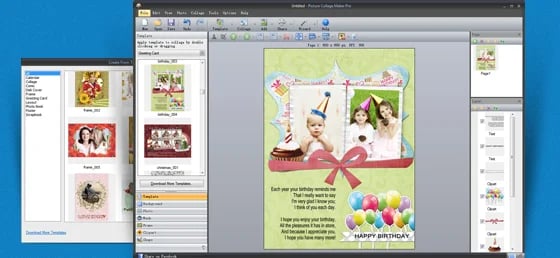
Picture Collage Maker is a desktop software tool (Windows / Mac) aimed at users who want to create collages, scrapbooks, greeting cards, photo calendars, posters — essentially creative layouts built from their photos. It provides templates, drag-and-drop editing, decorations (clipart, masks, frames, text), and exports in a variety of formats.
(4.3)
Operating System
WindowsDate Published
Mon Oct 20 2025Picture Collage Maker Discount 20% OFF
A Creative Tool for Photo-Collages
Picture Collage Maker is a desktop software tool (Windows / Mac) aimed at users who want to create collages, scrapbooks, greeting cards, photo calendars, posters — essentially creative layouts built from their photos. It provides templates, drag-and-drop editing, decorations (clipart, masks, frames, text), and exports in a variety of formats.
The idea is to make collage creation accessible — even for users without deep design skills — while still offering customization options.
Key Features & Capabilities
Here are some of the major features and what users can expect:
- Templates & Themes: The software includes many pre-designed templates for occasions like travel, birthday, wedding, anniversary, holiday, etc. For example, one version offered “180+ professional templates and 130+ extra templates for free download”.
- Drag & Drop Photo Placement: Users can import their photos (often by dragging in), move/rotate/resize them, crop to fit frames, etc. A review noted: “All you need to do is drag and drop your photos into the collage.”
- Decorations & Embellishments: Add clipart, frames, background patterns, text with styling (fill, glow, outline), masks, etc., to personalize your collage.
- Multiple Output Formats: Export collages as images (JPG, PNG, BMP, TIFF, GIF), as PDF, or print directly.
- Multi-page Projects: Some versions support multi-page albums/scrapbooks — e.g., add pages, duplicate them, specify margins.
- User-Friendly Interface: Many reviewers highlight the approachable UI, suitable for non-designers. For example: “easy to use and gives you plenty of option layouts.”
![MacX DVD Ripper Pro [Lifetime]](/cdn-cgi/image/format=avif,metadate=none,width=640/https://blogger.googleusercontent.com/img/b/R29vZ2xl/AVvXsEiU9zRTrtOm53PcYRJc3ISLpqfGeRYQZeDhFIS-AhtycOjEP4c3aiUR4zMqK83U8Weuw3nc3i8j91Vik0KIC5qUNyeNmObIkFbRCVkRFEj0RkS2FLw14MtH6fIP5gObTAeqB40pOUvTxoAuZhs9YtUgCJhzkWMSWKHqJj__uTGxRI9Fk2PDGzaaxluUw6hr/s500-rw/macx-dvd-ripper-pro-lifetime-software-mirrors.png)
Loading...