MakeMKV 1.18.2
Operating System
Windows / MacDate Published
Tue Dec 09 2025MakeMKV 1.18.2
MakeMKV is one of the most popular tools for converting DVD and Blu ray discs into high quality MKV video files. Known for its simplicity and powerful decryption engine, MakeMKV helps users preserve their movie collections by creating digital backups that maintain full video and audio quality. It is widely used by home theater enthusiasts, media archivists and anyone who wants flexible access to disc based content.
Download MakeMKV
What Is MakeMKV
MakeMKV is a disc ripping and conversion software available for Windows, macOS and Linux. It reads DVDs and Blu ray discs, bypasses protection mechanisms and converts the content into MKV format without compression or quality loss. The MKV container supports multiple audio tracks, chapter markers and subtitles, making it ideal for archival and media server use.
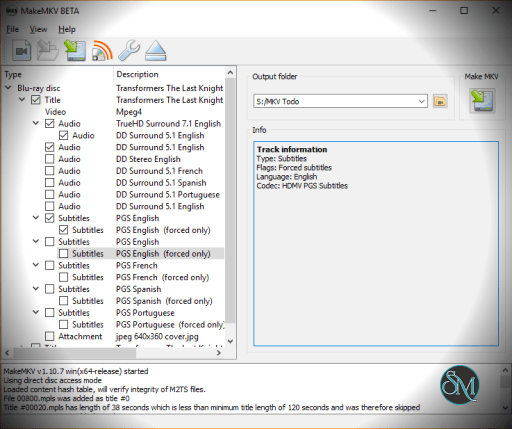
MakeMKV is designed to be easy to use. The program scans the disc, displays available titles and lets users choose which parts to convert. Since it does not re encode video, the conversion process is fast and produces an exact digital copy of the original content.
Key Features
Full Quality Backup
MakeMKV preserves the original video quality, audio tracks and subtitles. The resulting MKV file is a direct copy of the source, ensuring no loss of clarity or detail.
Wide Disc Support
The software reads DVDs, Blu ray discs and a variety of encrypted formats. It works with region locked and protected discs, making it highly versatile.
Fast Conversion
MakeMKV does not compress video. This allows for quick conversion speeds and accurate copies of the source material.
Multi Track Support
Users can select specific audio tracks, subtitle languages and chapters to include in the output file.
Cross Platform Compatibility
The program supports major operating systems including Windows, macOS and Linux, offering consistent performance across all platforms.
Integration with Media Servers
MakeMKV output works with media servers such as Plex, Jellyfin and Kodi. This makes it a popular choice for building personal digital movie libraries.
Frequent Updates
The developer releases regular updates to ensure compatibility with new disc formats and protection methods.
Benefits of Using MakeMKV
Easy conversion of disc based media into digital files
Preservation of full video and audio quality
Ideal for building a media server library
Supports multiple subtitles and languages
Works on major desktop platforms
Saves physical discs from wear and damage
Fast and reliable for both beginners and advanced users
MakeMKV remains a leading tool for creating high quality digital backups of DVDs and Blu ray discs. Its strong decryption capabilities, fast processing and uncompromised quality make it a trusted choice for anyone looking to preserve and organize their movie library.