HD Video Converter Factory Pro - Chrismast Sale 50% OFF
Operating System
WindowsDate Published
Sun Dec 14 2025HD Video Converter Factory Pro - Chrismast Sale 50% OFF
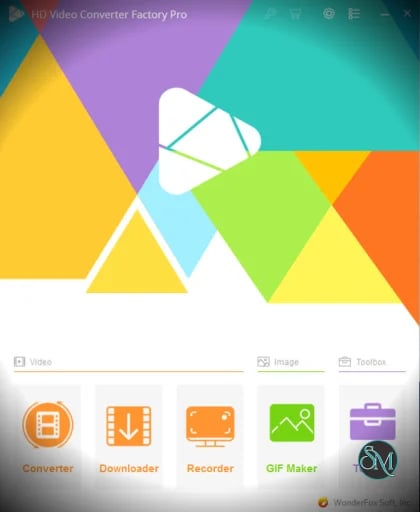
HD Video Converter Factory Pro is a professional video converter and downloader developed by WonderFox. It allows users to convert videos between hundreds of formats and devices, compress large video files, download online videos, record screens, and perform basic video editing. The software is designed to balance speed, quality, and ease of use, making it a popular choice for home users and content creators.
Key Features of HD Video Converter Factory Pro
High Speed Video Conversion
HD Video Converter Factory Pro uses hardware acceleration technologies to significantly reduce conversion time. It supports GPU acceleration, allowing faster processing while maintaining high output quality.
Wide Format Support
HD Video Converter Factory Pro supports popular formats such as MP4, MKV, AVI, MOV, HEVC, H264, and many audio formats. It also includes device presets for smartphones, tablets, gaming consoles, and smart TVs.
High Resolution Output
Users can convert and export videos in HD, Full HD, and 4K resolution. The software maintains sharp details and smooth playback even with large files.
Video Compression
The built in compression tool helps reduce file size without noticeable quality loss. This is useful for saving storage space or preparing videos for online sharing.
Online Video Downloader
HD Video Converter Factory Pro allows users to download videos from many popular websites. Downloaded videos can be saved in different formats and resolutions.
Screen Recording
HD Video Converter Factory Pro includes a screen recorder for capturing desktop activity, tutorials, gameplay, and online streams with audio support.
Basic Video Editing Tools
Users can trim, crop, rotate, merge clips, add subtitles, and adjust video parameters such as brightness and contrast.
Batch Processing
Multiple videos can be converted or processed at the same time, improving efficiency for users working with large video collections.
Benefits of Using HD Video Converter Factory Pro
Saves Time and Effort
Fast conversion speeds and batch processing help users complete tasks quickly.
Easy to Use Interface
The software is designed with a clear layout that makes video processing accessible even for beginners.
High Quality Results
Advanced encoding ensures that converted videos retain excellent visual and audio quality.
All in One Video Solution
With conversion, downloading, recording, and editing in one tool, users do not need multiple applications.
Suitable for Various Use Cases
The software works well for personal video collections, content creation, online sharing, and device compatibility.
HD Video Converter Factory Pro is a reliable and feature rich video processing solution for Windows users. Its combination of high speed conversion, wide format compatibility, video downloading, and screen recording makes it a practical choice for everyday video tasks. For users looking for an efficient and easy to use video converter with professional level capabilities, HD Video Converter Factory Pro is a strong option.
HD Video Converter Factory Pro is a powerful all in one video processing software designed for Windows users who need fast, high quality video conversion and editing. It supports a wide range of video and audio formats, modern codecs, and high resolution files including HD, Full HD, and 4K. With its simple interface and advanced acceleration technology, the software is suitable for both beginners and advanced users.